 6.5/10
Mac app for iOS App Store keyword tracking and low-competition keyword discovery, with a free tier for one app.


Mac app for App Store keyword research with Apple Ads popularity, difficulty, rank tracking and competitor keywords.
We may earn a commission when you buy through our links. How this works
The Astro ASO tool suits indie developers on a Mac who want App Store keyword research with Apple Ads popularity data and no keyword limits for a flat yearly fee. Skip it if you need Google Play data, a web app or team workspaces.
Best for: Indie iOS developers doing their own ASO
7.4/10 Good, with trade-offs. The overall score is our judgment against the questions we ask of every tool, not an average. How we score
| Question | Score | Why |
|---|---|---|
| Does the jobWhat it actually does for the task it is sold for, and where it falls short. | 7.8 | It tracks App Store rankings daily with Apple Ads popularity, a difficulty score, competitor keyword extraction and ratings across stores. |
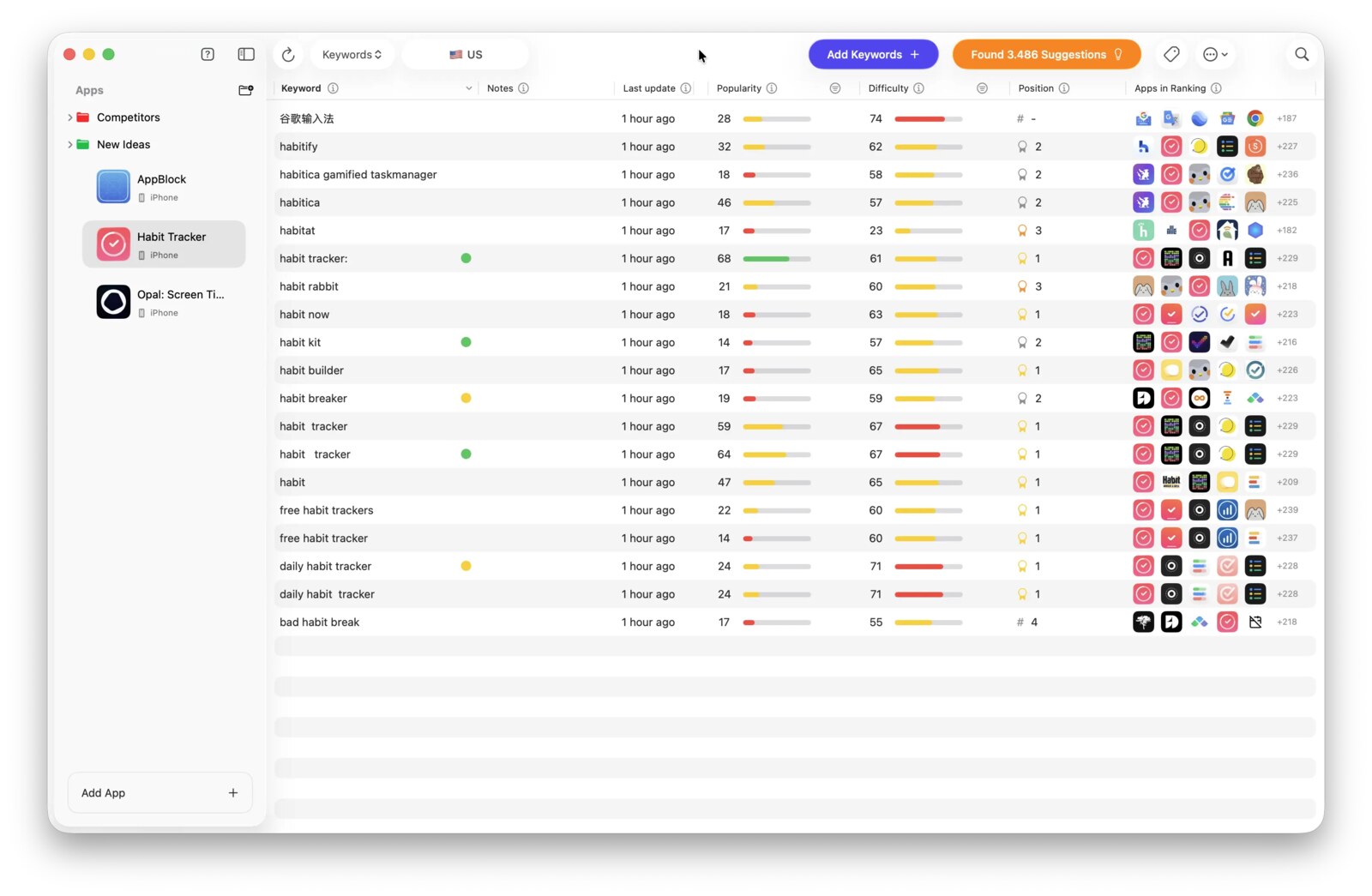
| Ease of useSetup needed and how quickly you get something useful done. | 7.6 | Docs show one table view with popularity, difficulty and position, keyword entry of up to 100 at a time, and keyboard shortcuts. |
| Pricing and limitsWhat you pay at a realistic size, including caps, add-ons and deal limits. | 7.8 | A flat $108 a year covers unlimited apps and keywords on one Mac, with a 14-day refund window. |
| Reliability and supportUpdate pace, known problems and how support responds. | 6.8 | Frequent GitHub builds and a public feedback board, but support is email to a single developer. |
| Fit against alternativesHow it compares with the alternatives for the people it is aimed at. | 6.8 | Against Altis ASO and ASO Suite it is a strong Mac option, but it lacks Google Play data and team features. |
Astro is a native Mac app for App Store Optimization (ASO) that shows which keywords people search on Apple's App Store, how hard each one is to rank for, and where your app sits today. It suits indie iOS and Mac developers who want simple keyword research at a flat yearly price, and it is not the Astro web framework, which is a different product entirely.
The Astro ASO tool is a desktop app for macOS 14 and later that tracks App Store keyword rankings, popularity and difficulty for your apps and your competitors. It is built and sold by indie developer Matteo Spada through tryastro.app, with payments handled by Lemon Squeezy.
It covers Apple platforms only, meaning iOS, iPadOS, macOS and visionOS apps. Popularity data comes straight from Apple Ads (Apple Search Ads), and the docs say Astro supports every storefront where Apple Ads runs, currently 91 of the App Store's 175 countries. New countries are added as Apple adds them.
Astro (App Store Optimization) is for solo developers and small studios who choose their own App Store keywords and want answers fast rather than a large dashboard.
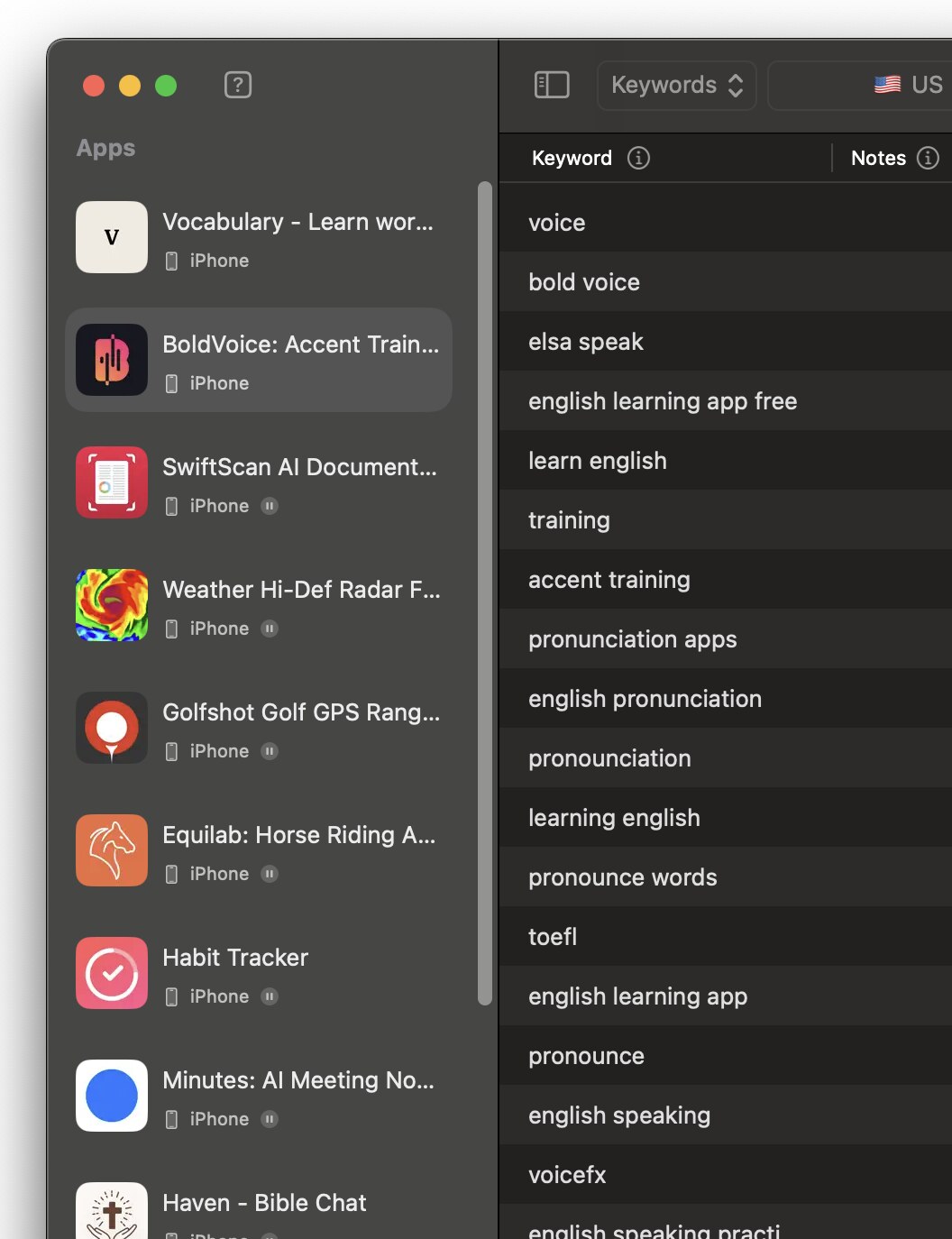
The workflow is add an app, add keywords, then read popularity, difficulty and position in one table that refreshes itself every day.
As a rule of thumb, the docs recommend adding keywords with popularity above 25 and difficulty below 75 to your metadata.
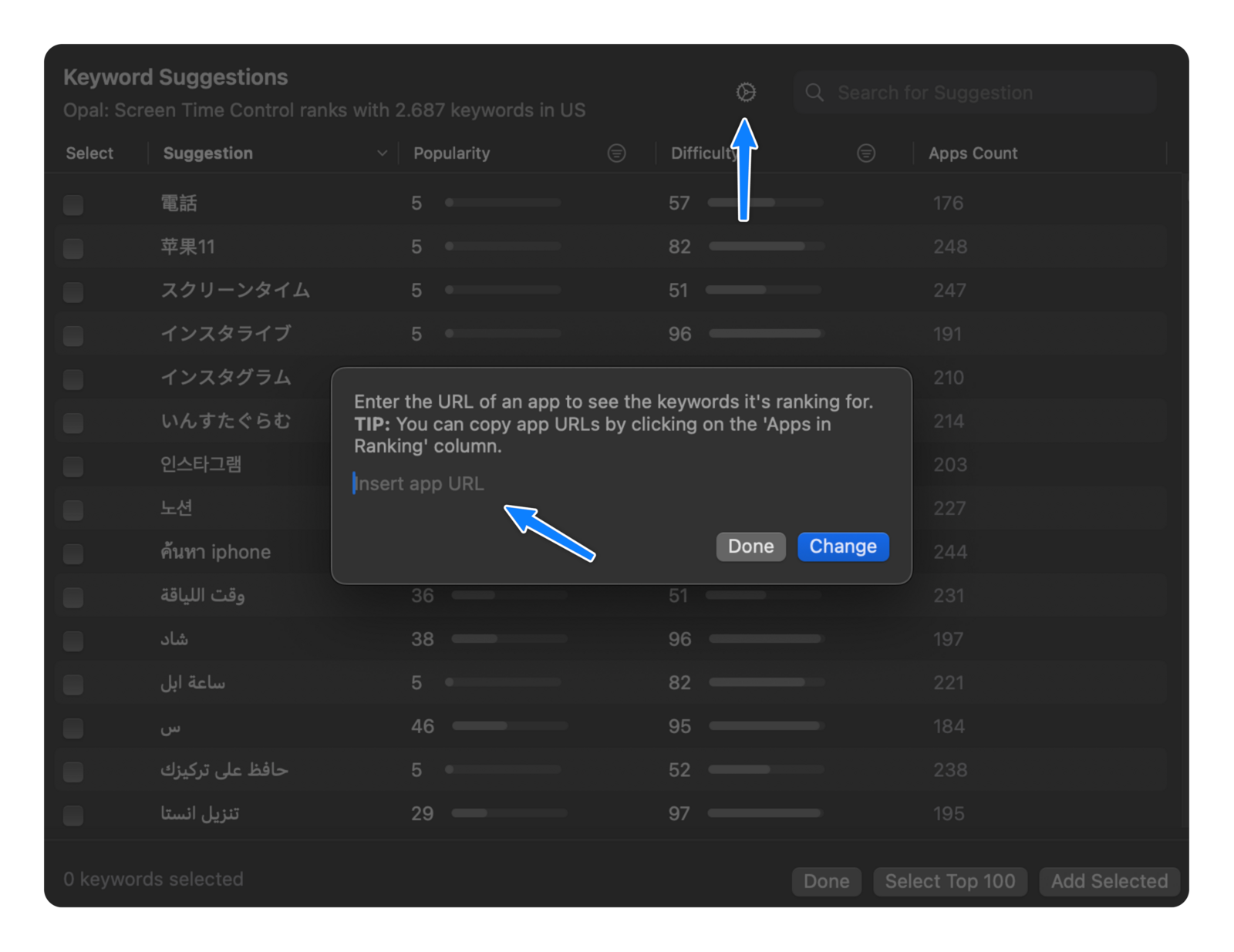
Astro's Suggestions view lists every keyword a given app ranks for in a store, sortable by popularity and difficulty. Paste any competitor's App Store URL into it, or click the eye icon next to an app in the "Apps in Ranking" column. Temporary apps let you research a category before your app exists, then copy the keywords across to the real app once it is published.
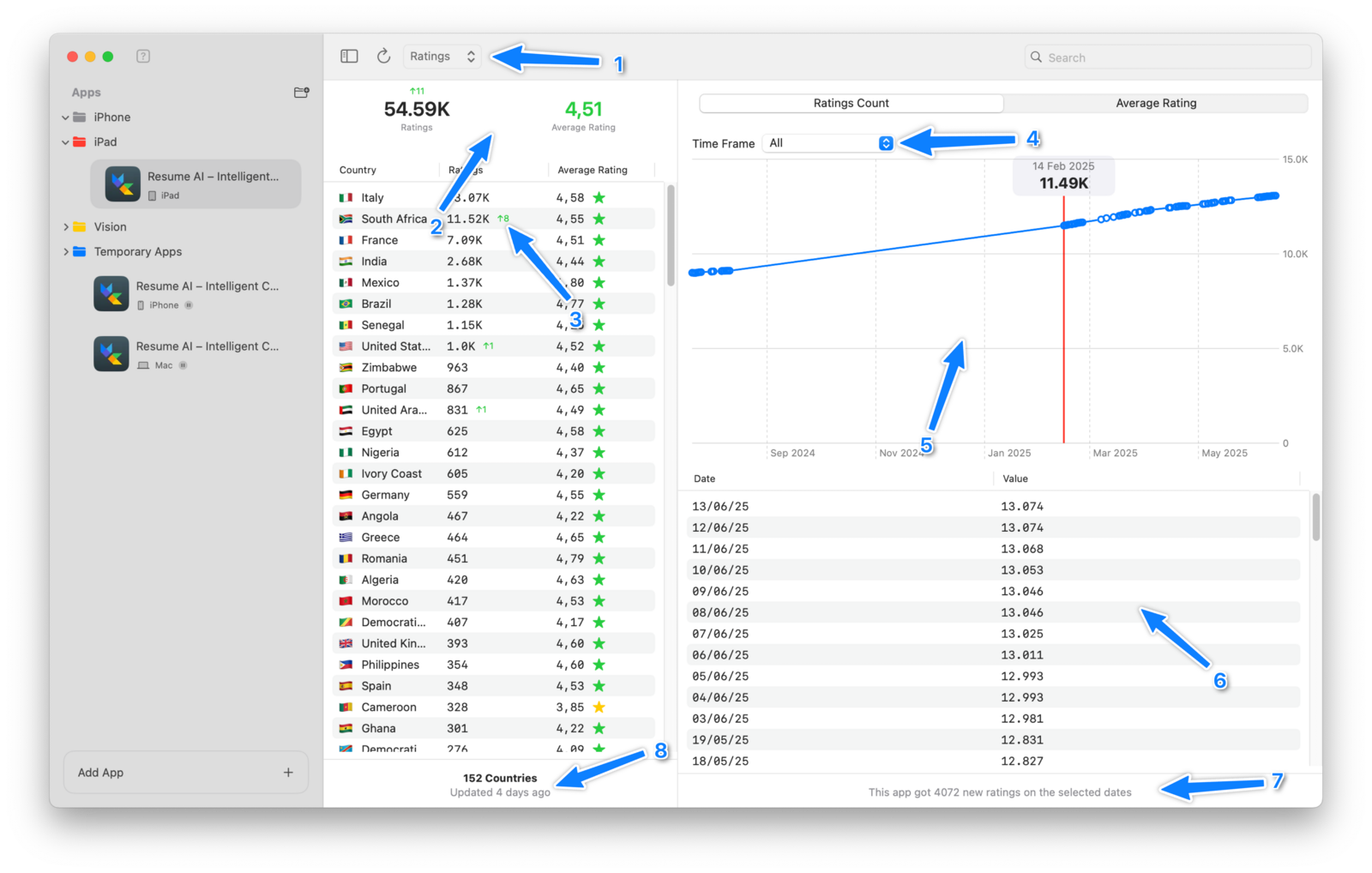
A separate Ratings view totals your ratings across every store worldwide, with daily changes, a per-country list and charts of rating count and average over time. Tags, folders and notes help organize large keyword lists, keywords can be exported and imported as CSV, and a DeepL integration shows an English translation when you hover over a foreign keyword.
Astro includes an MCP server, still labeled beta, that lets AI assistants such as Claude Code, Cursor, VS Code Copilot and Antigravity read and change your Astro data. It runs locally on port 8089, accepts connections from your own Mac only, and limits each client to 60 requests a minute. Its tools cover listing apps and keywords, rankings with history, ratings, competitor keyword extraction, live App Store search, keyword suggestions, and adding apps, keywords, notes and tags. Claude Desktop needs a Cloudflare quick tunnel to reach it. The docs warn that AI agents can make mistakes and that MCP use can burn a lot of AI tokens.
Astro costs $108 a year for a single Mac license, which the site presents as $9 a month billed annually, and there is a limited free version. Prices are in USD and taxes may apply. Prices checked 10 Nov 2026.
| Plan | Price (USD) | What it includes |
|---|---|---|
| Free version | $0 | The full Mac app with up to 10 keywords, without popularity or difficulty data |
| Single Mac License | $108 a year (about $9 a month) | Unlimited apps and keywords, popularity and difficulty data, suggestions, charts and full rankings, ratings analysis, competitor keyword extraction, translations, all supported countries, on one Mac at a time |
You have 14 days after activating a subscription to ask for a refund by email. Subscriptions are managed through a Lemon Squeezy account using your purchase email, and you can generate an invoice with your company details there. A license runs on one Mac at a time, and moving to a new Mac means deactivating it first.
Because the price is flat, a developer tracking 2,000 keywords across five apps pays the same $108 a year as one tracking 50. The free version's 10-keyword cap and missing popularity scores make it a trial of the interface rather than a working research tool.
Most published praise for Astro is on its own site, where it quotes developers such as Sebastian Röhl of HabitKit, who says he doubled his impressions after changing keywords. These quotes are chosen by the vendor. The vendor also says 90% of Astro users see more app impressions within a week of updating their metadata, and that thousands of developers use it. Neither figure is independently checked.
Astro runs a public feedback board where users post requests and the developer replies. The MCP server itself started there as a user request in January and was marked completed in February.
Astro is a local Mac app, so your keyword database lives on your own computer.
Astro ships often. Its GitHub release feed shows build 328 on October 1, build 329 on October 6 and build 330 on October 27, 2026, after a steady run of builds since April. The biggest recent addition is the MCP server and an MCP prompts library with ready-made prompts for common ASO jobs.
Astro's main limits come from being a single-developer Mac app focused on Apple's store.
The closest alternatives are other App Store keyword trackers aimed at indie developers, plus one enterprise suite for larger teams.
The Astro ASO tool does the core keyword research job well, with Apple Ads popularity data, competitor extraction, daily rank tracking and no keyword limits for a flat $108 a year. I would pick it if you build Apple apps on a Mac and want fast, uncluttered research. If you need Google Play, a browser app or team access, choose a broader suite instead.
Astro costs $108 a year for a single Mac license, shown as $9 a month billed annually, in USD with taxes possibly added. A free version allows up to 10 keywords without popularity or difficulty data.
No. The Astro ASO tool at tryastro.app is a Mac app for App Store keyword research. The Astro web framework is an unrelated open-source project for building websites.
Yes. Astro includes a beta MCP server that runs locally on port 8089 and lets clients such as Claude Code, Cursor and VS Code read rankings, ratings and suggestions and add keywords. It only accepts connections from your own Mac.
Astro takes popularity scores directly from Apple Ads (Apple Search Ads). Difficulty is Astro's own score for how hard it is to rank in the top 10 for a keyword.
Yes. Astro gives you 14 days after activating a subscription to request a refund by emailing the developer.
Yes. Each Astro license is active on one Mac at a time, so you deactivate it on the license deactivation page and then reactivate it on the new Mac. Your keywords, ranking history, tags and ratings move separately by copying Astro's model.sqlite database file to the new Mac.
We may earn a commission when you buy through links on SaaSPic. It never changes our verdicts or the price you pay. Affiliate disclosure
Add this badge to your website so your visitors can read this independent review in one click.
 6.5/10
Mac app for iOS App Store keyword tracking and low-competition keyword discovery, with a free tier for one app.
 6.9/10
App Store keyword rank tracker with popularity, difficulty and opportunity scores, competitor comparison and a CLI.
 7.0/10
Native Mac app for App Store Connect: multi-locale metadata, AI translation, screenshots, ASO tracking, revenue and build uploads.
| Tool | Score | From | Free plan | Best for |
|---|---|---|---|---|
| Astro ASO Tool | 7.4/10 | $108/yr | Yes | Indie iOS developers doing their own ASO |
| Altis ASO | 6.5/10 | $118.80/yr | Yes | Indie iOS developers tracking App Store keywords on a Mac |
| ASO Suite | 6.9/10 | $99/yr | Yes | Indie iOS developers tracking App Store keyword rankings on a budget |
| Asomium | 7.0/10 | €119.99/yr | No | Indie iOS and Mac developers who localize and ship their own apps |
 8.0/10
Link attribution platform with branded short links, conversion tracking and affiliate program management.
 7.8/10
Online form builder for forms, surveys and quizzes, with unlimited seats, payments, scheduling and database integrations.
 7.6/10
All-in-one CRM, funnel, messaging and AI platform that agencies can white-label and resell to their clients.