 7.4/10
No-code quiz, calculator and form funnel builder with lead scoring, a built-in CRM and automated email sequences.


Online form builder for forms, surveys and quizzes, with unlimited seats, payments, scheduling and database integrations.
We may earn a commission when you buy through our links. How this works
Fillout is strong value for teams that build forms feeding Airtable, Notion or a CRM, since even the free plan includes logic, payments and integrations with unlimited seats. Skip it if you need very high response volumes cheaply or Salesforce without an enterprise contract.
Best for: Small teams sending form data into Airtable, Notion or a CRM
7.8/10 Good, with trade-offs. The overall score is our judgment against the questions we ask of every tool, not an average. How we score
| Question | Score | Why |
|---|---|---|
| Does the jobWhat it actually does for the task it is sold for, and where it falls short. | 8.3 | Fillout's plans cover multi-page forms, logic, payments, scheduling, signatures, PDFs, Workflows and record updates in Airtable and Notion. |
| Ease of useSetup needed and how quickly you get something useful done. | 8.0 | G2 reviewers name ease of use among the most common positives in 30 reviews, and forms can be built by prompt or drag and drop. |
| Pricing and limitsWhat you pay at a realistic size, including caps, add-ons and deal limits. | 8.2 | Every plan has unlimited seats and forms, the free plan allows 1,000 responses a month, and Pro is $40 a month billed annually. |
| Reliability and supportUpdate pace, known problems and how support responds. | 6.8 | Priority support starts on Business, and Trustpilot shows 3.5 from 48 reviews including an August 2026 complaint about forms blocked by an automated flag. |
| Fit against alternativesHow it compares with the alternatives for the people it is aimed at. | 7.6 | Against Tally, Typeform and Jotform it stands out for flat pricing and database integrations, but response caps push heavy users to Business. |
Fillout is an online form builder for forms, surveys and quizzes that send responses straight into tools like Airtable, Notion, Google Sheets and HubSpot. It suits small businesses, nonprofits and ops teams that want a generous free plan with no per-seat charges; teams that need big response volumes cheaply or a native Salesforce link on a small budget should look harder.
Fillout is a no-code form builder where you build a form by describing it to the AI assistant or by dragging fields onto a page, then share, embed or host it and route each submission to the apps you already use. It started in 2022 and is now one product inside Zite, the renamed parent company.
The vendor says more than 100,000 organizations use Fillout, and in March 2026 it said Fillout had crossed 10,000 paying customers. Those are the company's own figures.
Fillout is for teams that collect data through forms and want that data to land in a database or CRM without copying it by hand. The pricing makes it especially good value for organizations with many people building forms, because every plan, including Free, has unlimited seats and unlimited forms.
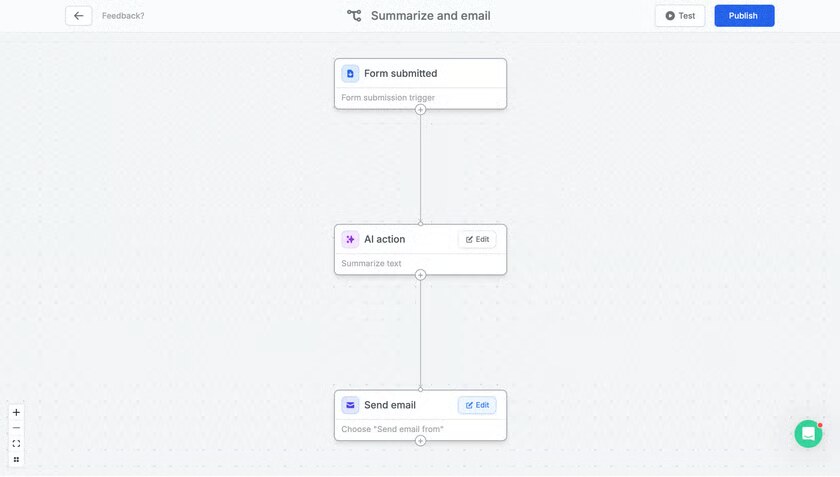
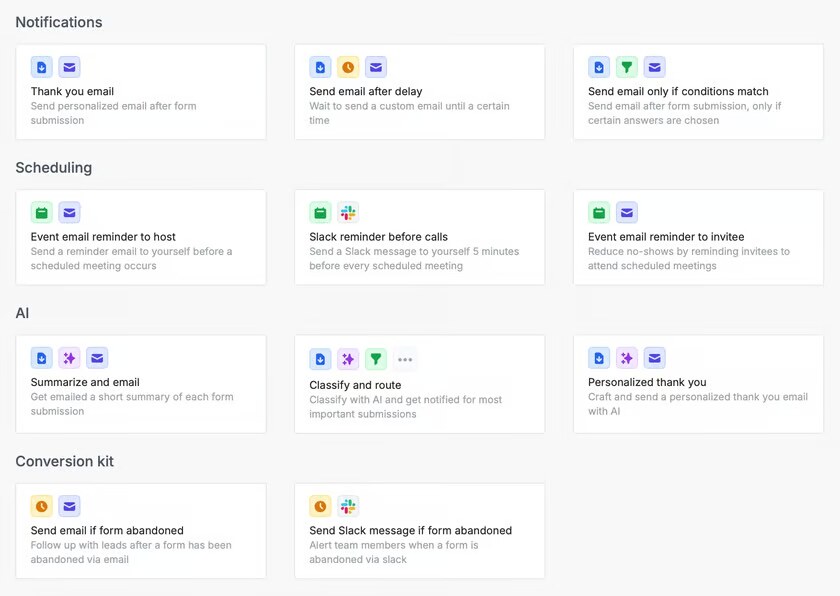
A typical Fillout workflow has four steps: build the form, connect where responses go, share it, then automate what happens after each submission. On the homepage you can type a prompt such as "event registration form with a profile photo" and the AI builds it in your brand, or start from a blank form in the drag-and-drop builder.
The integrations page lists native connections to Airtable, HubSpot, Notion, Stripe, Google Sheets, Salesforce, Slack, Monday.com, Attio, Mailchimp, Zapier, Make and more. Every plan includes REST API access and CSV export.
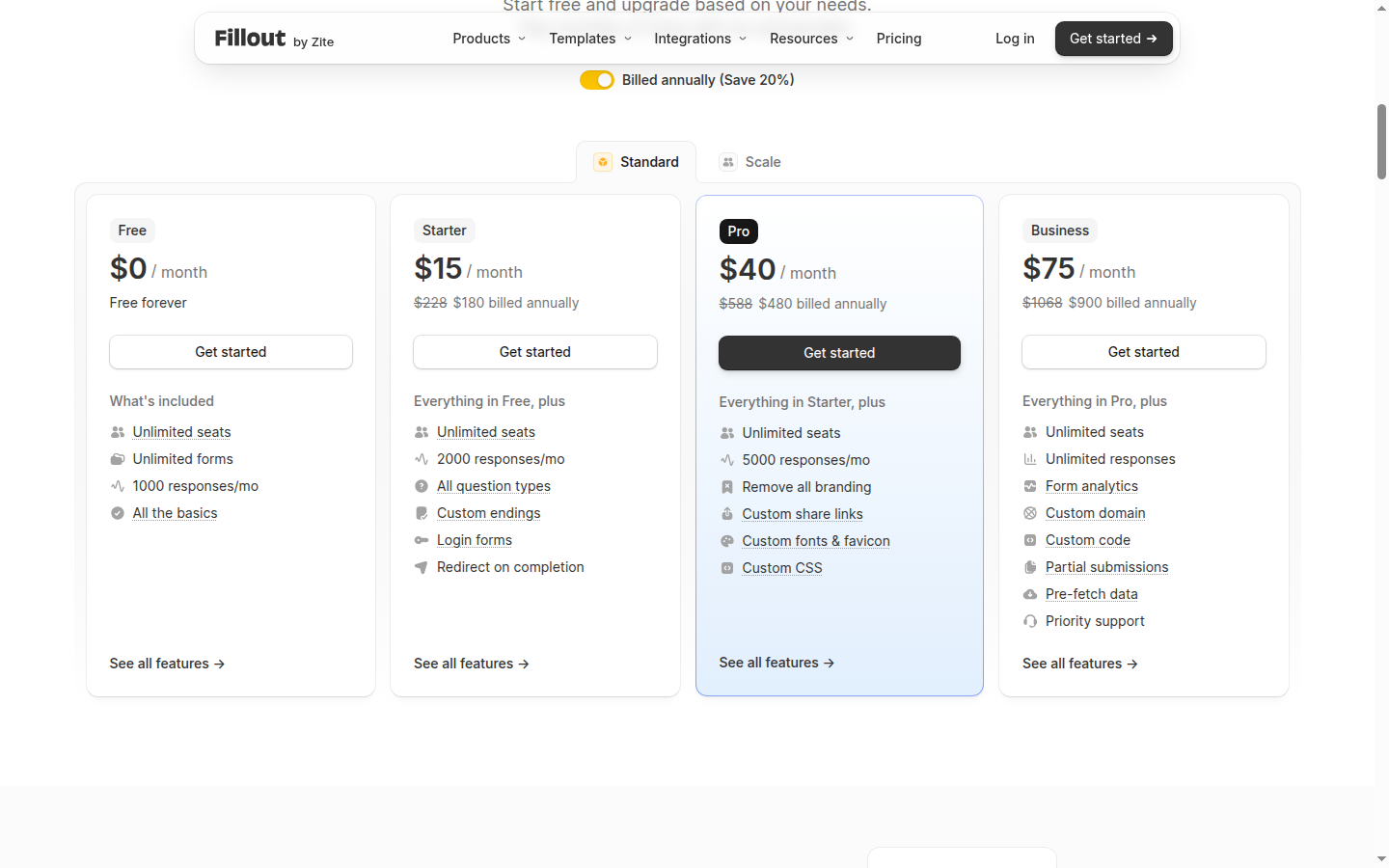
Fillout has a free plan and three self-serve paid plans priced per workspace, not per seat, plus a custom Enterprise plan. Prices checked 8 Nov 2026 on the Fillout pricing page, in USD; annual billing saves 20%.
| Plan | Price | Responses | What it adds |
|---|---|---|---|
| Free | $0 a month | 1,000 a month | Unlimited forms and seats, logic, payments, scheduling, PDFs, Workflows, integrations, API, Fillout badge, 20 MB files |
| Starter | $15 a month billed annually ($180 a year), or $19 month to month | 2,000 a month | All question types, CAPTCHA, login forms, custom endings, redirects, respondent emails, signatures, light branding |
| Pro | $40 a month billed annually ($480 a year), or $49 month to month | 5,000 a month | No Fillout branding, custom CSS, fonts and favicon, custom share links, white-label emails, duplicate prevention |
| Business | $75 a month billed annually ($900 a year), or $89 month to month | Unlimited | Custom domain, form analytics and drop-off rates, partial submissions, custom code, Meta Pixel, 1 GB+ files, priority support |
| Enterprise | Custom quote | Unlimited | SSO, audit logs, Salesforce, data residency in the USA, EU, UK, Australia or Canada, external storage only, custom SLAs |
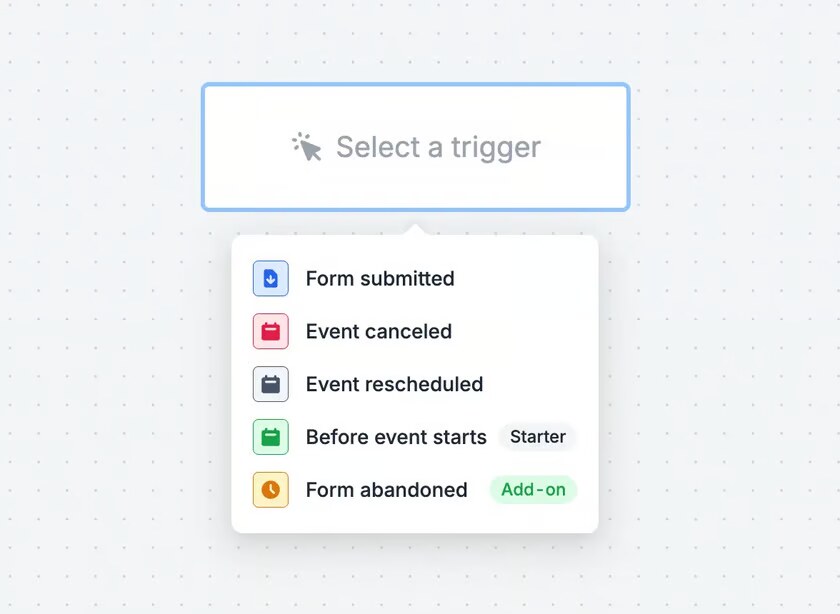
You can cancel at any time, and Fillout offers discounts for nonprofits, students, startups and schools. The pricing page does not publish a refund policy. A Conversion kit add-on (abandonment recovery, email validation, address autocomplete, Apollo lead enrichment) is sold separately, with its price not listed on the pricing page.
For most small teams the free plan covers the job: 1,000 responses a month is roughly 33 submissions a day. If you go over, the vendor says forms keep collecting responses and the count resets on the 1st, so you can upgrade or wait. A team taking about 3,000 leads a month needs Pro, which works out at $480 a year on annual billing, the same price for one builder or twenty.
Users rate Fillout highly on G2 but more mixed on Trustpilot. On G2, Fillout scores 4.6 out of 5 from 30 reviews (Nov 2026), with ease of use, features and integrations as the most-mentioned positives and price as the most-mentioned negative.
The Trustpilot profile for fillout.com shows 3.5 out of 5 from 48 reviews (Nov 2026), with only 7 posted in the last 12 months. The most recent, from August 2026, describes the reviewer's forms being blocked after an automated content flag, which is worth knowing if your forms are business-critical. Others praise the builder and named support staff. On its own homepage the vendor quotes a 4.8 average across G2 and Product Hunt.
Fillout is a web app that runs in the browser, with forms that work on any device. Here are the facts the vendor publishes:
The biggest change this year is that Fillout's parent company renamed itself Zite on 9 March 2026, with Fillout kept as its own product at fillout.com under the same accounts. Zite is the company's AI app builder, and you can now connect Fillout forms to a Zite Database and build apps on top of your submissions.
In August 2026 Zite announced that from 15 September new Zite workspaces would be limited by plan, but it also said the Classic workspaces that hold Fillout forms stay unlimited on every plan.
Fillout's main drawbacks are response caps on the cheaper plans and useful features held back for the higher tiers.
The closest Fillout alternatives are other form builders that sit in front of a database or CRM. G2 lists Tally, Typeform and Jotform as its top-rated alternatives.
Fillout is one of the best-value form builders for teams, because the free plan already includes logic, payments, scheduling, PDFs and database integrations with unlimited seats. I would pick it for Airtable or Notion based workflows and for any team where several people build forms. Skip it if you need very high response volumes on a small budget or Salesforce without an enterprise contract.
Yes. Fillout's free plan includes unlimited forms and seats, 1,000 responses a month, conditional logic, payments, scheduling, PDF generation, Workflows and most integrations. Paid plans start at $15 a month billed annually.
Prices checked 8 Nov 2026 are $15 (Starter), $40 (Pro) and $75 (Business) a month billed annually, or $19, $49 and $89 month to month. Plans are a flat fee with unlimited seats; Enterprise is a custom quote.
Yes. Fillout's parent company renamed itself Zite on 9 March 2026. Fillout stays a separate product at fillout.com with the same accounts, and forms can connect to a Zite Database to build apps on top of submissions.
Yes. Fillout has native Airtable and Notion integrations that create new records or update existing ones from a pre-filled form. It also connects to Google Sheets, HubSpot, Stripe, Slack, Zapier and Make.
Fillout says your forms keep collecting responses after you pass the monthly limit. You can then upgrade or wait until the count resets on the 1st of the next month.
Fillout says it is SOC 2 compliant, encrypts data in transit with TLS 1.2 and at rest with AES, and keeps daily encrypted backups. It is hosted on AWS via Render in the US and EU, and Enterprise adds SSO, audit logs and data residency in the USA, EU, UK, Australia or Canada.
We may earn a commission when you buy through links on SaaSPic. It never changes our verdicts or the price you pay. Affiliate disclosure
Add this badge to your website so your visitors can read this independent review in one click.
 7.4/10
No-code quiz, calculator and form funnel builder with lead scoring, a built-in CRM and automated email sequences.
 8.0/10
Link attribution platform with branded short links, conversion tracking and affiliate program management.
 7.6/10
All-in-one CRM, funnel, messaging and AI platform that agencies can white-label and resell to their clients.
 7.4/10
Mac app for App Store keyword research with Apple Ads popularity, difficulty, rank tracking and competitor keywords.