 6.9/10
App Store keyword rank tracker with popularity, difficulty and opportunity scores, competitor comparison and a CLI.


Native Mac app for App Store Connect: multi-locale metadata, AI translation, screenshots, ASO tracking, revenue and build uploads.
We may earn a commission when you buy through our links. How this works
Asomium is an ambitious, privacy-minded Mac app that replaces several tabs and tools for indie Apple developers at a fair yearly price. It suits developers who localize and ship several apps themselves; anyone who only tracks keywords or needs a team plan should pick a simpler ASO tool.
Best for: Indie iOS and Mac developers who localize and ship their own apps
7.0/10 Good, with trade-offs. The overall score is our judgment against the questions we ask of every tool, not an average. How we score
| Question | Score | Why |
|---|---|---|
| Does the jobWhat it actually does for the task it is sold for, and where it falls short. | 7.8 | Covers metadata, Claude translation, screenshots, keyword tracking, builds and revenue in seven panels, per the Asomium homepage. |
| Ease of useSetup needed and how quickly you get something useful done. | 7.0 | One window replaces several App Store Connect tabs, though setup needs an API key and macOS 15 or later. |
| Pricing and limitsWhat you pay at a realistic size, including caps, add-ons and deal limits. | 7.2 | One plan at u20ac119.99 a year with AI included, a 14-day no-card trial and a 14-day refund on new purchases. |
| Reliability and supportUpdate pace, known problems and how support responds. | 6.0 | Priority email support and Sparkle updates, but a young sole proprietorship with no public ratings and conflicting license rules. |
| Fit against alternativesHow it compares with the alternatives for the people it is aimed at. | 6.8 | Broader than ASO-only tools such as ASO Suite or Altis ASO, but Mac and Apple only with no team plan. |
Asomium is a native Mac app that brings App Store Connect work into one window: metadata in every locale, AI translation, screenshot design, keyword tracking, revenue charts and build uploads. It is built for indie iOS and Mac developers who ship their own apps and want to stop juggling browser tabs and separate ASO tools.
Asomium is a paid macOS companion for App Store Connect, sold as a notarized download outside the Mac App Store and billed through Lemon Squeezy. It is made by Native First, a sole proprietorship in Belgrade, Serbia, which also publishes the ThinkBud, RoleBud and PromptKit apps.
The app is written in SwiftUI, with no Electron or web shell. You paste an App Store Connect API key, which stays in your Mac's Keychain, and Asomium talks to Apple's API directly. The current download is version 2.2.0, and it needs macOS 15 Sequoia or later.
Asomium fits a solo developer or small studio that ships several iOS, iPadOS or macOS apps, localizes them into many languages, and does its own App Store optimization. It also suits developers who already work with Claude Code or Cursor, since a bundled MCP server lets an AI client drive the release workflow.
Skip it if you only need keyword rank tracking, if you work on Windows or Linux, or if you publish Android apps too, since it only covers Apple's App Store. Larger teams should note that each license is tied to a person, and the FAQ says multi-seat plans are still on the roadmap.
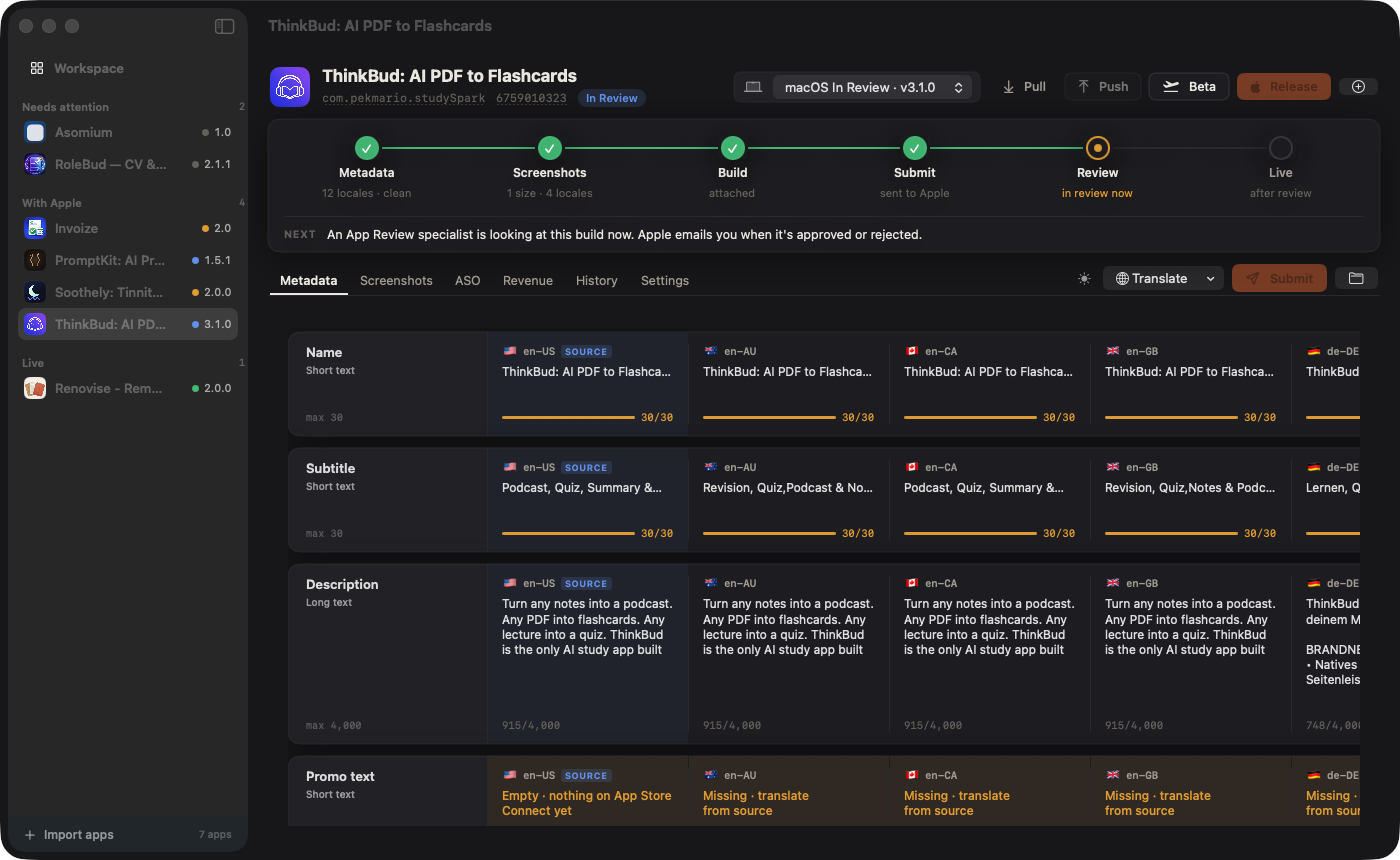
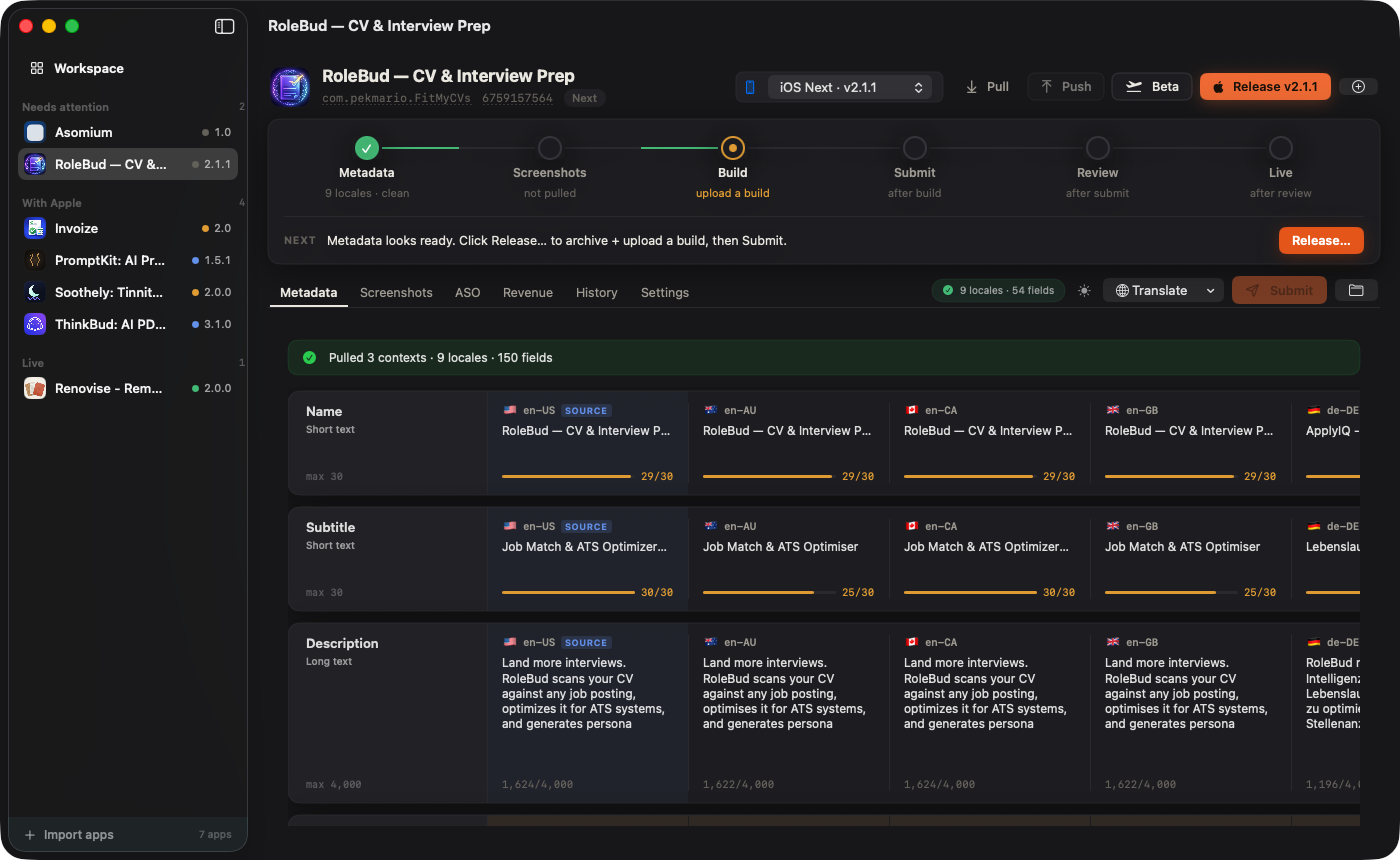
Asomium groups its features into seven panels that mirror App Store Connect tabs: Workspace, Pipeline, Metadata, Screenshots, ASO, Ship and Revenue. You connect your account once, pull your apps, then edit, translate, design and ship from the same window.
The Home view sorts your apps by state (needs attention, with Apple, live) and shows last week's proceeds and first-time downloads across all apps. A pipeline bar runs Metadata, Screenshots, Build, Submit, Review and Live above each app, with a checklist that reads export compliance and the App Review contact from App Store Connect. Background checks send a notification when Apple approves, rejects or releases a build.
Title, subtitle, description, keywords and What's New appear in one grid across every locale, with live character counters for each field's limit. Missing fields can be translated with Claude using a per-app brand voice, glossary and protected terms, and changes go back to Apple in one push with a diff preview. An "Expand to all English locales" option copies en-US into en-AU, en-CA, en-GB, en-IN and en-SG with spelling adjusted for each market.
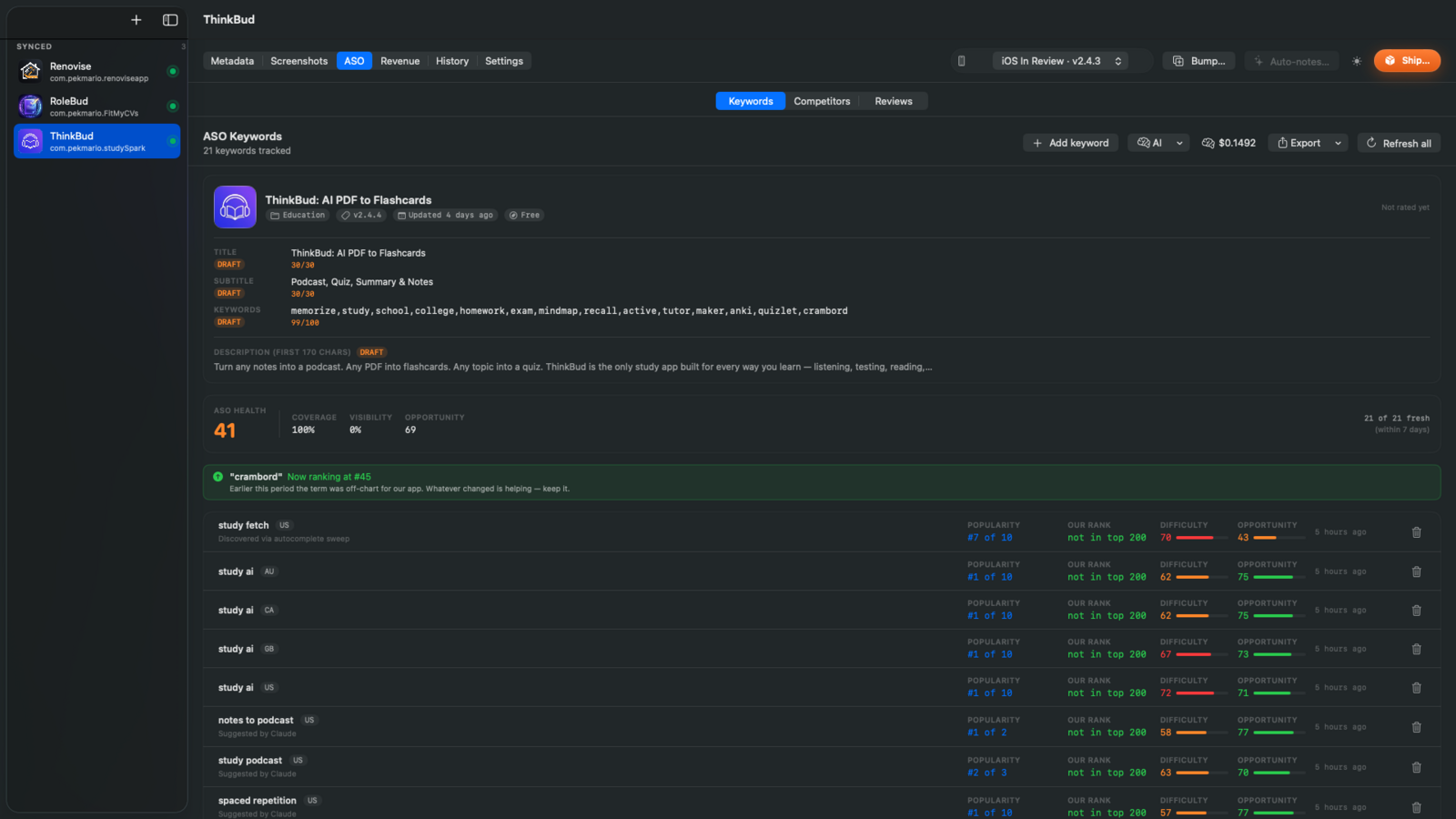
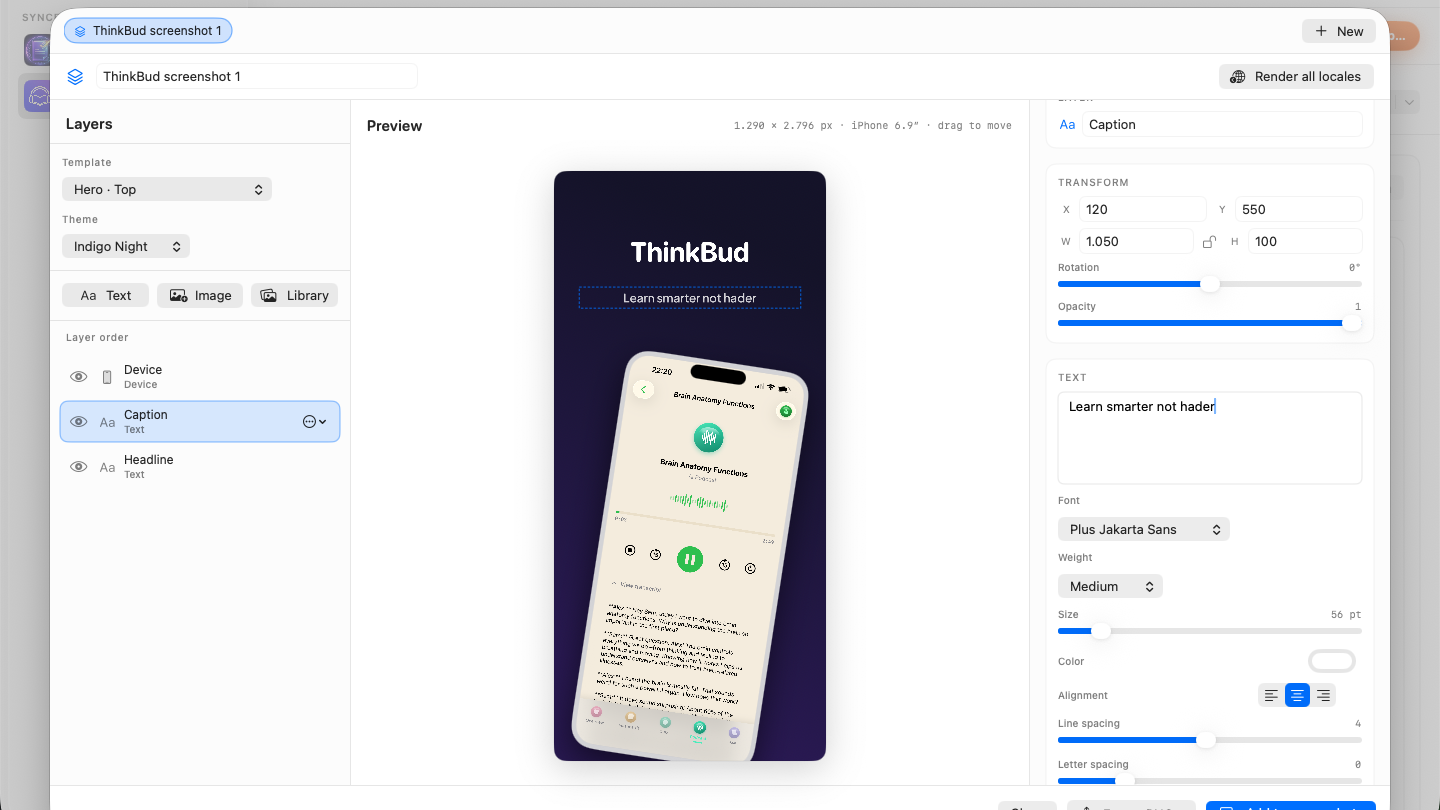
The screenshot designer uses real iPhone 6.9 inch, iPad Pro and Mac device frames, layered text and themes, then renders a translated set for every locale. The ASO panel logs rank, popularity, difficulty and an opportunity score per keyword and locale each day, finds terms through an App Store autocomplete sweep, compares competitors side by side and drafts replies to reviews. The Ship panel runs xcodebuild archive, uploads the build, attaches it to your version and can send it to TestFlight groups.
The Revenue panel pulls Sales Reports and Apple Analytics to chart impressions, page views, downloads and proceeds over 7, 30 or 90 days, converts currencies at the ECB rate as a marked estimate, and overlays your metadata pushes and keyword changes. A companion MCP server exposes 42 release actions to Claude Code, Claude Desktop, Cursor and Windsurf on both billing options.
Asomium has one plan, Asomium Pro, at €14.99 a month or €119.99 a year (about €9.99 a month). AI translation, ASO audit and revenue analysis are included, so there is no separate AI key or compute bill. Prices are in euros, with VAT and sales tax handled by Lemon Squeezy. Prices checked 6 Nov 2026.
| Plan | Price (EUR) | Billing | What you get |
|---|---|---|---|
| Asomium Pro Monthly | €14.99 a month | Monthly, cancel anytime | Unlimited apps and platforms, every feature, AsoAI, 42-tool MCP server, priority email support |
| Asomium Pro Annual | €119.99 a year (about €9.99 a month) | Yearly, renews automatically | Same features as Monthly, about 33% cheaper than paying monthly |
There are two ways to try it. The download gives 14 days of full access with no card and no account, starting the first time you pull an app, after which the app turns read-only. The subscription checkout also offers a 3-day free trial with a card. New purchases get a 14-day, no-questions refund, but renewal charges are not normally refunded.
A developer who ships a release every month or two pays €119.99 a year on the annual plan, which the vendor says pays for itself by month nine against monthly billing. Someone who only needs it for one or two releases a year could pay €14.99 for each busy month and cancel in between.
Asomium has no App Store ratings, because it is sold outside the Mac App Store, and it is a young product from a small sole proprietorship. The only results on its site are the vendor's own: it says the English locale expansion alone has paid for Asomium on the apps it ships with. Treat that as a vendor claim.
Asomium runs on macOS 15 or later and manages iOS, iPadOS and macOS apps, with the FAQ adding tvOS and visionOS. Credentials stay in the Keychain, App Store Connect calls go straight to Apple, and only AI requests pass through the vendor's Cloudflare Worker. In-app analytics use TelemetryDeck without tracking IDs. Updates arrive through Sparkle with signed downloads. The seller is Native First Beograd-Zemun, and the terms fall under Serbian law.
Asomium is new and moving fast. The pricing section is dated 16 May 2026, the terms and refund policy took effect on 17 May 2026, the current privacy policy took effect on 31 May 2026, and the site now promotes Asomium 2.0 with build 2.2.0 as the current download.
Asomium is Mac only, Apple only and tied to one maker, so you depend on a single developer keeping pace with App Store Connect changes. License rules conflict: the FAQ says one active Mac at a time, while the terms allow up to three Macs at once. There is no team or family plan yet. It can edit your Xcode version numbers when you ship, so keep your project in git.
Most Asomium alternatives are ASO-only tools that track keywords and rankings but leave metadata, screenshots and builds to you. They cost less effort to learn if keyword tracking is all you need.
Asomium is an ambitious, privacy-minded Mac app that replaces several tabs and tools for indie Apple developers, at a fair €119.99 a year. I would pick it if you localize and ship several apps yourself and like working with Claude or Cursor. If you only track keywords, or you need a team plan, a simpler ASO tool is the better buy.
Asomium Pro costs €14.99 a month or €119.99 a year, which works out to about €9.99 a month. Every feature, including AI translation and the MCP server, is in the one plan.
Yes. The download gives 14 days of full access with no card and no account, starting when you first pull an app. The subscription checkout also offers a 3-day trial with a card.
Yes. It manages iOS, iPadOS and macOS apps, and the FAQ says tvOS and visionOS too, with each platform side by side in the same app row.
Your App Store Connect API key and license key stay in your Mac's Keychain, and calls go directly to Apple. Only AI requests pass through the vendor's Cloudflare Worker.
ASO-only tools focus on keyword research and rank tracking. Asomium does that too and adds multi-locale metadata editing, screenshot design, build uploads, App Review submission, revenue charts and an MCP server.
Yes. The FAQ says you sign out and deactivate the old Mac in Settings, then paste the same license key on the new one, with no support ticket needed.
We may earn a commission when you buy through links on SaaSPic. It never changes our verdicts or the price you pay. Affiliate disclosure
Add this badge to your website so your visitors can read this independent review in one click.
 6.9/10
App Store keyword rank tracker with popularity, difficulty and opportunity scores, competitor comparison and a CLI.
 6.5/10
Mac app for iOS App Store keyword tracking and low-competition keyword discovery, with a free tier for one app.
 7.4/10
Mac app for App Store keyword research with Apple Ads popularity, difficulty, rank tracking and competitor keywords.
| Tool | Score | From | Free plan | Best for |
|---|---|---|---|---|
| Asomium | 7.0/10 | €119.99/yr | No | Indie iOS and Mac developers who localize and ship their own apps |
| ASO Suite | 6.9/10 | $99/yr | Yes | Indie iOS developers tracking App Store keyword rankings on a budget |
| Altis ASO | 6.5/10 | $118.80/yr | Yes | Indie iOS developers tracking App Store keywords on a Mac |
| Astro ASO Tool | 7.4/10 | $108/yr | Yes | Indie iOS developers doing their own ASO |
 8.0/10
Link attribution platform with branded short links, conversion tracking and affiliate program management.
 7.8/10
Online form builder for forms, surveys and quizzes, with unlimited seats, payments, scheduling and database integrations.
 7.6/10
All-in-one CRM, funnel, messaging and AI platform that agencies can white-label and resell to their clients.