 7.7/10
Status page, uptime monitoring and on-call tool with a free plan and flat per-page pricing instead of per-seat fees.


Uptime monitoring for websites, APIs, ports, cron jobs, SSL and DNS, with alerts and status pages. Free for 50 monitors.
We may earn a commission when you buy through our links. How this works
UptimeRobot suits freelancers, agencies and small teams who want reliable, low-cost uptime checks and status pages with little setup. Skip it if you need on-call scheduling, browser transaction tests or logs in the same tool, where Better Stack fits better.
Best for: Freelancers, agencies and small teams monitoring websites and APIs
7.9/10 Good, with trade-offs. The overall score is our judgment against the questions we ask of every tool, not an average. How we score
| Question | Score | Why |
|---|---|---|
| Does the jobWhat it actually does for the task it is sold for, and where it falls short. | 8.0 | It covers HTTP, keyword, ping, port, UDP, heartbeat, API, DNS, SSL and domain checks with status pages, but has no browser transaction tests or logs. |
| Ease of useSetup needed and how quickly you get something useful done. | 8.5 | Setup is add a monitor, pick an interval and alert contacts, and easy setup is among the most mentioned pros in G2 reviews. |
| Pricing and limitsWhat you pay at a realistic size, including caps, add-ons and deal limits. | 8.0 | Free covers 50 monitors and Solo starts at $12 a month billed annually, though SMS credits and extra seats cost more. |
| Reliability and supportUpdate pace, known problems and how support responds. | 7.0 | It holds 4.7 on both G2 and Trustpilot, but G2 reviewers flag inadequate notifications and some describe slow or inconsistent support. |
| Fit against alternativesHow it compares with the alternatives for the people it is aimed at. | 7.5 | It is the cheapest broad hosted option, while Better Stack offers more incident tooling and Uptime Kuma is free to self-host. |
UptimeRobot is a hosted uptime monitoring service that checks websites, APIs, servers, ports and cron jobs from outside your network and alerts you when something goes down. It suits freelancers, agencies and small dev teams who want cheap, simple monitoring with status pages. Skip it if you need logs, traces or browser transaction tests in the same product.
UptimeRobot (sometimes written Uptime Robot) is a tool for anyone who runs a website or online service and wants to hear about downtime before customers do. The vendor says more than 3.5 million users rely on it, and its generous free plan covers 50 monitors, which is why it is often the first uptime tool people try.
It is run by UptimeRobot s. r. o. in Bratislava, Slovakia, and the Free plan is open to commercial projects.
The best fit is a freelancer or agency watching client sites, a SaaS team that needs a status page, or a developer who wants heartbeat checks on cron jobs.
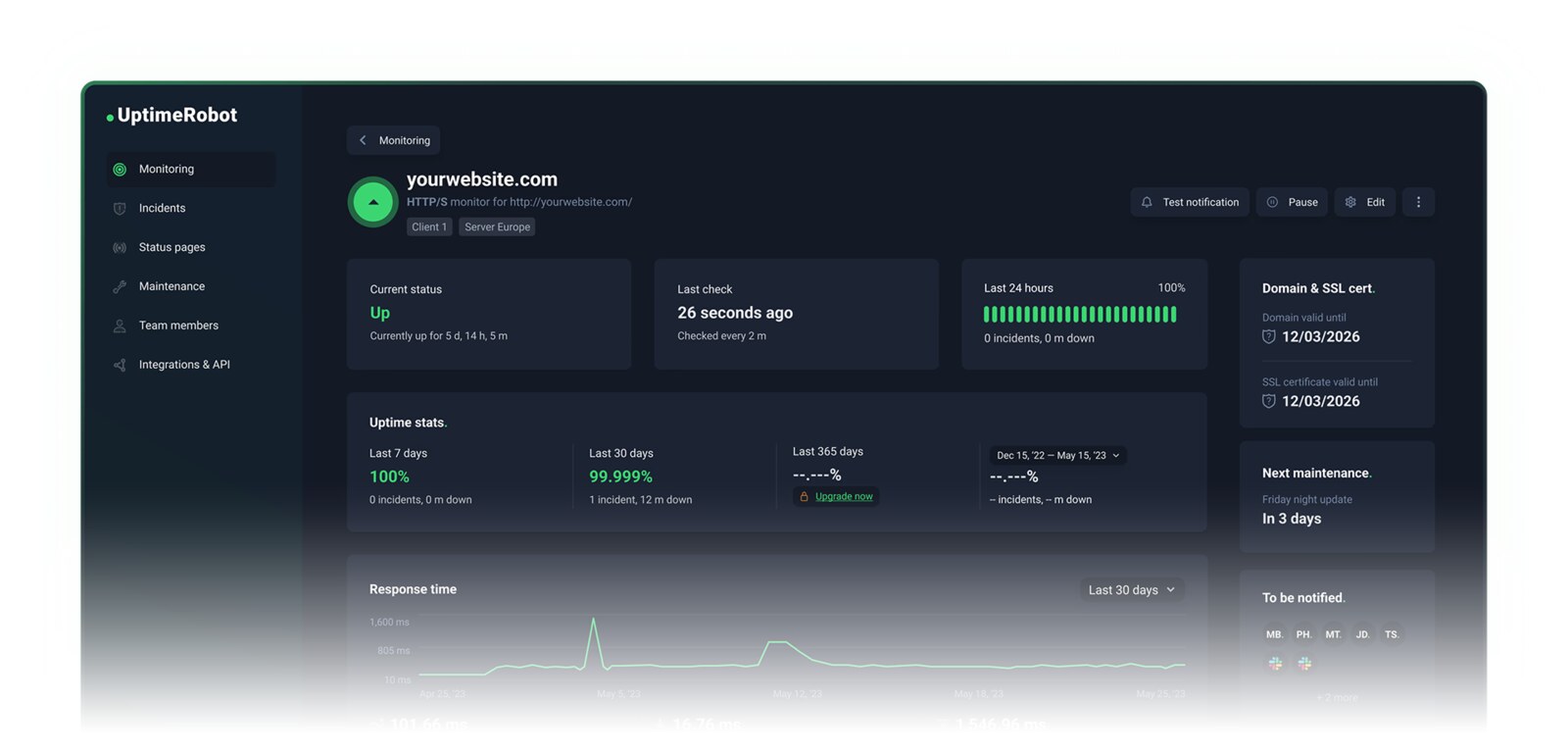
The workflow is short. You add a monitor, pick its type and check interval, attach alert contacts and, if you want, publish it on a status page. UptimeRobot then checks the target around the clock and opens an incident when a check fails.
Checks run every 5 minutes on Free, every 60 seconds on Solo, every 30 seconds on Team and every 15 seconds on Scale.
The core checks cover HTTP(S) websites and endpoints, keyword monitoring (alert when a word appears or disappears in the page HTML), ping monitoring for servers, port checks for services such as SMTP, and UDP checks.
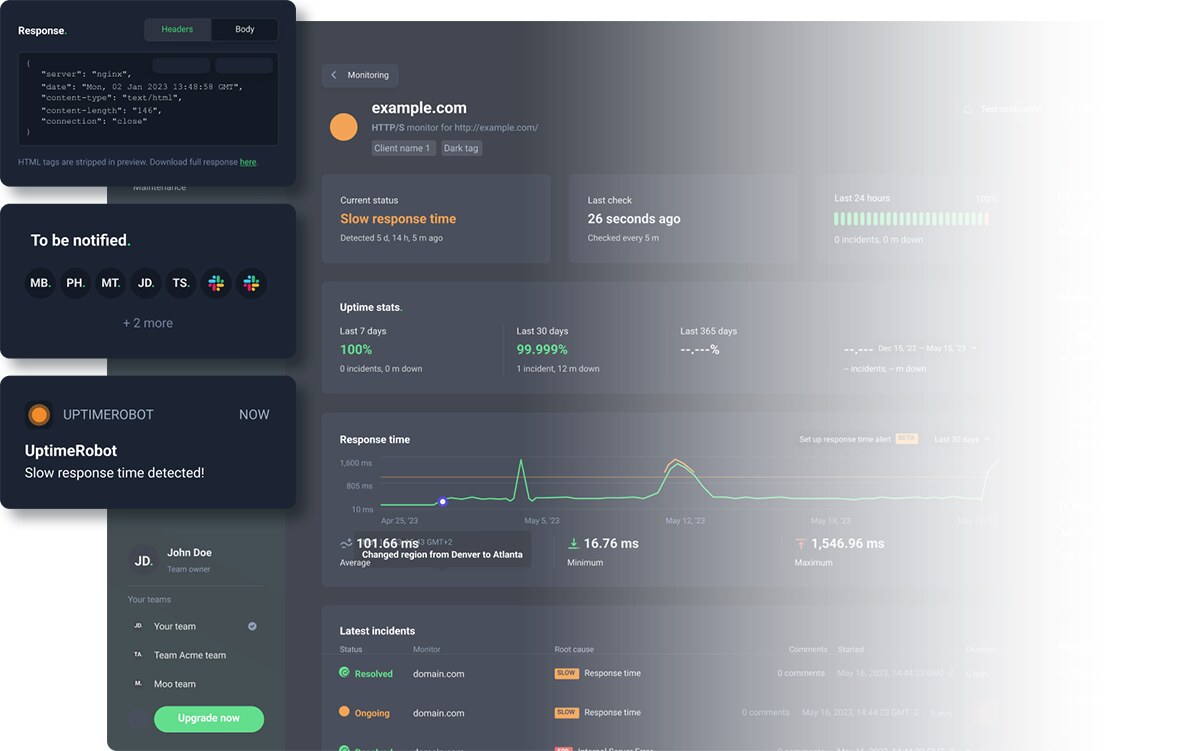
Paid plans add SSL certificate and domain expiry alerts, DNS record change alerts, slow response alerts, and API monitoring with authentication, custom headers and JSON field rules. Heartbeat monitoring covers cron jobs, where your job pings UptimeRobot and you are alerted if the ping is late.
To cut false alerts, the vendor says a failed check is re-checked from other data centers in the same region, including one on a different cloud provider, before an incident opens. This runs on every plan. Paid plans can also run one monitor from up to four regions (North America, Europe, Asia and Australia).
Alerts go out by email, SMS, voice call, mobile push and email-to-SMS. UptimeRobot integrates with Slack, Microsoft Teams, Telegram, Discord, Google Chat, Mattermost, PagerDuty, Splunk On-Call, Pushover, Pushbullet, webhooks and Zapier.
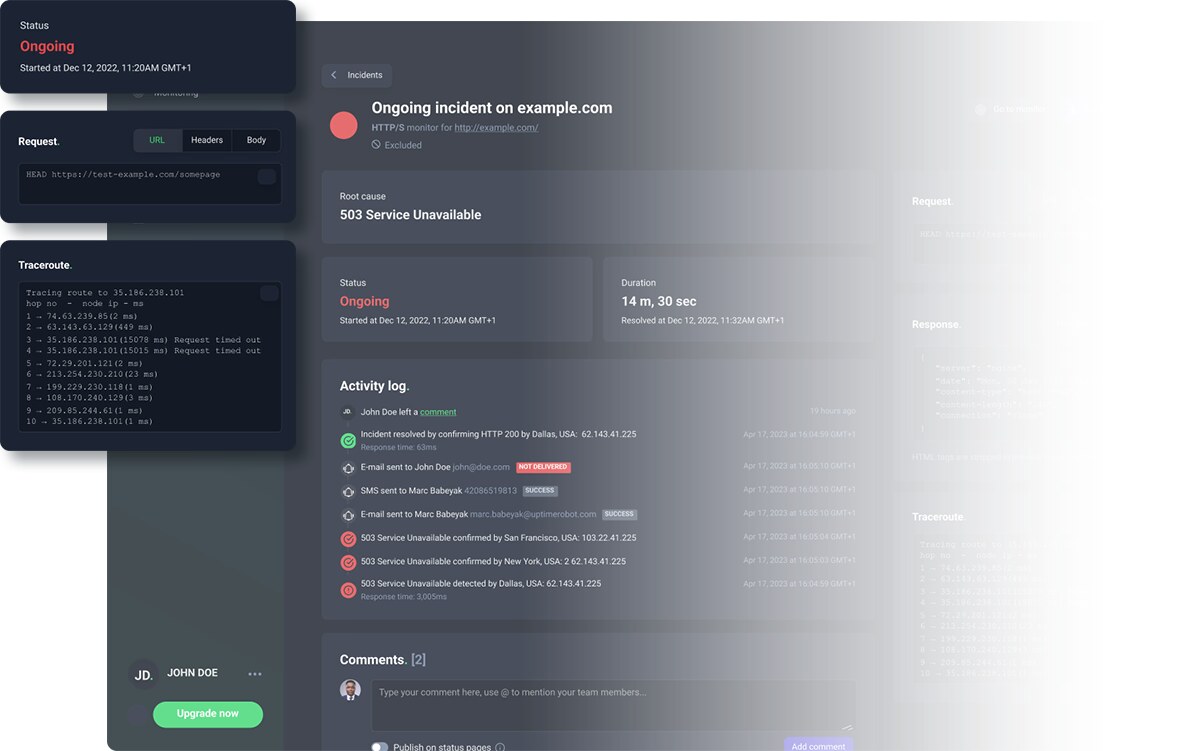
Incidents carry a timeline and root cause, and maintenance windows pause alerts during planned work. Status pages support a custom domain, password protection, 11 interface languages and, on higher plans, email subscribers and white-label branding. A newer third-party service monitoring feature alerts you when services you depend on go down.
UptimeRobot has a REST API (v3), and API access is included even on the Free plan. A hosted MCP endpoint lets AI agents list, create and update monitors and pull incident timelines without a local server. Native iOS and Android apps handle alerts on the go.
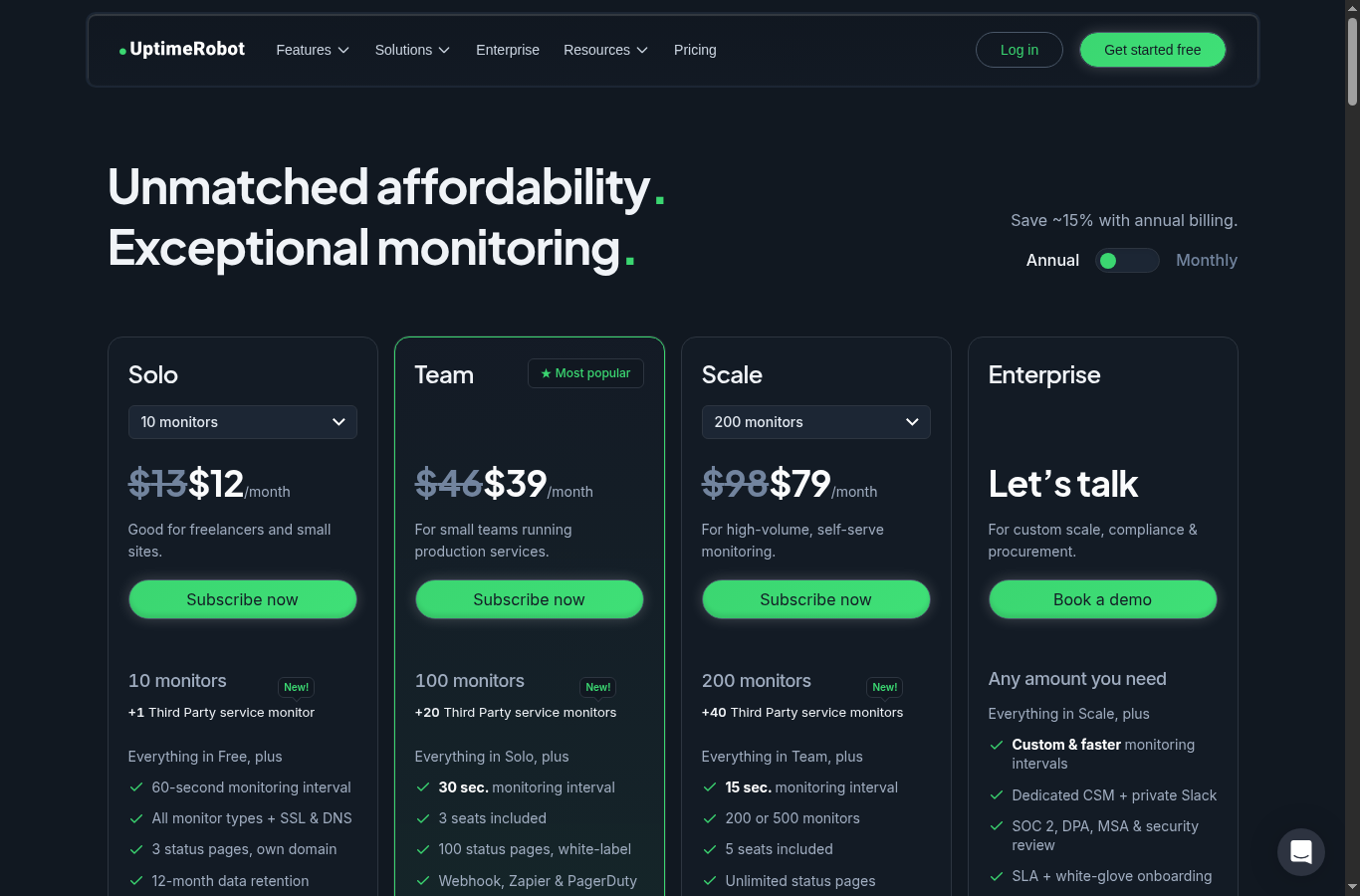
UptimeRobot pricing starts at $0 for 50 monitors, and paid plans start at $12 a month billed annually. Annual billing saves about 15 percent on most plans. The table lists every published plan in USD.
Prices checked 23 Nov 2026.
| Plan | Price (USD) | Monitors and interval | What it includes |
|---|---|---|---|
| Free | $0 a month, no card | 50 monitors, 5-minute checks | HTTP, keyword, ping and port checks, 1 basic status page, 5 integrations, 3-month data retention, no login or notify seats |
| Solo (10 monitors) | $13 a month, or $12 a month billed annually ($144 a year) | 10 monitors, 60-second checks | All check types including SSL, domain and DNS, 3 status pages on your own domain, 12-month retention, 1 third-party service |
| Solo (50 monitors) | $28 a month, or $24 a month billed annually | 50 monitors, 60-second checks | Solo features with 50 monitors and 5 third-party services |
| Team | $46 a month, or $39 a month billed annually ($468 a year) | 100 monitors, 30-second checks | 3 login and 3 notify seats, 100 white-label status pages, webhooks, Zapier and PagerDuty, 24-month retention, 30 SMS or voice credits |
| Scale (200 monitors) | $98 a month, or $79 a month billed annually ($948 a year) | 200 monitors, 15-second checks | 5 login and 5 notify seats, unlimited status pages, 40 third-party services, 24-month retention |
| Scale (500 monitors) | $228 a month, or $192 a month billed annually | 500 monitors, 15-second checks | Scale features with 500 monitors and 100 third-party services |
| Enterprise | Quote only | 500+ monitors, custom intervals | Dedicated success manager and private Slack, SOC 2 report, DPA and MSA, SLA, invoicing by PO or wire |
Extra login seats on Team and Scale cost from $15 a month per seat billed annually, or $19 billed monthly. SMS and voice credits are one-time packs from $3 for 10 credits up to $100 for 1,000, and they do not renew. New subscriptions and upgrades carry a 14-day money-back guarantee, and you can cancel by turning off auto-renewal.
A freelancer watching 10 client sites with 60-second checks and SSL expiry alerts fits Solo at $144 a year. An agency with 40 sites and three staff who all need dashboard logins has to pay for Team at $468 a year, because Solo has no login seats.
Public UptimeRobot reviews are strongly positive. It holds 4.7 out of 5 from 334 G2 reviews and 4.7 from 488 Trustpilot reviews (both seen 23 Nov 2026).
On G2 the most mentioned pros are notifications, easy setup, monitoring, ease of use and reliability. The most common complaints are inadequate notifications (20 mentions), plan limitations (13), the UI (9) and price (9). One recent G2 reviewer points out that the free plan's 5-minute interval can miss a short outage.
UptimeRobot says it is SOC 2 compliant and GDPR compliant, with a Data Processing Addendum. Payments run through Stripe or wire transfer.
On 9 Nov 2026 UptimeRobot added third-party service monitoring to its API, MCP and CLI, and on 12 Nov 2026 it launched a new app for Slack. On 26 May 2026 it added a Fair Use Policy to its terms, which lets it review accounts and recommend a plan change when usage outgrows the current plan.
The pros are price, breadth of checks and ease of setup. The cons sit mostly on the cheaper plans.
The closest UptimeRobot alternatives either add incident tooling, run on your own server, or bundle more than uptime checks. Here is when we would pick each.
Yes, for most small teams UptimeRobot is worth it and the easiest default for uptime monitoring. The free plan is generous, Solo is affordable, and the check types cover almost everything a small business or agency needs. We would pick something else only for deeper incident tooling (Better Stack) or to self-host (Uptime Kuma).
Yes. The Free plan includes 50 monitors with 5-minute checks, HTTP, keyword, ping and port monitoring and a basic status page, with no credit card required. It can be used for personal and commercial projects.
Yes. It is run by UptimeRobot s. r. o. in Bratislava, Slovakia, says it is SOC 2 and GDPR compliant, and holds 4.7 out of 5 from 334 G2 reviews and 4.7 from 488 Trustpilot reviews.
It checks websites, APIs, servers, ports, cron jobs, DNS records and SSL certificates from outside your network and alerts you by email, SMS, call, push or chat tools when something fails. It also hosts public or private status pages.
Every 5 minutes on Free, every 60 seconds on Solo, every 30 seconds on Team and every 15 seconds on Scale. Enterprise can have custom, faster intervals.
Yes. New subscriptions and upgrades have a 14-day money-back guarantee if you contact support within 14 days of payment. You can cancel any time by turning off auto-renewal, and the plan runs to the end of the billing cycle.
UptimeRobot says it is SOC 2 compliant and GDPR compliant, with a Data Processing Addendum. The latest SOC 2 report is shared through an enterprise demo for procurement or vendor reviews.
We may earn a commission when you buy through links on SaaSPic. It never changes our verdicts or the price you pay. Affiliate disclosure
Add this badge to your website so your visitors can read this independent review in one click.
 7.7/10
Status page, uptime monitoring and on-call tool with a free plan and flat per-page pricing instead of per-seat fees.
 6.8/10
Low-cost uptime and SSL monitoring for websites and APIs, with email, app, Telegram, SMS and WhatsApp alerts and a hosted MCP.
 7.3/10
Developer tool suite led by Crontap, a hosted scheduler for HTTP calls with uptime checks and heartbeats.
| Tool | Score | From | Free plan | Best for |
|---|---|---|---|---|
| UptimeRobot | 7.9/10 | $13/mo | Yes | Freelancers, agencies and small teams monitoring websites and APIs |
| Instatus | 7.7/10 | $15/mo | Yes | SaaS teams replacing Statuspage with monitoring built in |
| AlertsDown | 6.8/10 | $5/mo | Yes | Indie developers and small SaaS teams monitoring a handful of sites |
| Apihustle | 7.3/10 | $2.99/mo | Yes | Developers who need hosted cron jobs and simple monitoring |
 8.4/10
AI coding agent with a desktop editor, CLI, cloud agents and code review that plans, writes and fixes code in your repositories.
 8.2/10
Cloud platform where Replit Agent builds, tests and publishes web and mobile apps with built-in hosting, database and auth.
 7.9/10
Virtualization software to run Windows, Linux and macOS VMs on a Mac, authorized by Microsoft for Windows 11 on Apple silicon.