 7.9/10
Uptime monitoring for websites, APIs, ports, cron jobs, SSL and DNS, with alerts and status pages. Free for 50 monitors.


Developer tool suite led by Crontap, a hosted scheduler for HTTP calls with uptime checks and heartbeats.
We may earn a commission when you buy through our links. How this works
A cheap, focused way to run scheduled HTTP calls with uptime checks and heartbeats in one account. Good for WordPress cron, serverless jobs and small apps; larger teams needing status pages or on-call should look at fuller monitoring tools.
Best for: Developers who need hosted cron jobs and simple monitoring
7.3/10 Good, with trade-offs. The overall score is our judgment against the questions we ask of every tool, not an average. How we score
| Question | Score | Why |
|---|---|---|
| Does the jobWhat it actually does for the task it is sold for, and where it falls short. | 7.5 | Crontap runs scheduled HTTP calls with uptime monitors and heartbeats in one account, but only makes web requests. |
| Ease of useSetup needed and how quickly you get something useful done. | 7.5 | Schedules can be cron or plain English with a timezone each, and you can send a call once and read the real response before saving. |
| Pricing and limitsWhat you pay at a realistic size, including caps, add-ons and deal limits. | 8.0 | Pro starts at $2.99 a month with 1-minute cadence, and cancelling keeps items running on the free tier, though the API needs Ultra. |
| Reliability and supportUpdate pace, known problems and how support responds. | 6.5 | Includes automatic retries and a 14-day money-back guarantee, and the builders answer support email, but no SOC 2 or similar certification is published. |
| Fit against alternativesHow it compares with the alternatives for the people it is aimed at. | 6.5 | The review sends larger teams needing status pages or on-call to fuller tools such as Cronitor and Healthchecks.io. |
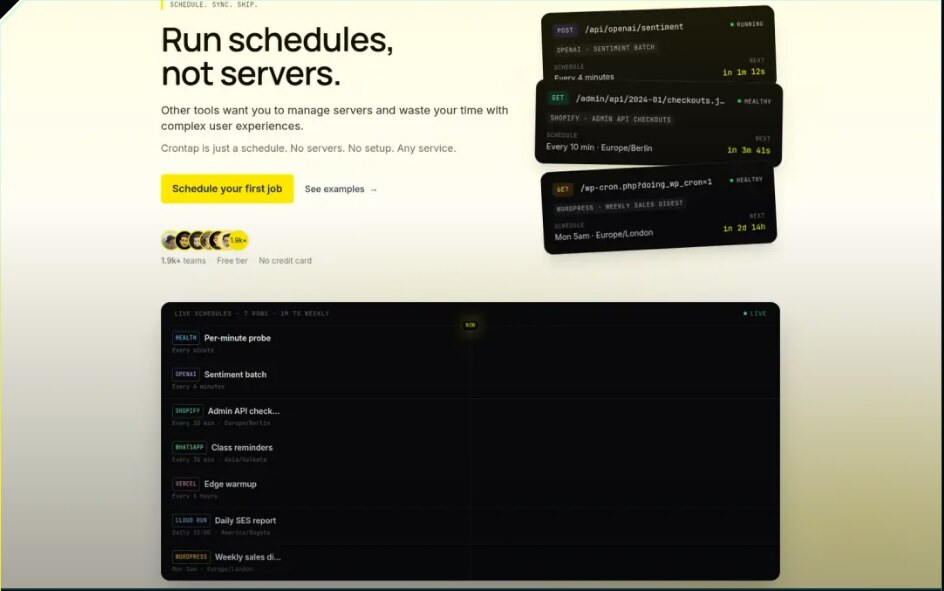
Apihustle is a small suite of developer tools from Copenhagen, built around Crontap, a hosted scheduler that calls your URLs on a cron schedule and also handles uptime checks and heartbeat monitoring. The rest of the suite covers API load testing, cron debugging and website code generation. This Apihustle review focuses on Crontap, since that is the paid product most buyers come for, and covers the other tools more briefly. Prices checked 30 Oct 2026.
Crontap suits developers, small teams and site owners who need something to hit an HTTP endpoint on a schedule without running a server or cron daemon: WordPress sites where wp-cron is unreliable, apps on Vercel or Cloud Run, Shopify scripts, AI batch jobs. The vendor says it has been running since 2022 and that more than 1,900 teams use it.
Skip it if your scheduled work is not reachable over HTTP, since Crontap only makes web requests. Larger teams who need status pages, on-call rotas or deep observability will want a fuller monitoring platform.
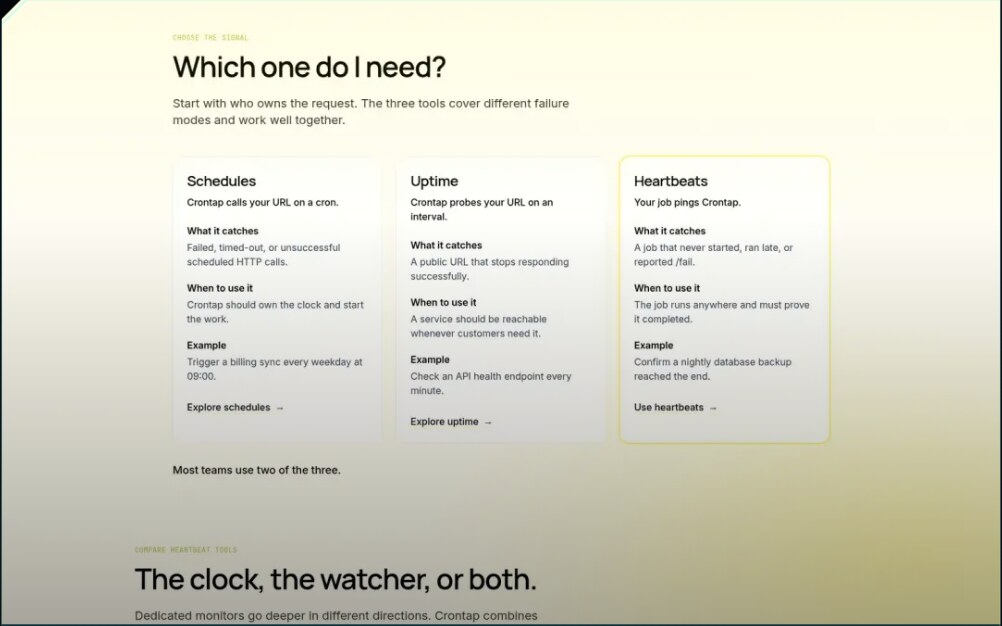
You describe the request (method, URL, headers and body), pick a schedule as a cron expression or in plain English such as "every weekday at 09:00", and set a timezone for that schedule so daylight saving does not shift it. You can send the call once before saving and read the real response, then re-run it by hand later. Crontap keeps a run history and alerts your notification list when calls start failing, with automatic retries on failed runs.
Uptime monitors send an anonymous GET request to a public URL at one of nine intervals, from every minute to every 24 hours. A 200 to 399 response counts as up; timeouts and network errors count as down. You choose how many consecutive failures (1 to 5) mark a monitor as down, and you get 90 days of history.
Heartbeats work the other way round. Your job pings a secret URL when it finishes, or appends /fail to report a failure. If the ping does not arrive within the period plus a grace window (20% of the period by default, five minutes minimum), you get an alert. This catches the job that never ran, which schedules and uptime checks miss.
Email alerts are on every plan. Paid plans add Slack, Discord and Telegram channels, unlimited webhook integrations and AI integrations. The Crontap site lists Zapier, Make, IFTTT and n8n for automation, and the homepage now advertises an MCP server so you can manage schedules from AI coding tools. A public REST API is only on the Ultra tiers.
Crontap prices are in USD and exclude VAT, which Lemon Squeezy adds at checkout. Schedules, uptime monitors and heartbeats share one combined item cap.
| Crontap plan | Items | Monthly | Annual | Main limits and extras |
|---|---|---|---|---|
| Starter | 2 | $0 | $0 | Intervals down to 1 hour, 1 uptime monitor at daily cadence, 1 heartbeat at hourly cadence, 100 history entries, email alerts |
| Pro 3 / 5 / 10 / 15 / 20 | 3 to 20 | $2.99 / $3.59 / $4.99 / $6.49 / $7.99 | $23.99 / $28.99 / $39.99 / $51.99 / $63.99 | 1-minute cadence, Slack, Discord and Telegram alerts, daily AI integrations, 1,000 history entries, up to 5 custom retries |
| Ultra 25 / 50 / 100 | 25 to 100 | $11.99 / $19.99 / $34.99 | $95.99 / $159.99 / $279.99 | Everything in Pro plus API access, priority support, hourly AI integrations, 10,000 history entries |
| Ultra 250 / 500 / 1000 | 250 to 1,000 | $69.99 / $119.99 / $199.99 | $559.99 / $959.99 / $1,599.99 | Same as Ultra |
| Custom | Over 1,000 | Contact sales | Custom | |
Paid Crontap plans have a 14-day money-back guarantee on the first payment. If you cancel or downgrade, nothing is deleted: your items keep running on Starter, and paid-only features pause.
The other tools are priced on their own sites. Page AI costs $149 lifetime for one website or $199 for five (shown as reduced from $349). Shipixen costs $249 for a 1-year license or $379 for a lifetime license, sold directly on its site (shown as reduced from $500). CronTool and Page UI are free. Clobbr's direct price is not shown on its homepage; on Setapp it is available from $7.99 a month on its own.
Say you want to run wp-cron every five minutes, monitor the site's homepage, and get a heartbeat from a nightly backup. That is three items, and the five-minute cadence rules out Starter, so Pro 3 at $2.99 a month or $23.99 a year covers it.
Clobbr has a rating on Setapp: 86% from 37 ratings, with the latest review dated 7 Oct 2026 saying it "works great" but would like streaming data support.
Crontap's homepage now leads with "Now with MCP" and its pricing has moved to item-based tiers that bundle schedules, uptime monitors and heartbeats under one cap. Shipixen's release notes show version 1.20.x updating to Next.js 15.5.7 and React 19.2.1 to fix a React security issue, and adding rules for Claude Code and Cursor. Neither site dates these changes.
Crontap is a cheap, focused way to run scheduled HTTP calls with uptime checks and heartbeats in one account, and the pricing is clear down to the item. I would pick it for WordPress cron, serverless jobs and small apps where a few dollars a month replaces a server. Teams that need status pages, on-call or a full API on a budget should compare Cronitor and Healthchecks.io first.
Apihustle is a suite of eight developer tools made by a small team in Copenhagen. Its main paid product is Crontap, which schedules HTTP calls and monitors uptime and heartbeats.
Yes, the Starter plan is free with two combined items and an hourly minimum interval. Pro plans start at $2.99 a month (Prices checked 30 Oct 2026).
Yes. The vendor lists WordPress as a use case: Crontap calls wp-cron.php on your schedule, so jobs run even when nobody visits the site.
Yes. Paid plans can be refunded in full within 14 days of the first payment by emailing support.
You get 3 items and 1-minute cadence on Pro 3, which costs $2.99 a month or $23.99 a year as of Oct 30, 2026. It adds Slack, Discord and Telegram alerts, daily AI integrations, 1,000 history entries and up to 5 custom retries.
You should pick Cronitor over Crontap if you want heartbeat-style cron monitoring alongside uptime checks and status pages for a larger team. Crontap is the cheaper, narrower choice for scheduled HTTP calls. Teams needing status pages or on-call should compare Cronitor first.
We may earn a commission when you buy through links on SaaSPic. It never changes our verdicts or the price you pay. Affiliate disclosure
Add this badge to your website so your visitors can read this independent review in one click.
 7.9/10
Uptime monitoring for websites, APIs, ports, cron jobs, SSL and DNS, with alerts and status pages. Free for 50 monitors.
 8.4/10
AI coding agent with a desktop editor, CLI, cloud agents and code review that plans, writes and fixes code in your repositories.
 8.2/10
Cloud platform where Replit Agent builds, tests and publishes web and mobile apps with built-in hosting, database and auth.
 7.9/10
Virtualization software to run Windows, Linux and macOS VMs on a Mac, authorized by Microsoft for Windows 11 on Apple silicon.