 7.3/10
AI YouTube production platform for outlier research, scriptwriting in your channel's voice, thumbnails and finished videos.


Windows and Mac desktop app for YouTube keyword, trend, video, channel, tag and comment research, sold for a one-time price.
We may earn a commission when you buy through our links. How this works
Tube Atlas suits creators, marketers and agencies who research YouTube niches on a desktop and want a one-time price. Anyone who mainly wants to optimize their own channel inside YouTube should pick vidIQ or TubeBuddy instead.
Best for: Creators and agencies researching YouTube niches on a desktop
6.3/10 Good, with trade-offs. The overall score is our judgment against the questions we ask of every tool, not an average. How we score
| Question | Score | Why |
|---|---|---|
| Does the jobWhat it actually does for the task it is sold for, and where it falls short. | 7.2 | Twelve-plus tools cover keywords, trends for 258 countries, 35 data points per video, channels, tags, titles and comments, per the sales page. |
| Ease of useSetup needed and how quickly you get something useful done. | 6.4 | Grids pass data between tools and a details window keeps research off YouTube, with more than 20 help videos to learn it. |
| Pricing and limitsWhat you pay at a realistic size, including caps, add-ons and deal limits. | 7.6 | A one-time $47 with 10 installs during the promotion, against vidIQ Boost at $199 a year or TubeBuddy Pro at $12 a month. |
| Reliability and supportUpdate pace, known problems and how support responds. | 5.0 | A public version history and 30-day refund, but only two releases so far in 2026 and the Trends tool is restricted by Google. |
| Fit against alternativesHow it compares with the alternatives for the people it is aimed at. | 5.6 | vidIQ and TubeBuddy work inside YouTube for your own channel, so Tube Atlas fits as a niche research tool. |
Tube Atlas is a Windows and Mac desktop app for YouTube research: it pulls keyword ideas, search trends, video and channel data, tags, titles and comments into sortable grids. It suits YouTube creators, video marketers and agencies who want that data for a one-time price instead of a monthly subscription.
Tube Atlas is YouTube research software from AppBreed that you install on your own computer, with 12+ built-in tools for finding topics, trending searches and the best performing videos and channels in a niche. It is sold once, with no monthly fee.
The developer, Dave Guindon, also makes Tik Analyzer for TikTok and Pin Inspector for Pinterest, and the apps share a design: search or browse, extract the data into a grid, then filter, analyze and export it. The vendor says Tube Atlas has more than 4,200 users.
Tube Atlas fits creators planning videos from search data, marketers researching which channels and videos perform in a niche, and agencies that sell YouTube research to clients under the included commercial license.
Skip it if you want help inside YouTube Studio itself, such as bulk editing, A/B tests or your own channel's analytics, which browser extension tools like TubeBuddy and vidIQ handle. Skip it too if you need a cloud tool your team can share, or if you work on a Chromebook or mobile device, since Tube Atlas is desktop only.
The workflow runs from keyword ideas to trends, then into videos, channels and comments, with tools for titles, tags and transcripts along the way. Each tool fills a data grid you can filter and send to the next tool.
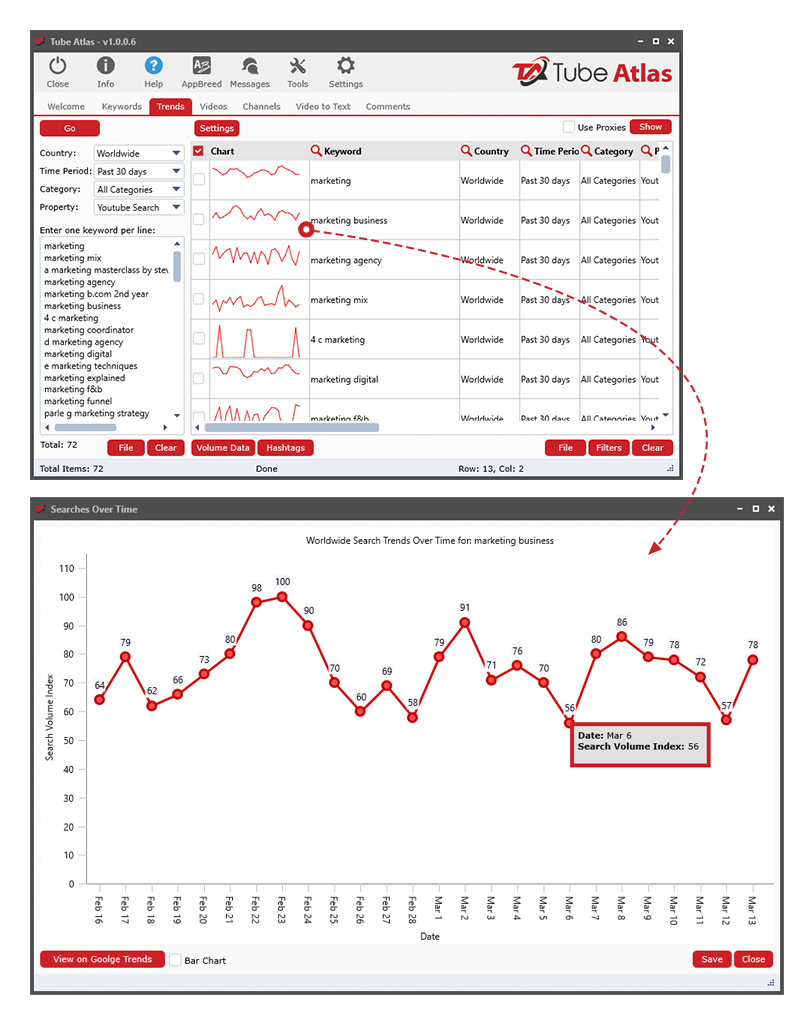
The Keyword Generator can generate hundreds of suggestions from YouTube's autosuggest engine, and you can add search volume, cost per click and competition from free sources or a paid Keywords Everywhere account. The Trends tool shows a search volume index with mini charts for every keyword, for 258 countries, with data from YouTube, Google, Image, News and Google Shopping search. Clicking a chart opens a full searches over time view.
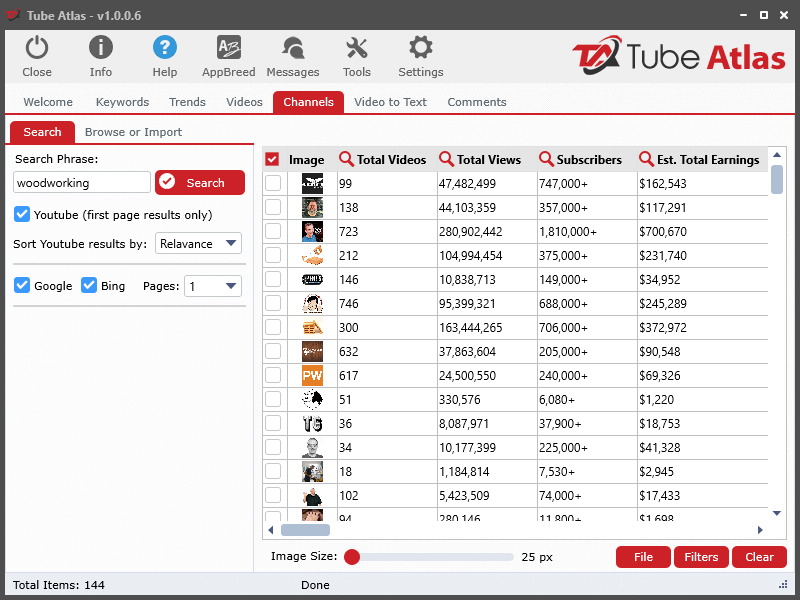
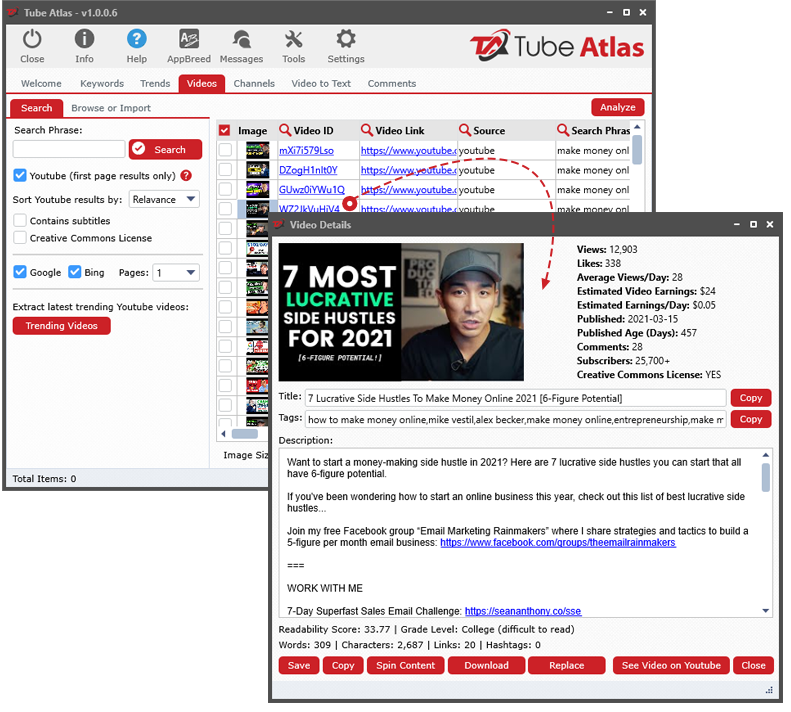
The Video Analyzer returns 35 data points per video, including views, likes, comments, publish age, average views per day, estimated earnings, description readability and hashtags. A Trending Videos button shows what is performing now. Browse and Extract lets you surf YouTube with its own filters inside the app and extract every video you see, and the Channel Analyzer gives 27+ data points per channel and can analyze every video in a channel.
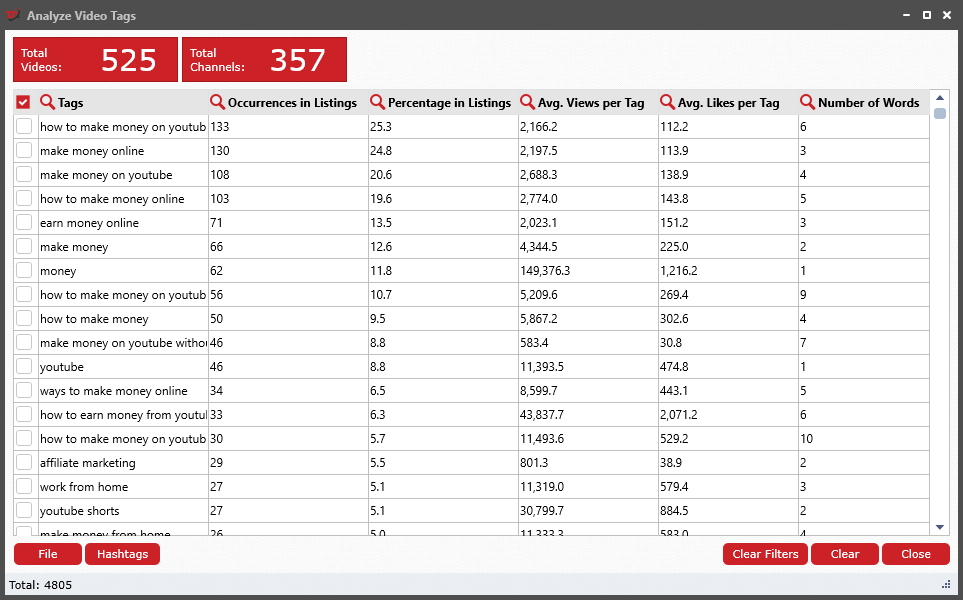
The Comment Analyzer extracts comments and sorts them by likes and replies, and can show only comments with questions or a chosen word combination. For YouTube SEO, the Tag Analyzer counts how often each tag appears across a set of videos with average views and likes per tag. The Video Title Analyzer finds the most common word combinations across titles. A title generator offers more than 1,200 headline templates.
The Video to Text converter turns a video into text, with an AI punctuator, find and replace, and a spinner that rewrites text by translating it through other languages. A downloader saves videos, audio or thumbnails, and the sales page lists hashtag generation, Shorts analysis, in-video ads, related videos and unlisted videos.
Tube Atlas costs a one-time $47 on its own site, which is the $67 list price after a $20 discount applied at checkout, with no free plan or trial. Prices checked 5 Nov 2026, in US dollars.
| Option | Price | What it includes | Terms |
|---|---|---|---|
| Tube Atlas, current sale price | $47 one-time | All tools, commercial license, outsource license, 10 computer installs, video training, bonus templates and reports | No monthly payments, free version 1 updates, 30-day money-back guarantee |
| Tube Atlas, list price | $67 one-time | All tools, commercial and outsource license, 10 computer installs, video training | No monthly payments, free version 1 updates, 30-day money-back guarantee |
| Optional upsells after purchase | Not priced on the sales page | A translator for video titles, descriptions and subtitles in 100+ languages, and a video rank tracker | Optional, not needed to use Tube Atlas |
| Keywords Everywhere data (optional) | Billed by Keywords Everywhere | Search volume, cost per click and competition inside the grids | Needs a paid Keywords Everywhere account |
The FAQ says the license normally covers 1 computer, but the promotion includes 10. Updates for major version 1 are free for life, and the maker says it releases 30 to 80 updates over one to two years per major version. The 30-day money back guarantee is handled through the support desk.
A typical research session costs nothing beyond the $47, because the sales page promises unlimited searches, extractions, transcripts and downloads. Generating keyword ideas for a niche, checking their trends, pulling the top videos and channels and analyzing their tags all run on your own computer.
For comparison, vidIQ Boost is billed at $199 a year and TubeBuddy Pro costs $12 a month on monthly billing, so Tube Atlas costs less than three months of the cheaper option. Those tools add features inside YouTube that Tube Atlas does not have.
The customer feedback Tube Atlas publishes is on its own sales page, which shows quotes from beta testers who praise the trends tool, the channel analysis and the browser extractor, and one says a bug was fixed within two hours of reporting it. Treat these as the vendor's selected testimonials.
These are the facts the maker publishes about the software.
Tube Atlas is on version 1.0.6.6, released 12 Apr 2026, according to AppBreed's public version history. Recent releases mostly keep extraction working as YouTube and its AI data sources change.
The biggest limit is that Tube Atlas depends on extracting data from YouTube and Google, so tools can stall when those services change or restrict access. The version history notes that the Trends tool is still restricted because Google has become stricter about fast data extraction.
The main alternatives are YouTube growth tools that work inside YouTube and charge monthly, plus an AI channel assistant.
Tube Atlas packs a lot of YouTube research into a one-time $47: keyword ideas, trends, 35 data points per video, channel analysis, tag and title analysis, comment mining and transcripts. I would pick it if I researched YouTube niches on a Windows or Mac computer and wanted to avoid another subscription. I would skip it if I mainly wanted to optimize my own channel inside YouTube, where vidIQ and TubeBuddy fit better.
Tube Atlas is a desktop app from AppBreed for Windows and Mac that extracts YouTube keyword ideas, trends, video and channel data, tags, titles and comments into data grids for research.
It is a one-time purchase: $67 list price, with a $20 discount at checkout that brings it to $47. The FAQ says there are no monthly or recurring payments, and it comes with a 30-day money-back guarantee.
Yes. The FAQ says it supports Mac OSX 10.10 or higher with a native Mac app, as well as Windows XP, 7, 8, 10 and 11. It does not run on iPads, iPhones or Android devices.
Yes, two optional ones: an app that translates video titles, descriptions and subtitles into more than 100 languages, and a tool that tracks the ranking of videos for keywords. Neither is needed to use Tube Atlas.
Updates for major version 1 are free for life. The app automatically checks for updates each time it opens, and the latest version, 1.0.6.6, was released on 12 Apr 2026.
We may earn a commission when you buy through links on SaaSPic. It never changes our verdicts or the price you pay. Affiliate disclosure
Add this badge to your website so your visitors can read this independent review in one click.
 7.3/10
AI YouTube production platform for outlier research, scriptwriting in your channel's voice, thumbnails and finished videos.
 7.2/10
YouTube research tool that finds outlier videos and uses the data to generate titles, ideas and thumbnails.
| Tool | Score | From | Free plan | Best for |
|---|---|---|---|---|
| Tube Atlas | 6.3/10 | $47 one-off | No | Creators and agencies researching YouTube niches on a desktop |
| Subscribr | 7.3/10 | $99/mo | Yes | Weekly long-form YouTube creators and agencies |
| 1of10 | 7.2/10 | $19/mo | Yes | YouTube creators researching ideas and packaging |
 8.4/10
Voice AI platform with Sonic text to speech, Ink speech to text and Managed Agents for phone voice agents via API.
 8.3/10
AI video and image generator running Kling's own models, with keyframes, character references, native audio, motion control and an API.
 8.3/10
AI voice platform for text to speech, voice cloning, dubbing, music and sound effects, plus voice agents and an API for developers.