 7.5/10
Open-source social media scheduler for 30+ networks that AI agents can drive through MCP, a CLI and an API on every plan.


Windows and Mac desktop app for Pinterest keyword, trend, pin, board and pinner research with Pinterest search volume.
We may earn a commission when you buy through our links. How this works
Pin Inspector suits bloggers, sellers and Pinterest marketers who study competitors and keywords on their own computer and want to avoid a monthly fee. Anyone who needs rank tracking, scheduling or a web app should choose PinClicks or Tailwind.
Best for: Pinterest marketers researching keywords and top pins without a subscription
6.6/10 Good, with trade-offs. The overall score is our judgment against the questions we ask of every tool, not an average. How we score
| Question | Score | Why |
|---|---|---|
| Does the jobWhat it actually does for the task it is sold for, and where it falls short. | 7.4 | Eight tools cover keywords, trends, pins with 52 data columns, boards, pinners and annotation search volume, per the maker's sales page and screenshots. |
| Ease of useSetup needed and how quickly you get something useful done. | 6.4 | Data flows between tools and filters can be saved, but 52 columns per pin is a lot to work through and there are 30 help videos to learn it. |
| Pricing and limitsWhat you pay at a realistic size, including caps, add-ons and deal limits. | 7.8 | $47 once with 10 installs costs less than two months of PinClicks Pin Pro at $29 a month. |
| Reliability and supportUpdate pace, known problems and how support responds. | 5.6 | Version 2 shows 12 recent updates and a 30-day refund, but there is no public changelog or independent rating. |
| Fit against alternativesHow it compares with the alternatives for the people it is aimed at. | 5.8 | PinClicks adds rank tracking and a web app and Tailwind adds scheduling, so Pin Inspector fits as a research-only tool. |
Pin Inspector is a Windows and Mac desktop app for Pinterest research that finds keywords, trends, top pins, boards and pinners, with Pinterest search volume, for a one-time price. It suits bloggers, ecommerce sellers and Pinterest marketers who want deep competitor data without a monthly subscription.
Pin Inspector is a one-time-purchase Pinterest keyword and content research tool with eight built-in data tools. It is made by AppBreed, the software brand of Innantech Industries Inc, and developed by Dave Guindon, who says on the sales page that it is one of AppBreed's top-selling apps.
Everything runs on your own computer. You search by keyword, category, board or user, and the app pulls Pinterest data into sortable tables that you filter, save and export.
Pin Inspector fits people who use Pinterest as a traffic source and want to study what already works there: food, home and craft bloggers, ecommerce and print-on-demand sellers, affiliate marketers, and freelancers who offer Pinterest research to clients under the commercial license.
Skip it if you want to schedule pins, design pins or track your own account's analytics, because Pin Inspector is a research tool, not a publishing tool. Skip it too if you want keyword rank tracking over time, or if you would rather use a web app on any device than install desktop software.
A typical session starts with keyword and trend research, moves to the top pins and boards for those keywords, and ends with annotation keywords and their Pinterest search volume. You can send data between tools, for example keywords to the Annotations tool or pin links from the Pins tool.
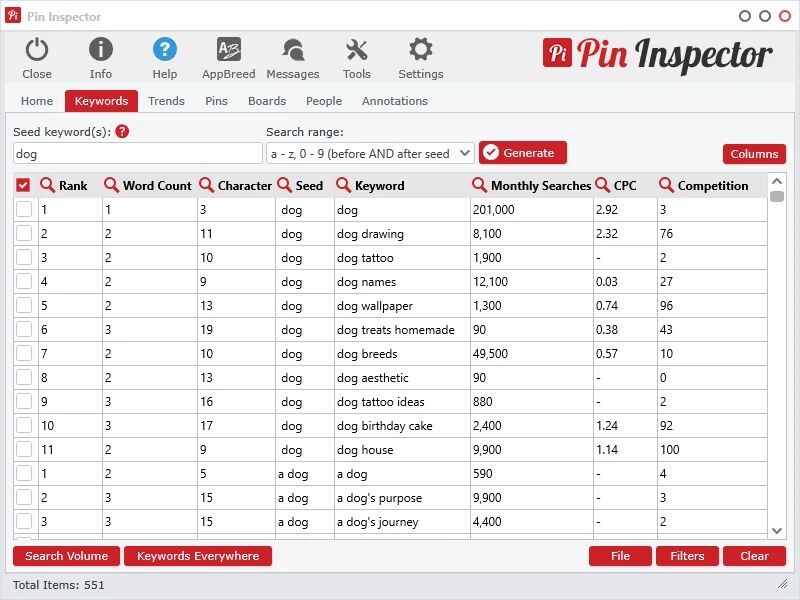
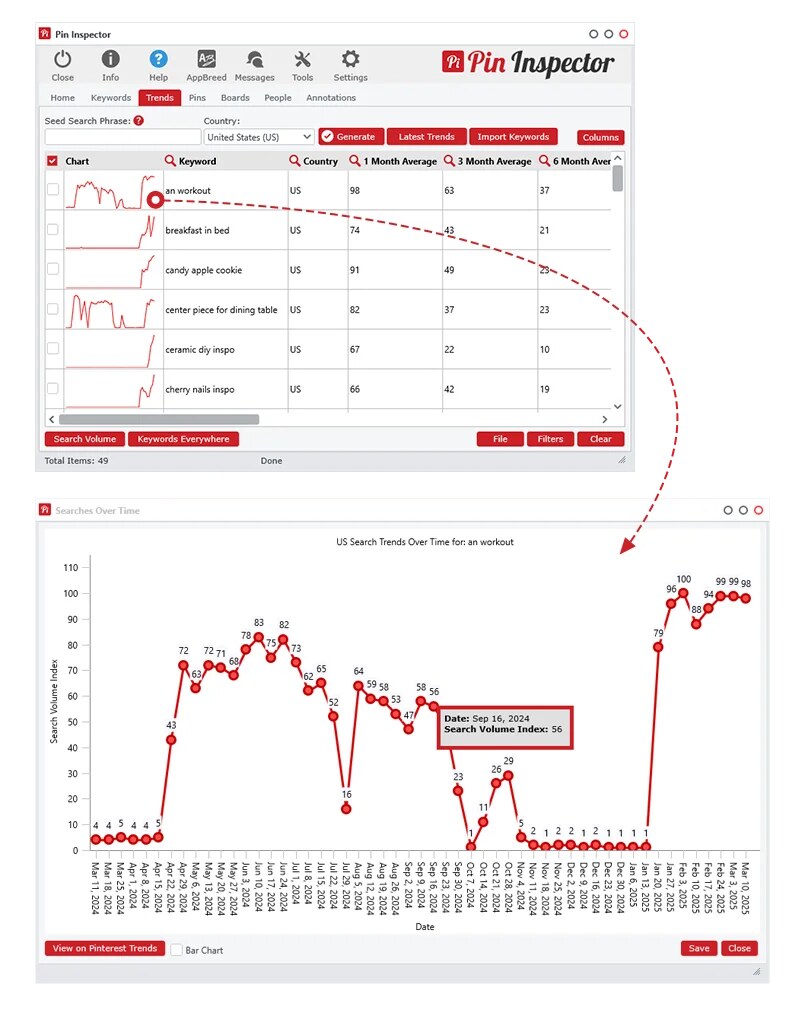
The Keyword Generator pulls popular keywords from the Pinterest autosuggest engine, and you can import search volume, cost per click and competition from free resources. The Trends tool extracts the latest trending searches from Pinterest Trends with a full year of search volume, expands any keyword with each letter of the alphabet, and pulls trend data and related trends for imported keyword lists.
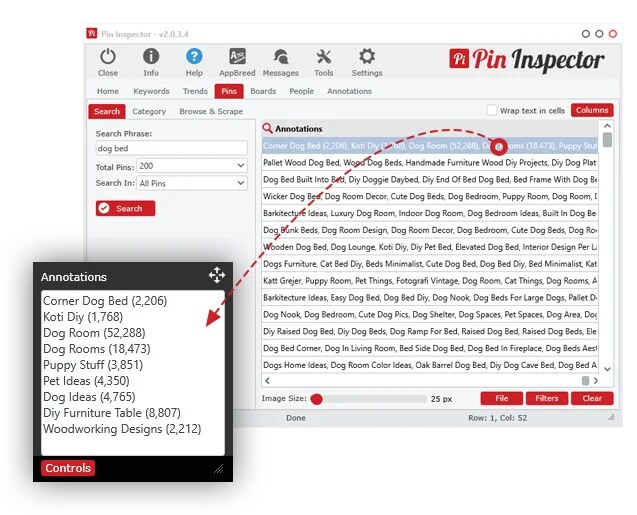
The Pins Analyzer extracts pins, videos and ads for a keyword or from more than 30 built-in categories, with 52 data columns per pin. These include saves, repins, comments, each reaction type, hashtags, date created, domain, whether the pin is promoted or a video, and details on the pinner, board and creator. Double-click the Annotations column to see a pin's annotation keywords and pull their monthly search volume.
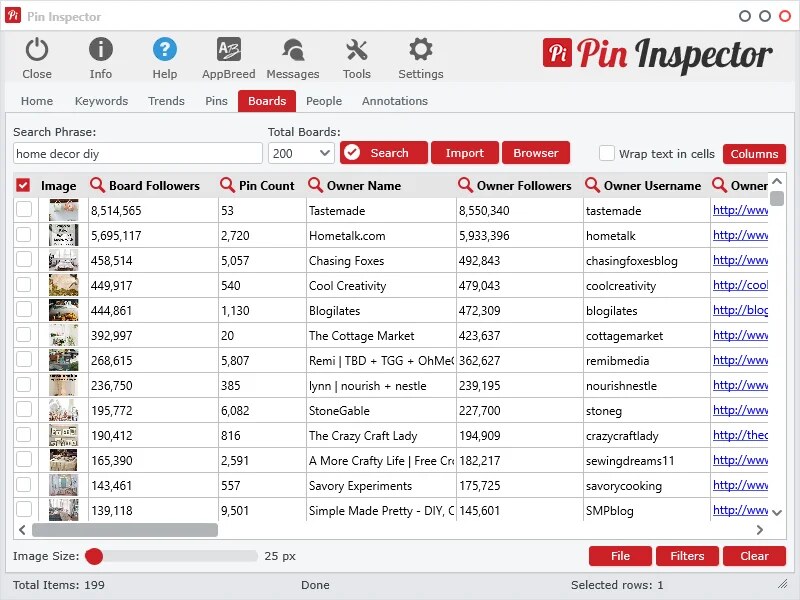
The Boards Analyzer returns 18 data points per board, extracts each board's related interest keywords with search volume, and can analyze every pin inside a board. The Pinner Analyzer returns 19 or more data points per user, including profile views in the past 30 days, and can list a user's pins or boards. Browse and Scrape is a built-in browser that captures pins, ads, boards and profiles from your own Pinterest feed as you scroll.
The Annotation Analyzer gives three ways to find annotation keywords with real Pinterest monthly search volume: from a search phrase, from a list of pin links, or by checking an imported keyword list. It also shows follower counts, last updated dates, category trees, and related and additional (pivot) annotations. A Keywords Everywhere tool adds historical volume, CPC and trend slopes if you have a paid Keywords Everywhere account. You can also download pin images and videos, hide or show columns, and save quick and custom filter sets.
Pin Inspector is sold directly on its own site as a one-time purchase in US dollars, with no free plan or trial. Prices checked 4 Nov 2026.
| Option | Price | What it includes | Terms |
|---|---|---|---|
| Pin Inspector, promotional price | $47 one-time (the buy button applies a $20 discount) | All eight tools, commercial license, outsource license, 10 computer installs, video training, bonus PDF reports, videos and 12 pin templates | No monthly payments, free version 2 updates, 30-day refund policy |
| Pin Inspector, list price | $67 one-time | Same software and licenses | Same terms |
| Keywords Everywhere data (optional) | Billed by Keywords Everywhere on credits | Historical volume, CPC and trend charts inside the app | Needs a paid Keywords Everywhere account |
The FAQ says there are no upsells after purchase and that you go straight to the download page. Updates for major version 2 are free, and the vendor says it releases 30 to 80 updates over one to two years per major version. Normally the license covers 1 computer, but the current promotion includes 10.
A typical Pinterest research session costs nothing beyond the $47, because the sales page promises unlimited searches and annotation lookups with no credits. Finding trending keywords for a niche, pulling the top pins and boards for each, and checking annotation search volume all run on your own computer.
For comparison, PinClicks costs $29 a month for Pin Pro or $249 a year, so Pin Inspector costs less than two months of it. The trade-off is that PinClicks adds keyword rank tracking and a web app, which Pin Inspector does not offer.
There is no independent Pin Inspector review profile on the major review platforms to weigh. The sales page shows quotes from beta testers and a set of customer messages and supporter notes, many thanking the developer for recent updates, and one customer says the update let them cancel another subscription. Treat these as the vendor's selected testimonials. PinClicks' own homepage quotes a creator who names Pin Inspector as the tool it compares itself with.
These are the facts the maker publishes about the software and the company.
Pin Inspector is now on major version 2. The developer's note on the sales page says he recently released 12 major updates with 68 individual improvements and features, including the Annotations tool with Pinterest search volume and related interest keywords for boards. The help page lists a version 2.0.0.8 update video, and the newest screenshots show version 2.0.3.4.
Pin Inspector depends on reading Pinterest's pages and feeds. If Pinterest changes how it serves data, tools can break until AppBreed ships an update, and without a public changelog there is no record of how fast fixes arrive.
It is research only. There is no scheduling, pin design, rank tracking or reporting on your own account, so you will still need a scheduler such as Tailwind to publish.
Use the media downloader with care: other people's pin images and videos are their work, and reposting them can raise copyright issues. The sales page also leans on income claims in its bonus videos (for example making thousands a week with Pinterest affiliate marketing), which are marketing, not results you should expect.
These tools do the same job of researching Pinterest keywords, trends and top-performing pins.
Pin Inspector gives a lot of Pinterest data for a one-off price: trends, top pins with 52 data points, boards, pinners and annotation keywords with Pinterest search volume, plus 10 installs and a commercial license. I would pick it if you study Pinterest competitors and keywords on your own computer and want to avoid another monthly bill. If you want rank tracking, scheduling or a web app, PinClicks or Tailwind is the better fit.
It is desktop software that extracts Pinterest keywords, trends, pins, boards, pinners and annotation keywords, with Pinterest search volume and up to 52 data points per pin.
Pin Inspector is $67 one-time, and the current promotion brings it to $47 at checkout. It includes a commercial license, 10 installs and a 30-day refund policy, with no upsells.
They suit different buyers. Pin Inspector is a one-time desktop app with deep pin, board and pinner data, while PinClicks is a web subscription from $29 a month that adds keyword rank tracking.
Yes. The Annotations, Trends and Boards tools pull Pinterest monthly search volume, and a paid Keywords Everywhere account adds historical volume and CPC.
Yes. It runs on Mac OSX 13 or higher and on Windows XP, 7, 8, 10 and 11. Older Macs work except for the Trends and Browse and Scrape tools.
We may earn a commission when you buy through links on SaaSPic. It never changes our verdicts or the price you pay. Affiliate disclosure
Add this badge to your website so your visitors can read this independent review in one click.
 7.5/10
Open-source social media scheduler for 30+ networks that AI agents can drive through MCP, a CLI and an API on every plan.
 7.0/10
X (Twitter) growth tool with a viral tweet library, AI tweet writer, scheduling, auto-DMs, analytics and a CRM for building an audience.
 7.0/10
Upload a video once and publish or schedule it to TikTok, YouTube Shorts, Reels and six more platforms, with an API and MCP server.