 7.9/10
AI meeting assistant that records, transcribes and summarizes calls on Zoom, Meet and Teams, with search and CRM sync.


AI note taker that turns voice, audio, video, YouTube links and text into transcripts, summaries and notes on mobile, web and Chrome.
We may earn a commission when you buy through our links. How this works
Audionotes suits people who capture ideas by voice and want lectures, videos and browser calls turned into tidy notes, ideally on the yearly Pro plan. Skip it for regulated data, team meeting automation or if you need recordings kept indefinitely.
Best for: Individuals turning voice notes, lectures and calls into structured notes
7.1/10 Good, with trade-offs. The overall score is our judgment against the questions we ask of every tool, not an average. How we score
| Question | Score | Why |
|---|---|---|
| Does the jobWhat it actually does for the task it is sold for, and where it falls short. | 7.6 | Audionotes captures voice, uploads, YouTube links and images, transcribes 99+ languages with speaker recognition and turns them into summaries, custom outputs and chat with notes. |
| Ease of useSetup needed and how quickly you get something useful done. | 7.3 | The App Store app averages 4.8 from 98 ratings, while Google Play reviews average 3.6 from 433 with complaints about small text and no landscape mode. |
| Pricing and limitsWhat you pay at a realistic size, including caps, add-ons and deal limits. | 6.8 | Yearly Pro at $129.99 is about $10.83 a month for six-hour recordings, but Free is capped at one-minute notes, monthly Pro is $29.99 and there are no refunds. |
| Reliability and supportUpdate pace, known problems and how support responds. | 6.4 | Support is by email with a stated 24-hour reply aim, updates ship often, but old recordings are deleted on a schedule and there is no HIPAA BAA. |
| Fit against alternativesHow it compares with the alternatives for the people it is aimed at. | 7.0 | Against Otter.ai, Granola and Fireflies.ai it fits individuals who record themselves and lectures better than teams that want automatic meeting bots. |
Audionotes is an AI note taker that turns voice recordings, uploaded audio and video, YouTube links, images and typed text into transcripts, summaries and structured notes. It suits people who think out loud or sit in lots of lectures and calls, such as consultants, students, sales reps and creators; teams that want a bot to join every meeting and file notes into a CRM should look elsewhere.
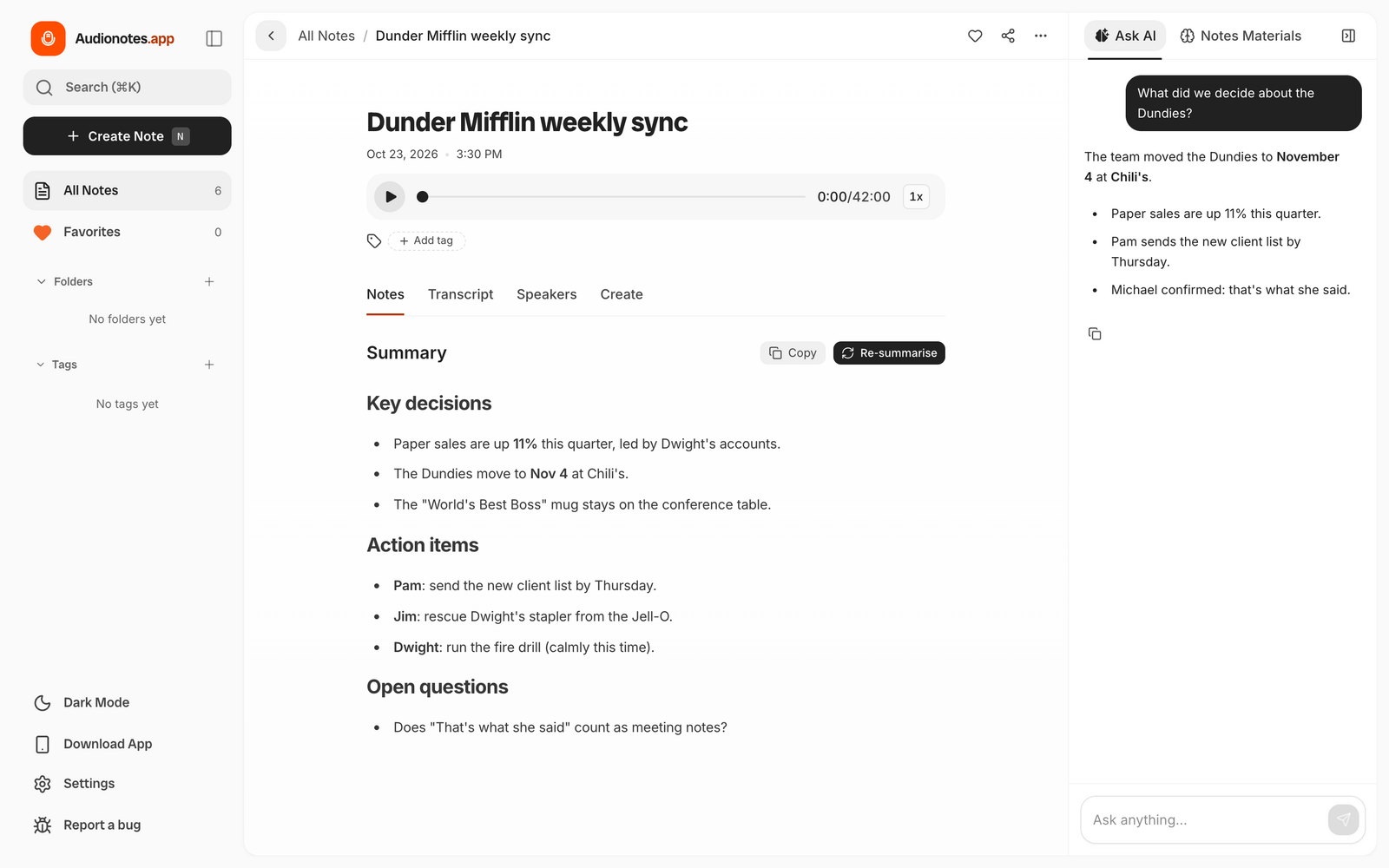
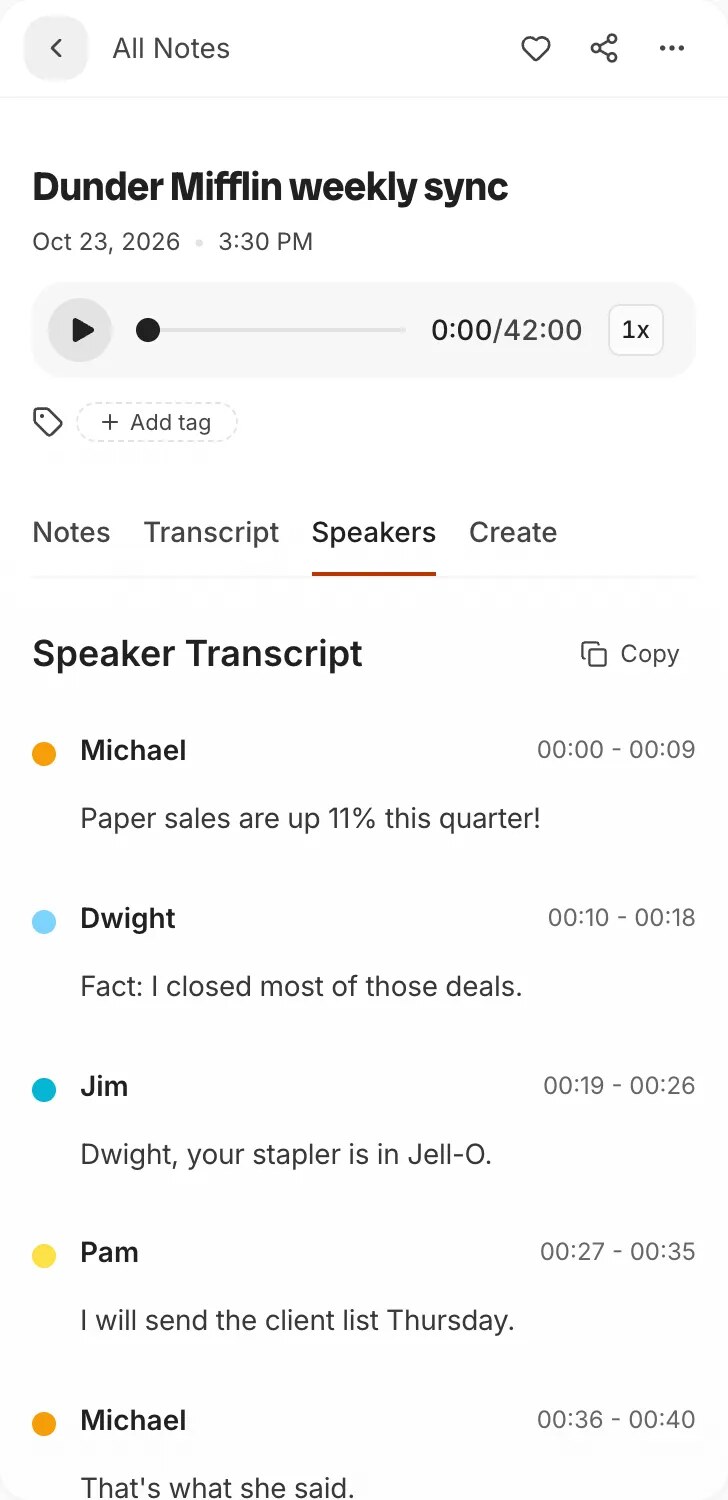
Audionotes is a capture and summarizing app from 1811 Labs, published on the App Store by Vatsal Sanghvi, that works on iPhone, iPad, Android, the web, a Chrome extension and a Mac app in beta. You record or upload something, it is transcribed in any of 99+ languages, and AI turns it into the note format you choose, such as minutes, a journal entry or an email.
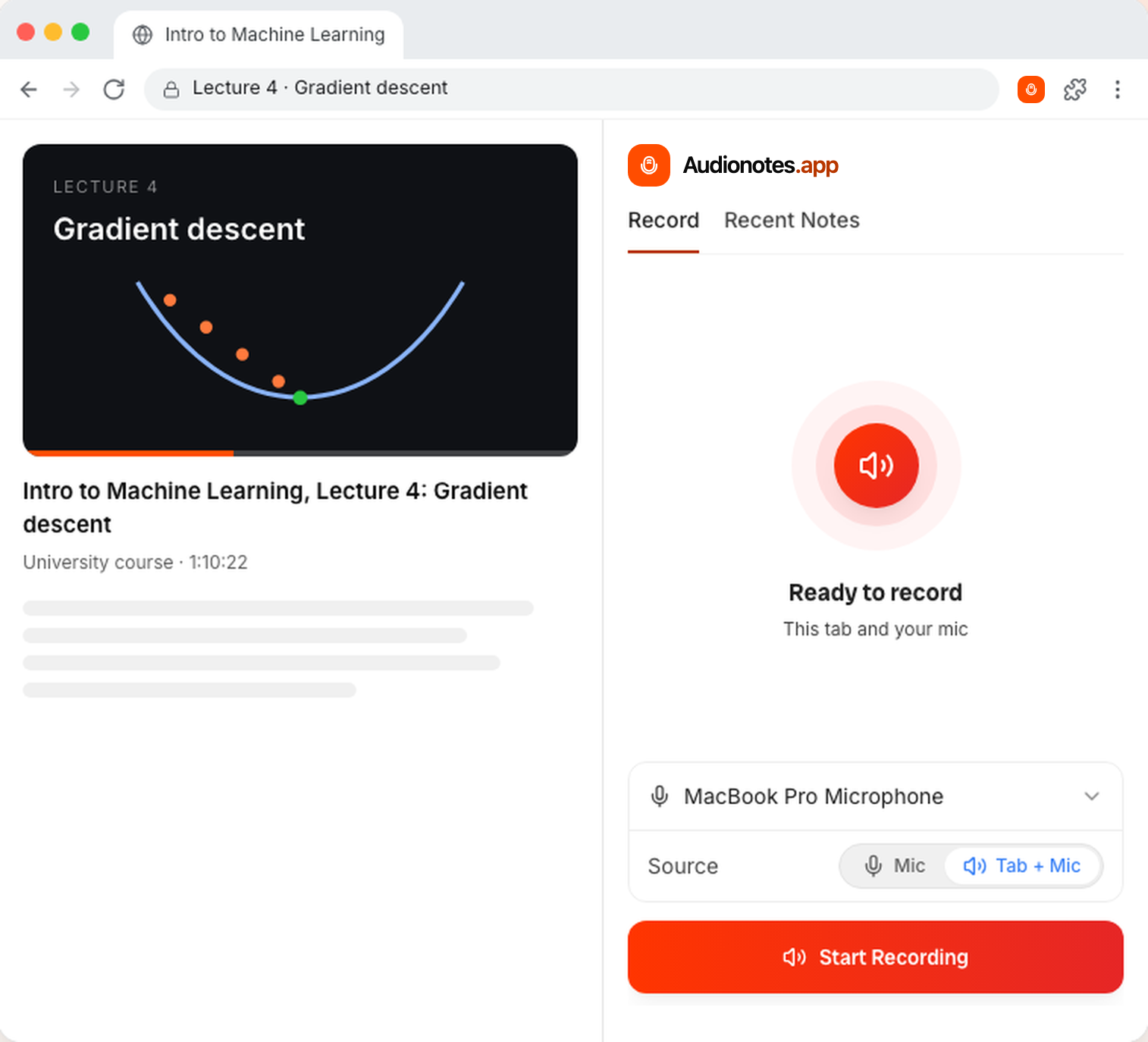
The vendor says the service uses OpenAI's Whisper and other audio models for transcription. No meeting bot joins your call. On the web and Mac you can record your mic and system audio together, while the phone apps record the mic only.
It is for individuals who want to talk instead of type and get tidy, searchable notes back. The free plan only handles one-minute voice notes, so most regular users will end up on Pro.
The workflow has five steps on the vendor's own page: capture, transcribe or translate, summarize or generate a custom output, chat with the note, then publish or share it. Notes sync across the phone apps, web app and extension.
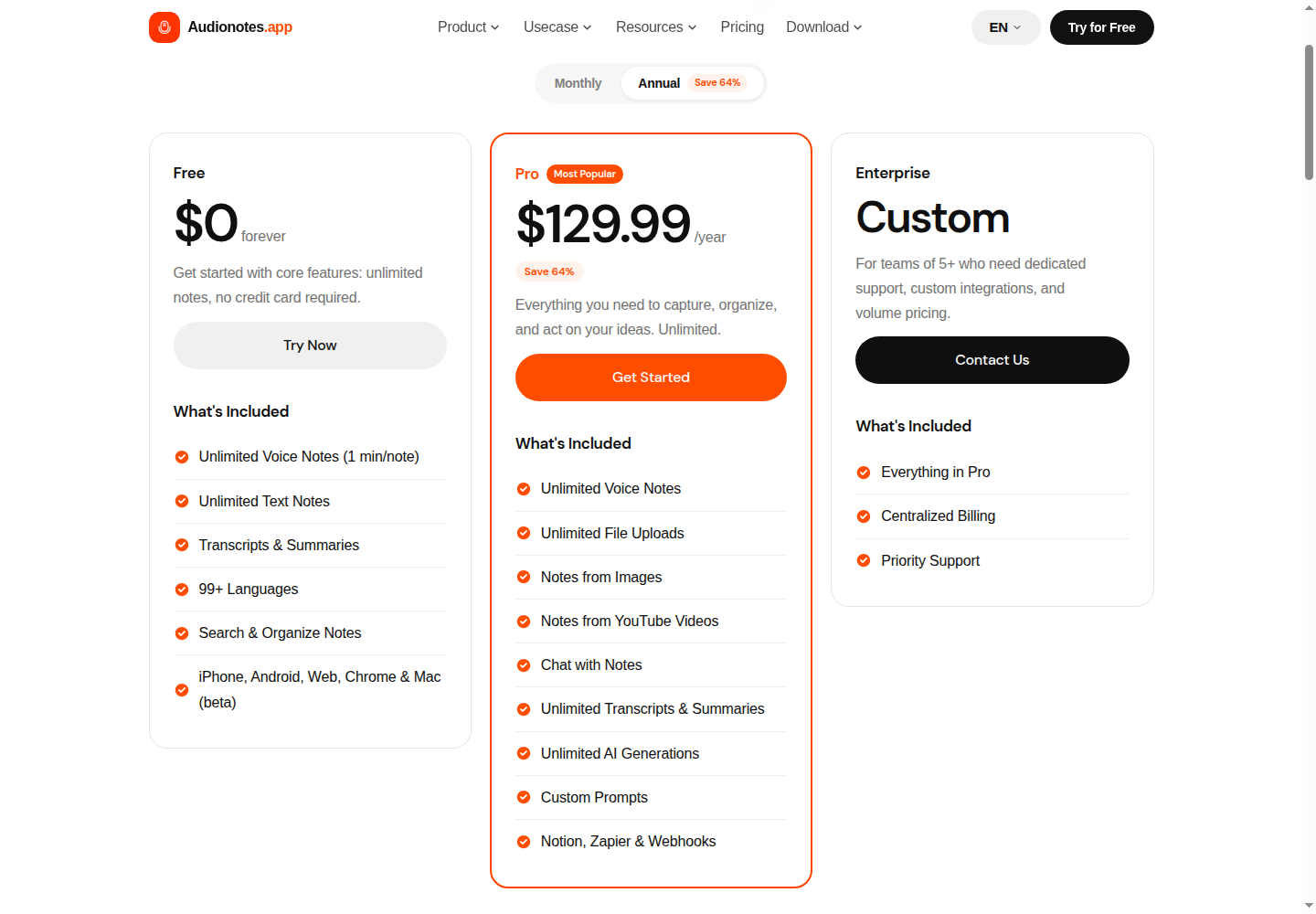
Audionotes pricing has a Free plan at $0, Pro at $29.99 a month or $129.99 a year, and a custom Enterprise plan for teams of five or more. Prices checked 10 Nov 2026 on the official pricing page, in US dollars.
| Plan | Price (USD) | Key limits | What it includes |
|---|---|---|---|
| Free | $0, no card needed | Voice notes up to 1 minute each, text notes up to 20,000 characters | Unlimited short voice notes and text notes, transcripts and summaries, 99+ languages, search and folders, all apps |
| Pro, billed monthly | $29.99 a month | Up to 6 hours per recording, 500 MB per audio or video upload, 20 MB per image | Unlimited voice notes and uploads, notes from images and YouTube, chat with notes, unlimited AI outputs, custom prompts, Notion, Zapier and webhooks |
| Pro, billed yearly | $129.99 a year | Up to 6 hours per recording, 500 MB per audio or video upload, 20 MB per image | Every Pro feature at the yearly rate, which the vendor labels a 64% saving |
| Enterprise | Custom quote | Teams of 5 or more users | Everything in Pro, centralized billing, priority support, volume pricing |
Every new account gets one full Pro note free (up to six hours of recording) before the Free limits apply. You can upgrade or downgrade at any time and the change takes effect at the start of the next billing cycle. The vendor does not offer refunds on paid subscriptions, and it asks users to try the free plan first. Schools can ask for educational discounts.
On the yearly plan, Pro works out to about $10.83 a month for unlimited recordings of up to six hours each, enough for a full day of lectures. Paying monthly costs $359.88 over a year, so the yearly plan is the better deal for anyone who will continue past a few months, bearing in mind there is no refund.
Ratings are strong on iPhone and mixed on Android. On the US App Store the app scores 4.8 from 98 ratings, on Google Play it scores 3.6 from 433 reviews with more than 10,000 downloads, and the Chrome extension shows 5.0 from 6 ratings with 564 users (all seen 10 Nov 2026).
Positive reviews mention recording seminars, webinars and YouTube videos and coming back to the summaries later. The most visible Android complaint is small text and no landscape mode, and the developer replied that it is working to improve this. The vendor claims more than 200,000 users, which is its own figure.
Audionotes runs on iOS 16 or later, iPadOS, Android, the web, Chrome and a Mac beta, and it connects to Notion, Zapier, webhooks and a WhatsApp bot. The iOS app is available in English, German and Spanish, while transcription covers 99+ languages.
Audionotes ships updates often to improve the apps. iOS version 2.4.5 (26 Oct 2026) added iPad landscape, Split View and Stage Manager support and made mind maps follow the iPad's orientation, and version 2.4.4 improved recording when you switch apps or take a call.
The Android app was last updated on 30 Oct 2026, and the Mac app is still in beta, so Mac users should expect some rough edges while it stays active in development.
The main limits of the service are the one-minute cap on Free, no refunds, and scheduled deletion of old audio.
The closest Audionotes alternatives are other AI note takers, and the right one depends on whether you mostly record yourself or record meetings.
Audionotes is a flexible AI note taker for people who capture ideas by voice and also want lectures, YouTube videos and browser calls turned into structured notes. I would pick it on the yearly Pro plan if I recorded long sessions on several devices and wanted custom outputs and chat with notes. I would skip it for regulated data, for team meeting automation, or if I needed every original recording kept indefinitely.
Yes, there is a Free plan at $0 with unlimited voice notes of up to one minute each and text notes up to 20,000 characters. New users also get one full Pro note, with recordings of up to six hours, before the Free limits apply.
Audionotes Pro costs $29.99 a month or $129.99 a year, which works out to about $10.83 a month. Prices checked 10 Nov 2026. Teams of five or more can ask for custom Enterprise pricing.
Yes. Audionotes has an iPhone and iPad app that needs iOS 16 or later, a Mac app in beta, a web app and a Chrome extension. The Mac and web versions can record system audio as well as the microphone.
No. You start recordings yourself, and no meeting bot joins the call. In Chrome you can record a Google Meet tab and your microphone together from the side panel.
No. The vendor says it does not provide refunds for paid subscriptions and encourages users to try the free plan first. Plan changes take effect at the start of the next billing cycle.
Audionotes transcribes and translates in 99+ languages with automatic language detection, or you can pick the language yourself. The iOS app interface itself is available in English, German and Spanish.
We may earn a commission when you buy through links on SaaSPic. It never changes our verdicts or the price you pay. Affiliate disclosure
Add this badge to your website so your visitors can read this independent review in one click.
 7.9/10
AI meeting assistant that records, transcribes and summarizes calls on Zoom, Meet and Teams, with search and CRM sync.
 7.8/10
AI notepad that transcribes meetings from your device audio, with no bot joining the call, and turns your notes into summaries.
| Tool | Score | From | Free plan | Best for |
|---|---|---|---|---|
| Audionotes | 7.1/10 | $129.99/yr | Yes | Individuals turning voice notes, lectures and calls into structured notes |
| Fireflies.ai | 7.9/10 | $10/mo | Yes | Sales and recruiting teams capturing every call |
| Granola | 7.8/10 | $14/mo | Yes | Founders, sales and product people in back-to-back meetings |
 8.4/10
Scheduling software that lets people book time with you through a link, with team routing, reminders, payments and AI meeting recaps.
 8.3/10
Web booking page and scheduler that syncs your calendars and lets clients book and pay for sessions, packages and subscriptions.
 8.1/10
Time tracker and timesheet app for teams, with a free plan and per-seat paid tiers for invoicing, approvals and scheduling.