 7.0/10
AI and drag-and-drop website builder for small businesses, with a free plan, online store, email and multilingual sites.


Open source visual website builder and CMS that you can self-host for free or run on Ycode Cloud, with AI design help via your own model.
We may earn a commission when you buy through our links. How this works
Ycode suits designers, agencies and developers who want a Webflow-style visual builder and CMS without lock-in, either self-hosted or on a modest per-project Cloud plan. If you need ecommerce, a large template marketplace or a mature plugin ecosystem, a more established builder is the safer choice for now.
Best for: Agencies and designers who want to own their site code
7.0/10 Good, with trade-offs. The overall score is our judgment against the questions we ask of every tool, not an average. How we score
| Question | Score | Why |
|---|---|---|
| Does the jobWhat it actually does for the task it is sold for, and where it falls short. | 7.2 | Visual editor, CMS with dynamic pages, forms, localization and an AI Agent that writes editable layers, per the Ycode docs, but no ecommerce. |
| Ease of useSetup needed and how quickly you get something useful done. | 7.0 | Product Hunt reviewers cite a smoother learning curve than Webflow, while self-hosting needs GitHub, Vercel and Supabase. |
| Pricing and limitsWhat you pay at a realistic size, including caps, add-ons and deal limits. | 7.6 | Free to self-host under the MIT license, and Cloud plans cost $10 or $25 a month per project on yearly billing with monthly AI credits. |
| Reliability and supportUpdate pace, known problems and how support responds. | 6.4 | Official support only on Cloud projects and community Discord for open source; Product Hunt holds 4.4 from 9 reviews, including an old crash complaint. |
| Fit against alternativesHow it compares with the alternatives for the people it is aimed at. | 6.8 | A credible open source alternative to Webflow and Framer, with a smaller template and integration ecosystem than either. |
Ycode is an open source visual website builder and CMS that you can self-host for free or run on Ycode Cloud, with a built-in AI Agent that edits pages as real, editable layers. It is aimed at designers, agencies and developers who want a Webflow-style editor without platform lock-in.
Ycode suits designers, freelancers and agencies who build marketing sites, blogs and CMS-driven pages for business clients and want to own the code. Because the core product is MIT-licensed on GitHub, a business with data residency concerns can host it on its own infrastructure.
It also suits small business teams who want AI help without a black box, and developers who want a visual front end for web application development: the AI Agent builds sections on the canvas as layers you can then adjust by hand. Skip Ycode if you need a full online store, a large template marketplace or a mature plugin ecosystem, where Webflow, Framer or WordPress are further ahead. Skip self-hosting if nobody on your team is comfortable with GitHub, Vercel and Supabase.
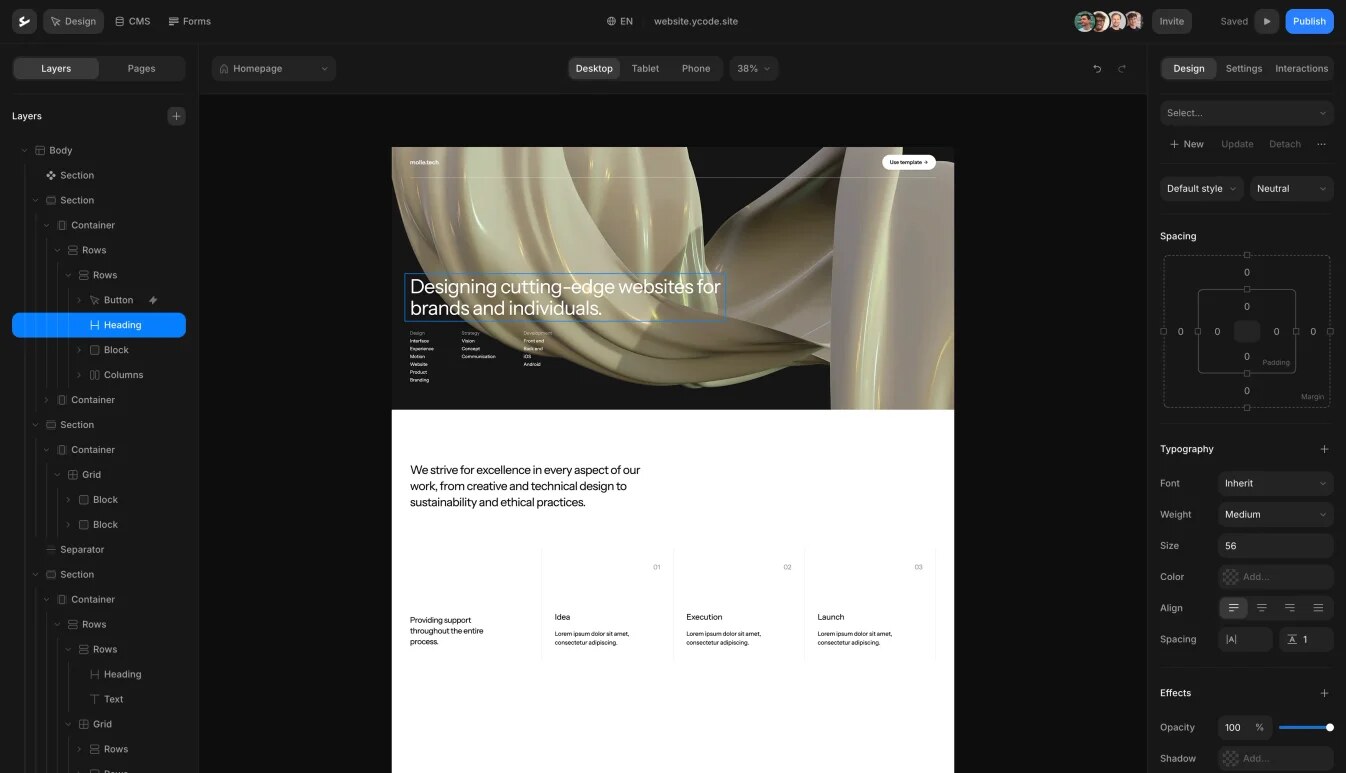
You design pages on a no-code visual canvas, manage content in a built-in CMS, and publish either to Ycode Cloud or to your own deployment. The docs cover the editor, CMS, forms, assets, localization, SEO, integrations and deployment.
The editor has a layers panel, design controls, color variables, fonts, responsive breakpoints for desktop, tablet and phone, reusable components, interactions and custom code. Built-in elements include rich text, maps, sliders and lightboxes, and you can set custom domains and redirects.
The CMS lets you create collections, add items, build dynamic pages and filter content, plus global fields shared across a site. A form builder stores submissions. The number of CMS collections depends on the plan: unlimited when self-hosted, 5 on Cloud Basic and 50 on Cloud Pro.
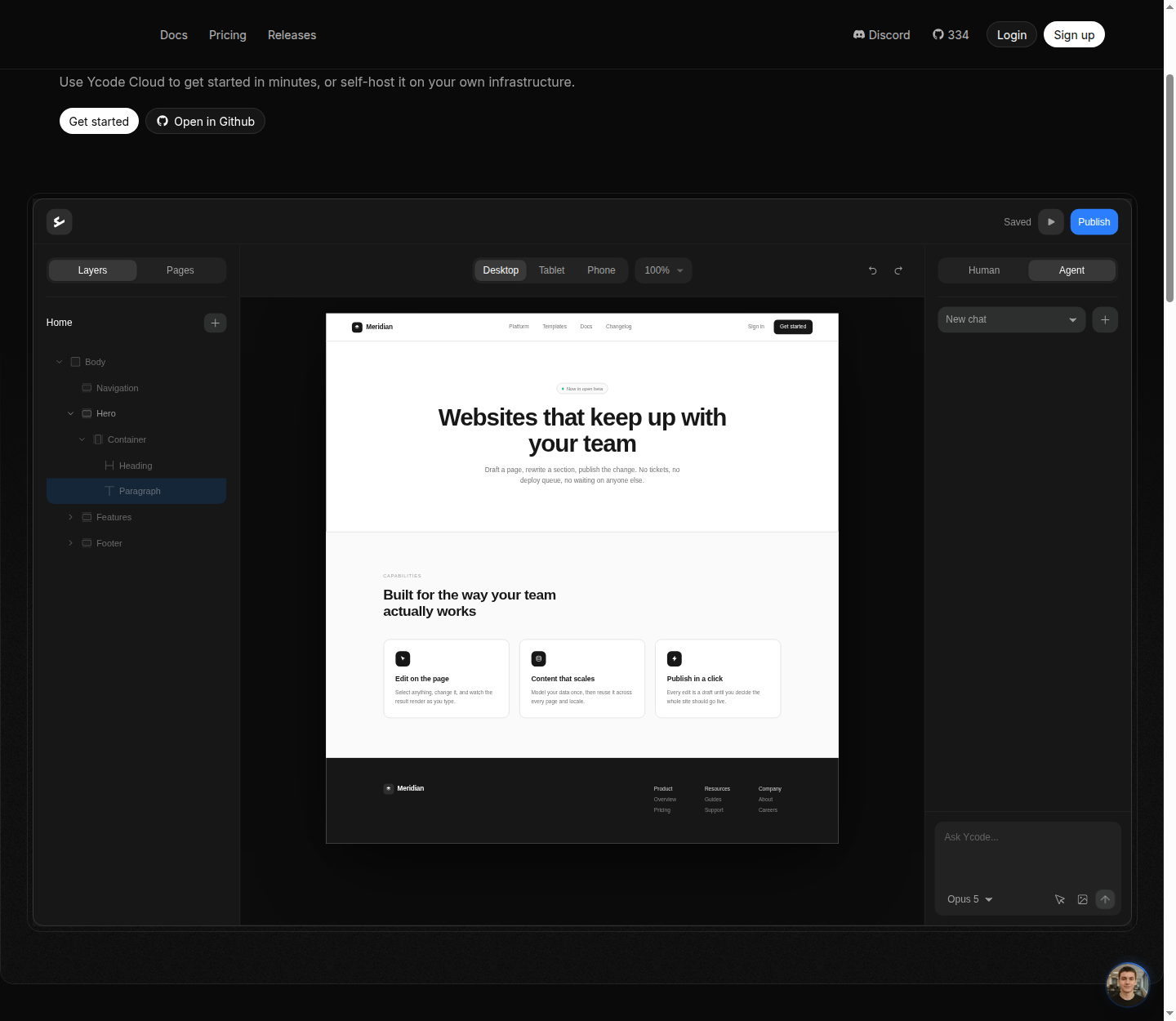
The Agent tab in the builder takes prompts and writes the result to the canvas as editable layers. A model picker offers Auto, Fast and Best, and every reply shows roughly what it cost in credits. On Ycode Cloud the agent uses included AI credits with no API key; you can also connect your own Anthropic, OpenAI, Google Gemini or xAI key and use no Ycode credits.
To self-host, you fork the GitHub repository, deploy it to Vercel and connect Supabase. Every Ycode project also exposes a Model Context Protocol server, so Claude, Cursor, ChatGPT, VS Code and other MCP clients can read and edit pages, collections, assets and settings.
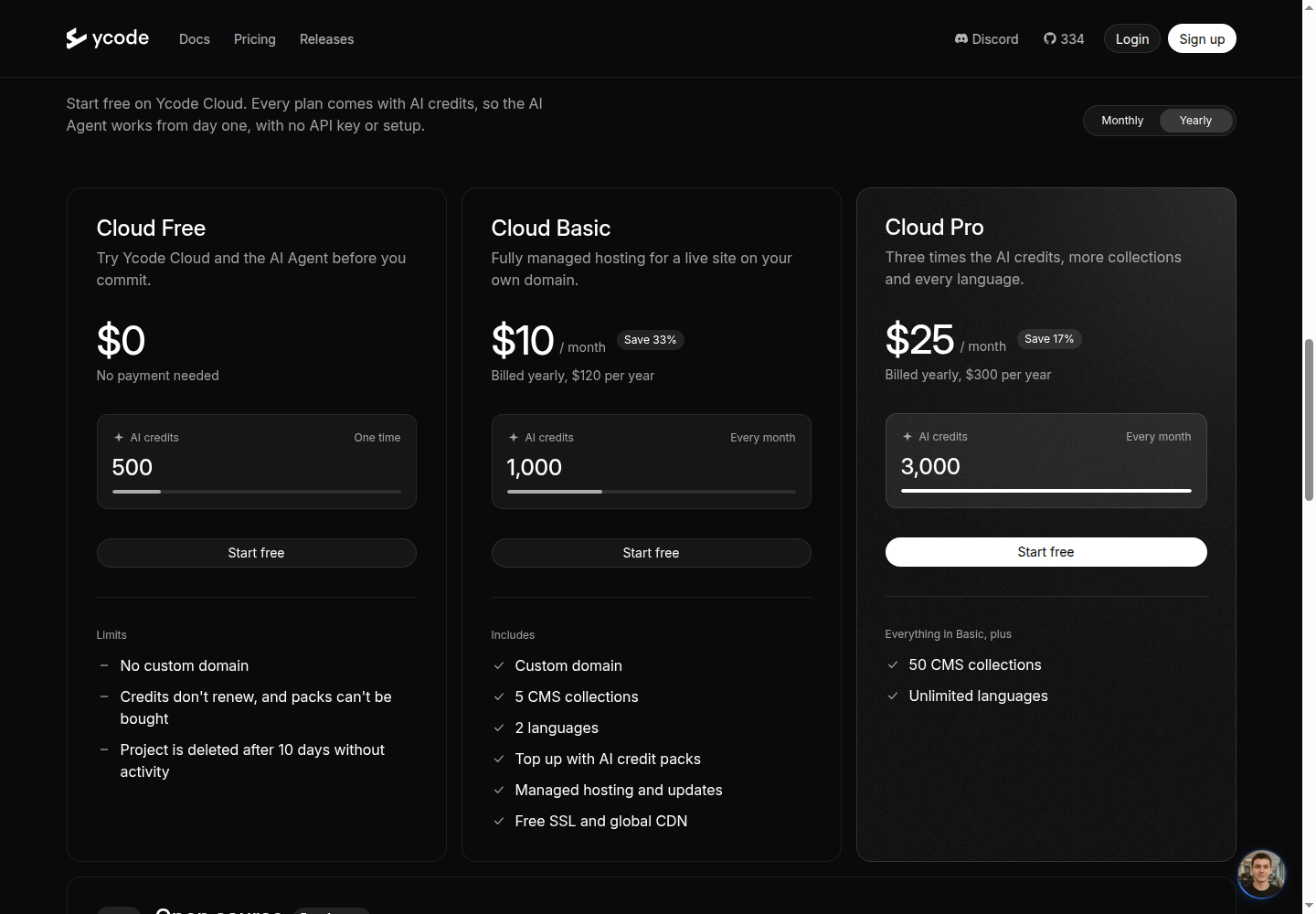
Ycode has a free Cloud trial, two paid Cloud plans priced per project, and a free open source edition you host yourself. Yearly billing saves 33% on Basic and 17% on Pro, and paid plans include monthly AI credits. Prices checked 3 Nov 2026.
| Plan | Price (USD) | AI credits | Key limits |
|---|---|---|---|
| Cloud Free | $0, no payment needed | 500 one time, no top-ups | No custom domain; project deleted after 10 days without activity |
| Cloud Basic | $15 a month, or $10 a month billed yearly ($120 a year) | 1,000 a month | Custom domain, 5 CMS collections, 2 languages, managed hosting, free SSL and global CDN, credit packs available |
| Cloud Pro | $30 a month, or $25 a month billed yearly ($300 a year) | 3,000 a month | Everything in Basic plus 50 CMS collections, unlimited languages and priority support |
| Open source (self-host) | Free forever | None; the agent runs on your own API key | Unlimited users, pages, CMS collections, languages and form entries, custom domains, community support |
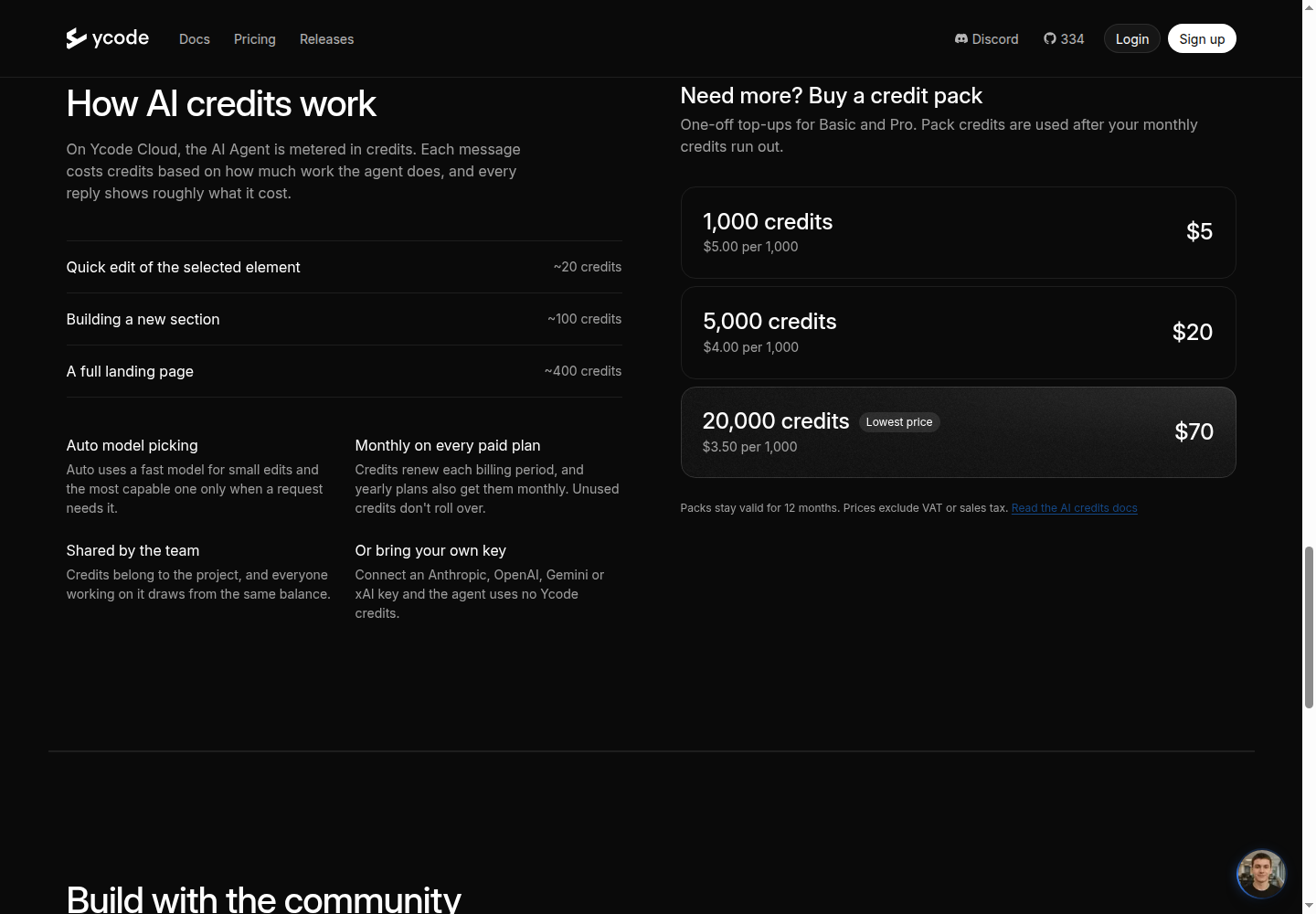
One-off AI credit packs for Basic and Pro cost $5 for 1,000 credits, $20 for 5,000 and $70 for 20,000, are used after monthly credits run out, and stay valid for 12 months. Monthly credits do not roll over. Prices exclude VAT or sales tax. Self-hosting is free from Ycode, but Vercel and Supabase may charge once your site outgrows their free tiers.
Ycode's own estimates put a quick element edit at about 20 credits, a new section at about 100 and a full landing page at about 400. So Cloud Basic's 1,000 monthly credits cover roughly two full AI-built landing pages or ten new sections a month, and Pro's 3,000 cover about seven pages.
For an agency running five client sites on Cloud Basic with yearly billing, hosting costs $600 a year in total, since pricing is per project. Web searches by the agent add about 5 credits each.
Ycode holds a 4.4 rating from 9 reviews on Product Hunt, where it has 1.2K followers and five launches. Most are positive reviews: users praise the CMS, Airtable integration, pre-designed layouts, SEO settings per page and a smoother learning curve than Webflow, and one says it was easy to start using with a series of video tutorials.
The most detailed negative review, posted about three years ago, describes a Pro site that crashed repeatedly and a refund that was first refused and later granted; a Ycode team member replied with an apology. Product Hunt's summary also notes some bugs and a steeper path to advanced features. The testimonials on Ycode's own site come from designers and agency founders who switched from Webflow.
Ycode Inc. publishes these facts on its site, docs and GitHub:
Ycode releases on GitHub every few days, and the latest version is 1.38.2, released on 2 Nov 2026. It keeps long URLs intact in agent chat and translates custom attributes such as aria-label and title.
Version 1.38.0 on 29 Oct 2026 added binding CMS fields to grid column and row spans plus resizable sidebars, and 1.38.1 the same day fixed a builder crash when linking to a CMS item. The bigger shift is commercial: Cloud plans now include metered AI credits and a free Cloud trial, and monthly billing is $15 for Basic and $30 for Pro.
Ycode's main trade-off is maturity: the open source edition is young, so templates, integrations and tutorials are fewer than on established builders. Other limits to weigh:
The closest alternatives are other visual website builders with a CMS, and the key difference is ownership versus ecosystem size:
Ycode is one of the few visual website builders you can self-host and own outright, and its AI Agent writes editable layers rather than locked code. Cloud pricing of $10 or $25 a month per project on yearly billing is fair for agencies. I would start on the free Cloud plan, then decide whether self-hosting is worth the setup; for ecommerce or plugin-heavy sites, WordPress or Webflow remain safer today.
Yes, in two ways. The open source edition is free to self-host with no limits on pages or collections, and Cloud Free gives 500 one-time AI credits without a custom domain. Paid Cloud plans start at $10 a month per project billed yearly.
Cloud Basic is $15 a month or $10 a month billed yearly, and Cloud Pro is $30 a month or $25 a month billed yearly, both per project. AI credit packs cost $5 to $70. Prices checked 3 Nov 2026.
Fork the Ycode repository on GitHub, deploy it to Vercel and connect a Supabase project. The AI Agent then runs on your own Anthropic, OpenAI, Gemini or xAI key.
Webflow is a closed, fully hosted platform with a bigger ecosystem. Ycode is open source, so you can take the code and run it yourself, at the cost of fewer templates and integrations.
Each AI Agent message costs credits based on the work done, from about 20 for a quick edit to about 400 for a full landing page. Credits renew monthly on paid plans, do not roll over, and are shared by everyone on the project.
We may earn a commission when you buy through links on SaaSPic. It never changes our verdicts or the price you pay. Affiliate disclosure
Add this badge to your website so your visitors can read this independent review in one click.
 7.0/10
AI and drag-and-drop website builder for small businesses, with a free plan, online store, email and multilingual sites.
 7.0/10
AI website builder that creates editable sites from a prompt, image or URL, with hosting, a built-in backend, forms, SEO and code export.
 6.7/10
AI website builder that generates editable sites from a prompt, with hosting, WordPress publishing and HTML or React export.
 7.2/10
AI website, landing page and funnel builder from Onepage, with a visual editor, CRM, EU hosting and a separate forms and funnels add-on.
| Tool | Score | From | Free plan | Best for |
|---|---|---|---|---|
| Ycode | 7.0/10 | $10/mo | Yes | Agencies and designers who want to own their site code |
| Webnode | 7.0/10 | £3.90/mo | Yes | Small businesses wanting a simple, multilingual website |
| Readdy | 7.0/10 | $25/mo | Yes | Small businesses and agencies who want an AI-built site live fast |
| CodeDesign AI | 6.7/10 | $15/mo | Yes | Small businesses wanting an AI built site without lock-in |
| Onepage AI | 7.2/10 | $19.90/mo | Yes | Agencies and small businesses building lead-generation sites in Europe |
 7.8/10
Drag-and-drop WordPress website builder with a free plugin, Editor Pro plans, the Elementor One bundle and managed hosting.
 7.7/10
Membership platform that adds logins, Stripe payments, gated content and member data to Webflow, WordPress and custom sites.
 7.3/10
Free, open-source Hugo kit for building academic, portfolio, blog and docs sites from Markdown blocks, with optional AI help.