 7.8/10
Drag-and-drop WordPress website builder with a free plugin, Editor Pro plans, the Elementor One bundle and managed hosting.


WordPress plugin and desktop app that lets Claude, Codex or Cursor build pages in your site over MCP, with feedback.
We may earn a commission when you buy through our links. How this works
BuildPress suits WordPress freelancers and agencies who already pay for Claude, Codex or Cursor and want AI page building with guardrails and a client feedback loop. Skip it if you want the AI included, or need a mature, out-of-beta tool for critical live sites.
Best for: WordPress freelancers building with their own AI

6.6/10 Good, with trade-offs. The overall score is our judgment against the questions we ask of every tool, not an average. How we score
| Question | Score | Why |
|---|---|---|
| Does the jobWhat it actually does for the task it is sold for, and where it falls short. | 7.2 | It gives MCP clients tools to build pages, design systems and content models in WordPress, verifies each render and handles pinned client feedback. |
| Ease of useSetup needed and how quickly you get something useful done. | 6.4 | Setup needs an App Password and an MCP client config, and the docs require WordPress 6.5, PHP 8.1 and HTTPS. |
| Pricing and limitsWhat you pay at a realistic size, including caps, add-ons and deal limits. | 7.4 | Plans run $49 to $199 a year or $79 to $299 lifetime with every feature, but an AI subscription is extra. |
| Reliability and supportUpdate pace, known problems and how support responds. | 5.6 | Priority email support on every plan, but the product is pre-1.0 beta with no public reviews or named company. |
| Fit against alternativesHow it compares with the alternatives for the people it is aimed at. | 6.6 | Against Novamira it adds guardrails, render checks and a feedback loop, while Novamira offers a free open-source core. |
BuildPress is a WordPress plugin that turns your site into an MCP server, so an AI client you already pay for, such as Claude, Codex or Cursor, can build real pages, design systems and content types inside WordPress. It suits WordPress freelancers and agencies who already use an AI coding assistant, and it is not for anyone who wants a hosted AI site builder with the AI included.
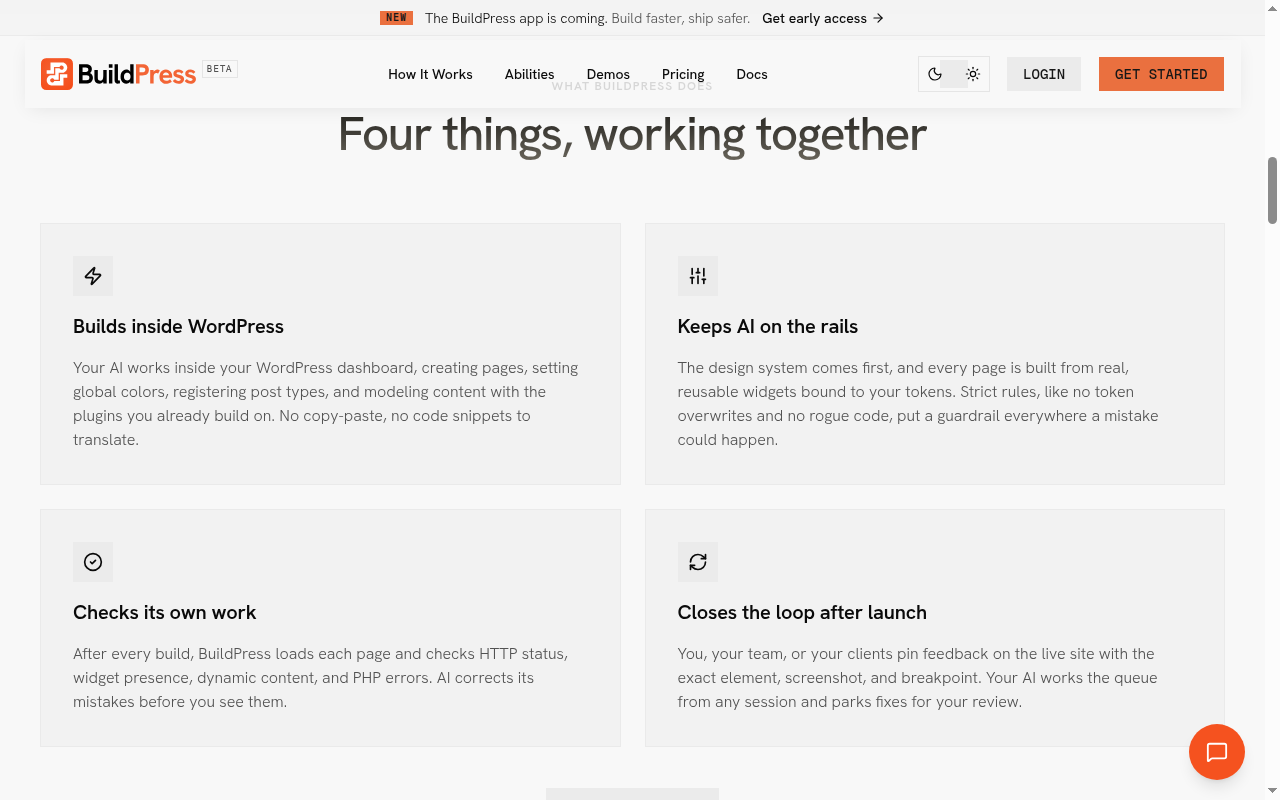
BuildPress is a paid WordPress plugin, plus a new desktop app, that lets your own AI assistant work directly in your WordPress dashboard through the Model Context Protocol (MCP). You describe what you want in conversation, and the AI creates pages, sets global colors, registers post types and models content using the plugins you already run.
BuildPress does no AI processing itself. Its terms say it is not in the data path for AI requests and runs no AI cloud or proxy, so you need your own subscription to an MCP-compatible client.
BuildPress is for people who build WordPress sites for a living and want an AI agent to do the page work under rules, with a client feedback loop after launch.
BuildPress follows a three-phase workflow of setup, design and build, then keeps going after launch through a feedback queue.
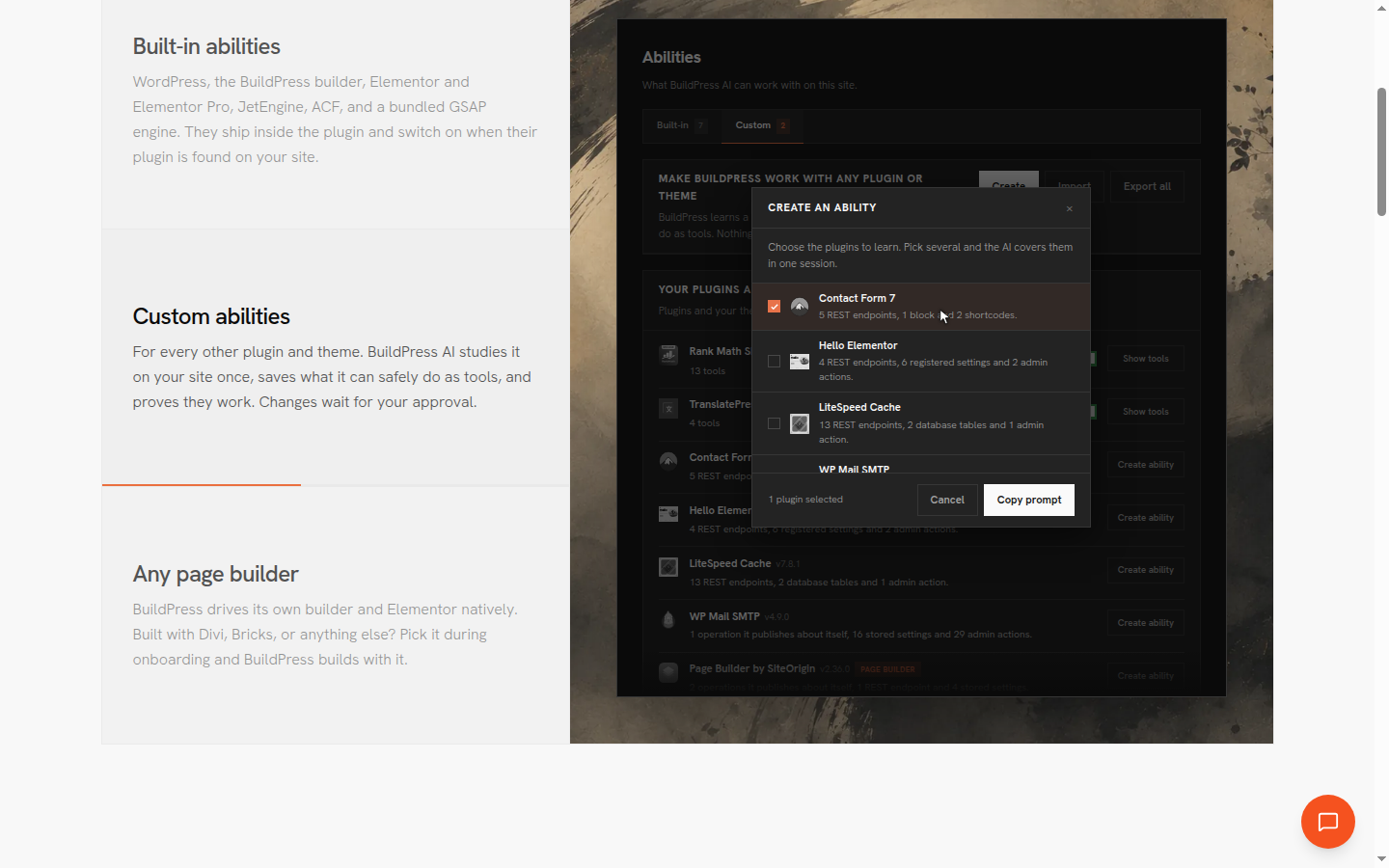
Abilities are BuildPress's name for the MCP tools the AI uses to drive a plugin. Built-in abilities cover WordPress, Elementor, Elementor Pro, JetEngine, ACF and the GSAP animation library. For any other plugin or theme, it can save a custom ability, read-only until you switch changes on, and export it to other sites. Its own BuildPress Builder is the default, Elementor is optional, and Divi or Bricks can be a build target.
The desktop app, in early access since October 25, 2026, runs WordPress sites locally and puts Claude Code or Codex beside a live preview. You pull a site from Cloudways, Hostinger, InstaWP or any SSH server, let the AI work on the copy, review the changes and push, with a backup before each pull and one-click undo.
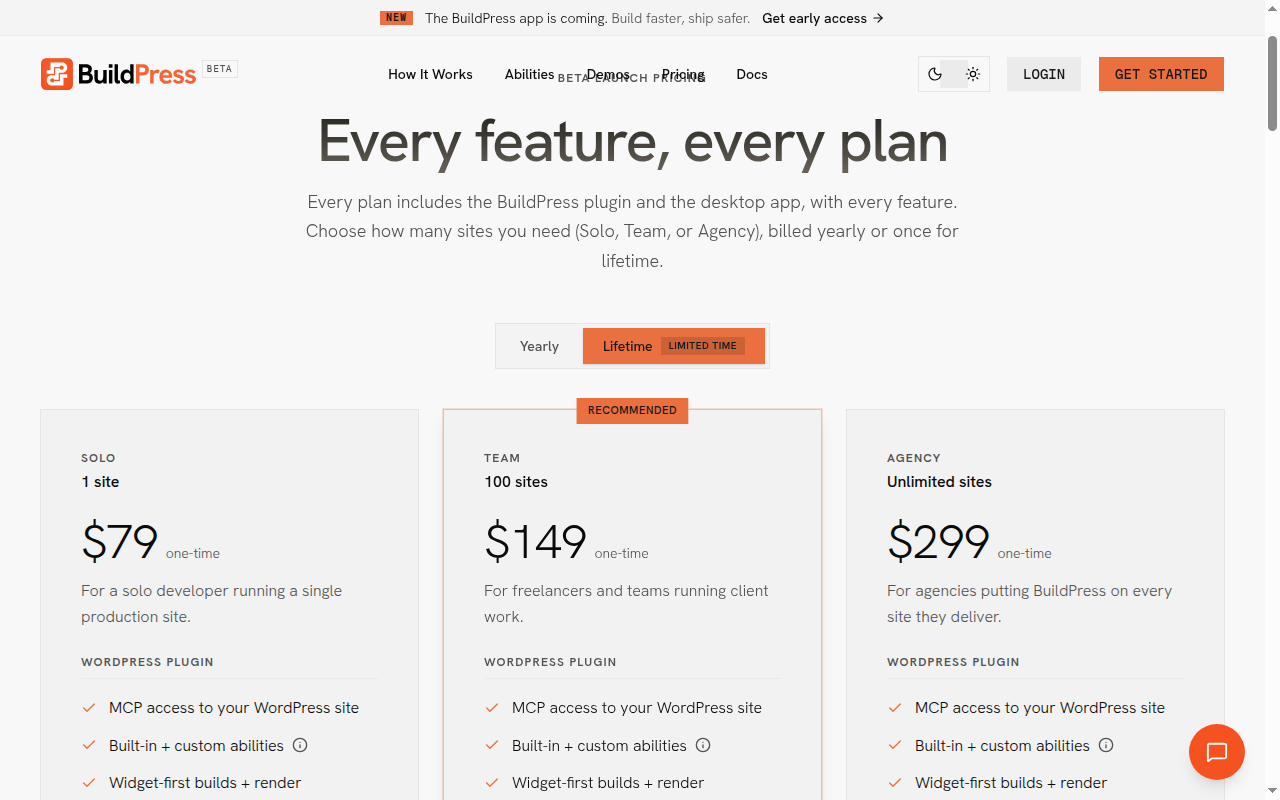
BuildPress is one paid product with every feature on every plan, and the plans differ only in how many sites and computers they cover. You pay yearly or once for a lifetime license, which BuildPress sells directly on its own site as a limited-time beta offer. There is no free plan. Prices checked 10 Nov 2026.
| Plan | Price (USD) | What it covers |
|---|---|---|
| Solo, yearly | $49 a year | 1 live site, desktop app with 3 local sites on 1 computer, every feature, priority email support |
| Team, yearly | $129 a year | 100 live sites, unlimited local sites on 10 computers, every feature |
| Agency, yearly | $199 a year | Unlimited live sites, unlimited local sites and computers, every feature |
| Solo, lifetime | $79 one time | Same as Solo, never expires |
| Team, lifetime | $149 one time | Same as Team, never expires |
| Agency, lifetime | $299 one time | Same as Agency, never expires |
BuildPress says beta prices will change soon. Local development sites on .local, .test, localhost or a private IP do not use one of your license's sites. If a yearly license lapses, AI build commands are rejected until you renew, but your widgets, memory, history and audit log stay in your WordPress database. Refunds can be requested within 14 days of purchase where there is a valid reason, such as the plugin not working as described, and are processed by Lemon Squeezy.
Remember to add your AI subscription to the BuildPress price. A freelancer on Team pays $129 a year for up to 100 client sites, which is about $1.29 per site per year, plus whatever their Claude, Codex or Cursor plan costs.
BuildPress has no public ratings yet, and there is no Trustpilot profile for its domain. The evidence on offer is the vendor's own. Its demo sites, such as Elise Archives, are labeled as built through BuildPress MCP with Claude Opus 4.8, and a comparison page runs one site brief through BuildPress and Novamira. Neither is an independent review.
BuildPress needs a fairly modern WordPress setup and your own AI client.
BuildPress has moved fast through 2026. Version 0.3.0-beta on September 13 added custom abilities, any page builder and guest feedback without a WordPress account. Version 0.4.0-beta on October 14 added a visual editor and account-based activation. The desktop app followed on October 25, and the changelog says the app opens to everyone and BuildPress leaves beta in early November. A WooCommerce ability, built-in SEO abilities and a cloud feedback agent are on the roadmap.
The main drawback is maturity, because BuildPress is still a beta product that changes monthly.
The closest alternatives are other ways to connect an AI agent to WordPress, plus one hosted AI builder for people who do not want to bring their own AI.
BuildPress is a thoughtful way to let Claude, Codex or Cursor build in WordPress, with design tokens, render checks and a client feedback queue that most MCP plugins lack, at a low price for many sites. I would try it on a staging or local site if you build WordPress sites for clients and already pay for an AI assistant. I would wait for the out-of-beta release and some independent reviews before letting it loose on important live sites.
BuildPress costs $49 a year for 1 site, $129 a year for 100 sites or $199 a year for unlimited sites. Lifetime licenses are $79, $149 and $299 as a limited-time beta offer, and every plan includes every feature.
Yes. BuildPress provides the tools and runs no AI of its own, so you need an active subscription to an MCP-compatible client such as Claude, Codex, Cursor or Windsurf.
Yes. BuildPress has built-in abilities for Elementor and Elementor Pro, and Elementor is an optional base builder. Its own BuildPress Builder is the default, and Divi, Bricks or another builder can also be a build target.
AI build commands are rejected until you renew, even if the plugin stays installed. Your widgets, memory entries, project history and audit log stay in your WordPress database, and a lifetime license never expires.
BuildPress needs WordPress 6.5 or newer, PHP 8.1 or newer, HTTPS on production sites, a BuildPress license and an MCP-compatible AI client. It works on any host.
BuildPress runs on your own server with WordPress Application Passwords, an audit log, domain lock and three kill switches, and it says it is built for live sites. It is still beta software, so the desktop app's local copy with review before push is the more cautious route.
We may earn a commission when you buy through links on SaaSPic. It never changes our verdicts or the price you pay. Affiliate disclosure
Add this badge to your website so your visitors can read this independent review in one click.
 7.8/10
Drag-and-drop WordPress website builder with a free plugin, Editor Pro plans, the Elementor One bundle and managed hosting.
 7.7/10
Membership platform that adds logins, Stripe payments, gated content and member data to Webflow, WordPress and custom sites.
 7.3/10
Free, open-source Hugo kit for building academic, portfolio, blog and docs sites from Markdown blocks, with optional AI help.
 7.2/10
AI website, landing page and funnel builder from Onepage, with a visual editor, CRM, EU hosting and a separate forms and funnels add-on.