 7.3/10
Native Swift email app for Mac with a unified inbox, tracker blocking, on-device AI and a built-in MCP server.


AI email filter that works with any email client, moving unimportant mail out of your inbox and adding reminders, digests and blocking.
We may earn a commission when you buy through our links. How this works
SaneBox suits busy professionals with overflowing inboxes who want automatic filtering, sender blocking and reminders without changing email client. Light email users can rely on Gmail or Outlook's built-in sorting instead.
Best for: Busy professionals with overflowing inboxes
7.6/10 Good, with trade-offs. The overall score is our judgment against the questions we ask of every tool, not an average. How we score
| Question | Score | Why |
|---|---|---|
| Does the jobWhat it actually does for the task it is sold for, and where it falls short. | 8.0 | Files unimportant mail into folders such as SaneLater, blocks senders with SaneBlackHole and tracks unanswered emails, working behind any email client. |
| Ease of useSetup needed and how quickly you get something useful done. | 7.5 | Nothing to install, but expect to move messages between folders for the first weeks before filing matches how you work. |
| Pricing and limitsWhat you pay at a realistic size, including caps, add-ons and deal limits. | 6.5 | Snack is $9.49 a month billed monthly but $4.54 on the 2-year plan, and it only includes 2 features on 1 account. |
| Fit against alternativesHow it compares with the alternatives for the people it is aimed at. | 7.5 | Works the same across every client and account, which built-in Gmail and Outlook sorting does not, though light email users can skip it. |
SaneBox is an AI email organizer that works behind the email account you already use: it decides which messages matter, keeps those in your inbox and files the rest into folders such as SaneLater and SaneNews. It suits busy professionals with overflowing inboxes who want less clutter without switching email client.
SaneBox is for people who get a lot of email and lose important messages under newsletters, notifications and cold pitches: founders, managers, freelancers, sales staff and anyone with several busy accounts. Because it works at the mailbox level, it suits people who read mail in more than one app or device.
Skip it if you get a handful of emails a day, since Gmail's tabs and Outlook's Focused Inbox may be enough. Skip it too if your company does not allow third-party services to connect to work mailboxes, because SaneBox needs access to your account to work.
SaneBox works by watching how you treat email, not by reading it. SaneBox says it looks at the basics like sender, subject line and date, plus which emails you open and reply to and how quickly, then decides importance and moves less important mail out of the inbox.
SaneBox connects to your account, learns from your history and starts filing new mail. Important mail stays in the inbox, and the rest goes to SaneLater, newsletters to SaneNews and so on. You train it by moving a message from one folder to another, and it files that sender's future mail the same way. The Daily Digest summarizes unread, less important mail with bulk actions, which is also a quick way to correct the filtering. Since the folders are ordinary email folders, it works in Gmail, Outlook, Apple Mail and any phone app, with nothing to install.
SaneBox features split into a core set on every plan and power tools you pick per account. The core set is Email Deep Clean, email organizing, the Daily Digest and iOS and Android apps, plus subject, domain and advanced filters.
Each power feature is a folder or rule you switch on per account.
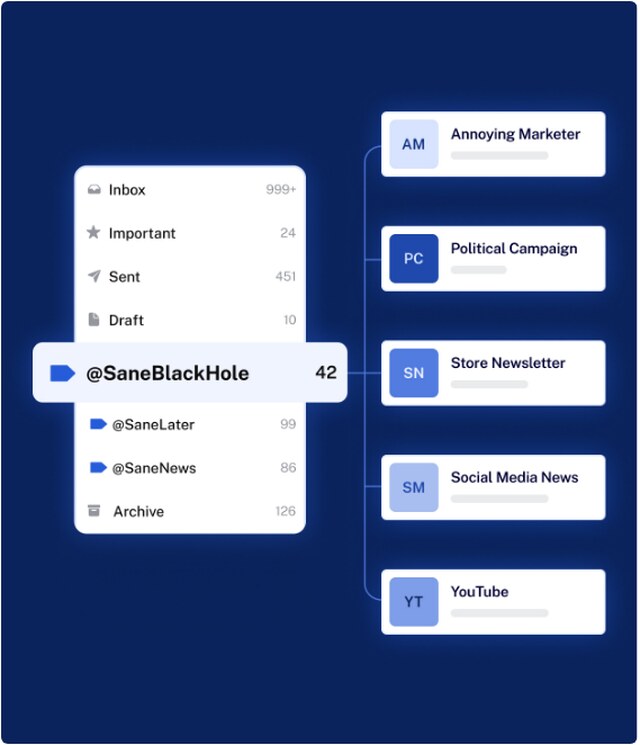
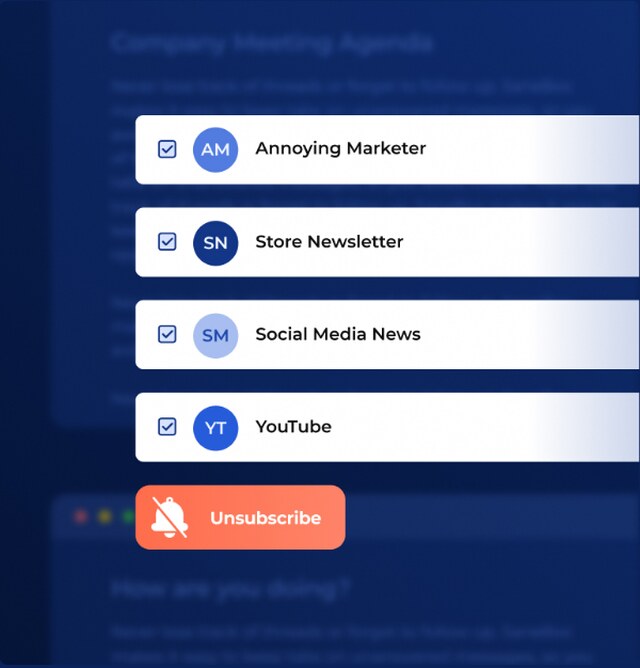
Drag an email into the SaneBlackHole folder and you will not see messages from that sender again. It is SaneBox's answer to unsubscribe links that do not work.
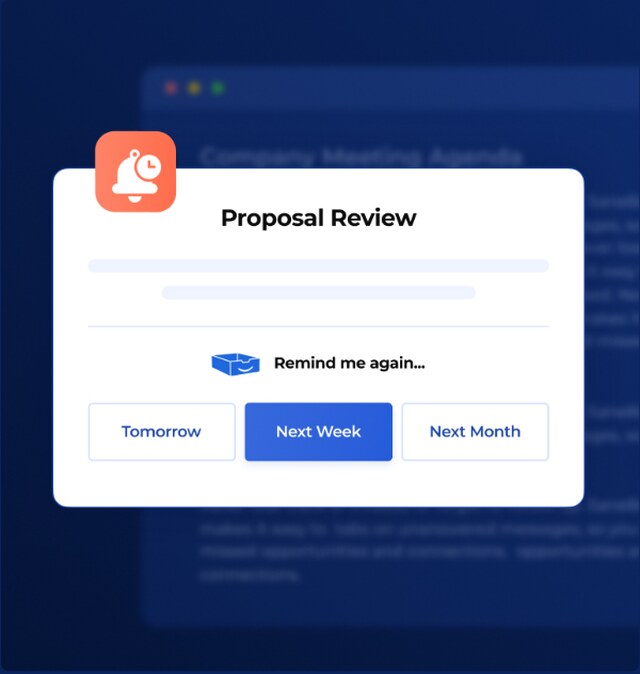
Reminders tell you to follow up if someone has not replied by a set time, and SaneNoReplies tracks sent emails still waiting for an answer. Custom Snooze sends an email away until a time you choose, using folders such as @SaneTomorrow, and SaneDoNotDisturb holds new mail so you can focus. Attachments can be moved to Dropbox or Box.
Deep Clean clears thousands of old, unneeded emails in bulk, grouped by sender.
SaneBox's newest features are AI ones. SaneDrafts writes replies in your voice for you to review and send, SaneSummary summarizes a custom folder, SaneNoReplies Plus shows only the emails that need a reply with thread summaries, and Digest Plus adds a one-line summary of each email in your digest.
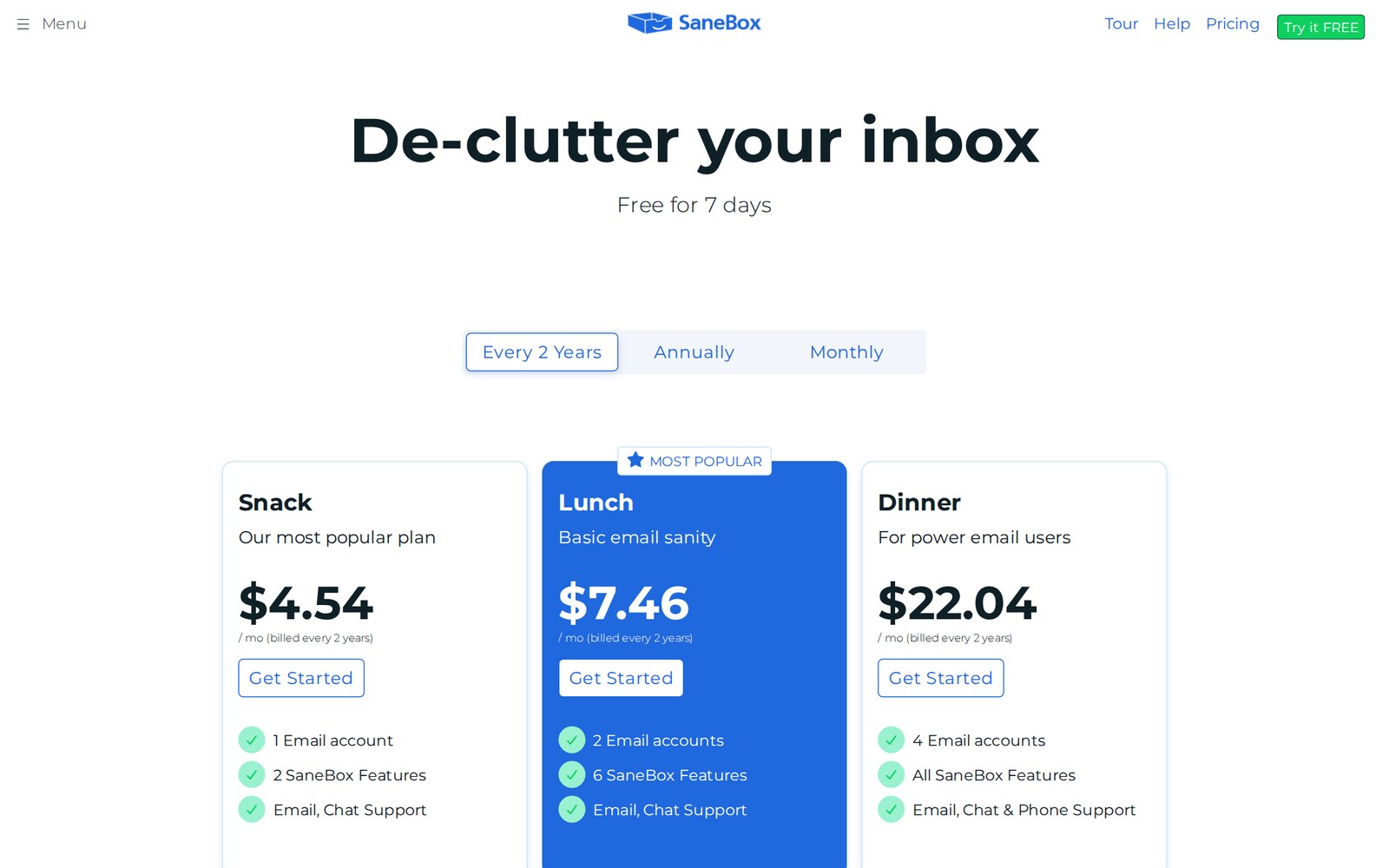
SaneBox pricing has three plans in US dollars, set by the number of email accounts and how many power features you can switch on, with lower monthly rates on annual or 2-year billing. Prices checked 6 Nov 2026 on the SaneBox pricing page.
| Plan | Monthly billing | Annual billing | Billed every 2 years | Accounts and features |
|---|---|---|---|---|
| Snack | $9.49 a month | $5.42 a month | $4.54 a month | 1 email account, pick 2 power features, email and chat support |
| Lunch | $15.99 a month | $9.08 a month | $7.46 a month | 2 email accounts, pick 6 power features per account, email and chat support |
| Dinner | $42.99 a month | $26.58 a month | $22.04 a month | 4 email accounts, all features including the AI Bundle, email, chat and phone support |
The 7-day free trial includes every feature for up to 4 accounts, and the homepage says no credit card is needed. Educational, nonprofit and government organizations get an extra 25% off. More than 4 accounts, and team plans through SaneBox for Business, are by request. The site explains how to cancel, including whether to keep or remove your Sane folders, but does not publish a refund policy on the pricing page. There is no lifetime deal on the SaneBox site.
A freelancer with one work account who mainly wants SaneLater and SaneBlackHole fits Snack, at $9.49 a month or $5.42 a month billed annually (about $65 a year). Adding reminders or SaneNews means a third feature, which needs Lunch.
Someone with a work and a personal account who wants SaneLater, SaneNews, SaneBlackHole, Reminders, SaneNoReplies and Snooze needs Lunch, at $9.08 a month billed annually (about $109 a year). The AI Bundle needs Dinner, at $26.58 a month billed annually.
SaneBox has strong ratings on the platforms checked. It holds a 4.8 TrustScore from 761 Trustpilot reviews and a 4.8 out of 5 from 246 G2 reviews (Nov 2026), with 92% of the G2 reviews giving 5 stars.
The vendor also claims more than 100,000 users and a 4.6 iOS App Store rating; those are its own figures.
SaneBox is a web service with iOS and Android apps. It works with Gmail, Microsoft 365, Apple iCloud, Yahoo Mail and Fastmail, and with any IMAP, Microsoft Exchange or ActiveSync server. SaneBox, Inc. was started in 2010 and lists a mailing address at 6 Liberty Square, Boston, MA.
On security, the vendor says your emails stay on your mail server, it analyzes headers and never stores full emails or attachments, and credentials are encrypted with keys held in hardware security modules. It has passed Google's annual Cloud Application Security Assessment and external audits by Leviathan Security Group, and runs a HackerOne bug bounty. SaneBox for Business adds company-wide rules and Active Directory, Office 365 and Salesforce integrations.
SaneBox launched its AI Bundle on October 26, 2026, its biggest change in a while. The bundle adds SaneDrafts and SaneSummary, plus AI versions of SaneNoReplies and the Digest.
The AI Bundle is included on the Dinner plan, and other members can try the new features on a 14-day trial. The vendor says it never uses your email content to train AI, does not store full message bodies, and lets you switch off any AI feature with one click.
The main limit of SaneBox is how much the cheaper plans hold back. Snack is a taster with 2 features on one account, and the AI Bundle needs Dinner.
Few tools do exactly what SaneBox does, so each alternative below covers part of the job.
SaneBox is one of the longest-running email filtering services, and working behind any email client is still its biggest strength, backed by 4.8 ratings on Trustpilot and G2. It suits busy professionals who want important mail at the top and everything else filed, blocked or summarized. I would start on the free trial, then pick Lunch on annual billing for the useful mix of SaneLater, SaneBlackHole, SaneNews and reminders. Light email users can skip it.
SaneBox connects to your email account and studies which emails you open and reply to, then keeps important mail in the inbox and moves the rest to folders such as SaneLater. You train it by moving messages between folders.
Snack is $9.49 a month, Lunch $15.99 and Dinner $42.99 on monthly billing, dropping to $4.54, $7.46 and $22.04 a month billed every 2 years. Every plan has a 7-day free trial.
The vendor says it mainly analyzes headers like sender, subject and date and never stores full emails or attachments. Optional features that read message bodies do not store them, and it does not use email content to train AI.
Yes. It works with Gmail, Microsoft 365, iCloud, Yahoo Mail and Fastmail, plus any IMAP, Exchange or ActiveSync server, in any email app.
A SaneBox folder you drag an email into to stop seeing mail from that sender. Future messages from them skip your inbox, which helps when unsubscribe links do not work.
Yes. SaneBox gives an extra 25% off any plan to educational, nonprofit and government organizations; you claim it by contacting support during the free trial.
We may earn a commission when you buy through links on SaaSPic. It never changes our verdicts or the price you pay. Affiliate disclosure
Add this badge to your website so your visitors can read this independent review in one click.
 7.3/10
Native Swift email app for Mac with a unified inbox, tracker blocking, on-device AI and a built-in MCP server.
 7.3/10
AI assistant for Gmail and Outlook that sorts email, drafts replies in your tone and takes meeting notes.
 8.4/10
Scheduling software that lets people book time with you through a link, with team routing, reminders, payments and AI meeting recaps.
 8.3/10
Web booking page and scheduler that syncs your calendars and lets clients book and pay for sessions, packages and subscriptions.
 8.1/10
Time tracker and timesheet app for teams, with a free plan and per-seat paid tiers for invoicing, approvals and scheduling.