 7.9/10
AI meeting assistant that records, transcribes and summarizes calls on Zoom, Meet and Teams, with search and CRM sync.

AI meeting assistant with two-way noise cancellation, bot-free notes, transcripts, recording and accent conversion.
We may earn a commission when you buy through our links. How this works
Krisp suits people and teams whose calls suffer from background noise and who also want bot-free meeting notes in the same subscription. Skip it if you want a free noise filter or only take the odd call, since there is no free plan after the 7-day trial.
Best for: Remote and sales teams on noisy calls who want bot-free notes
7.6/10 Good, with trade-offs. The overall score is our judgment against the questions we ask of every tool, not an average. How we score
| Question | Score | Why |
|---|---|---|
| Does the jobWhat it actually does for the task it is sold for, and where it falls short. | 8.2 | Unlimited two-way noise cancellation, bot-free notes, transcripts, recording and AI Chat are on every paid plan, per the Krisp pricing page. |
| Ease of useSetup needed and how quickly you get something useful done. | 8.0 | Capterra reviewers rate ease of use 4.7 out of 5 (11 reviews, Nov 2026), and Krisp works inside any meeting app as a virtual microphone. |
| Pricing and limitsWhat you pay at a realistic size, including caps, add-ons and deal limits. | 6.6 | Core is $8 per user a month billed annually, but there is no free plan and Capterra reviewers rate value for money 3.6 out of 5. |
| Reliability and supportUpdate pace, known problems and how support responds. | 7.4 | Krisp ships monthly releases and offers 24/7 support plus a Slack community, while the Android app trails at 3.5 on Google Play. |
| Fit against alternativesHow it compares with the alternatives for the people it is aimed at. | 7.6 | Against Granola, Fireflies.ai, Notta and Circleback it is the only one that also cleans call audio, though some rivals cover more languages. |
Krisp is an AI meeting assistant that removes background noise from calls and takes bot-free notes, transcripts and recordings of your meetings. It suits remote workers, sales teams and support staff who spend their day on Zoom, Google Meet or Teams. Skip it if you only want a free noise filter, because Krisp no longer has a free plan.
Krisp is a voice AI app from Krisp Technologies Inc. that sits between your microphone, your speakers and your meeting apps, so it works with any conferencing tool. The company sells three separate products built on the same voice engine: the AI Meeting Assistant, Call Center AI for contact centers, and an AI Voice SDK for developers.
This Krisp review covers the AI Meeting Assistant, which most small businesses would buy. It bundles Krisp's noise cancellation with an AI note taker, recording, AI chat and accent conversion.
Krisp fits people who take a lot of calls from noisy places and want notes without a bot joining the meeting. Good fits include remote teams in shared homes or co-working spaces, sales reps who want notes pushed into HubSpot or Salesforce, and agents who want their accent softened in real time.
Krisp works at the audio level, so you pick it as your microphone and speaker inside Zoom, Google Meet, Teams, Slack Huddles or any other app. It cleans audio both ways and captures the conversation without adding a bot to the attendee list.
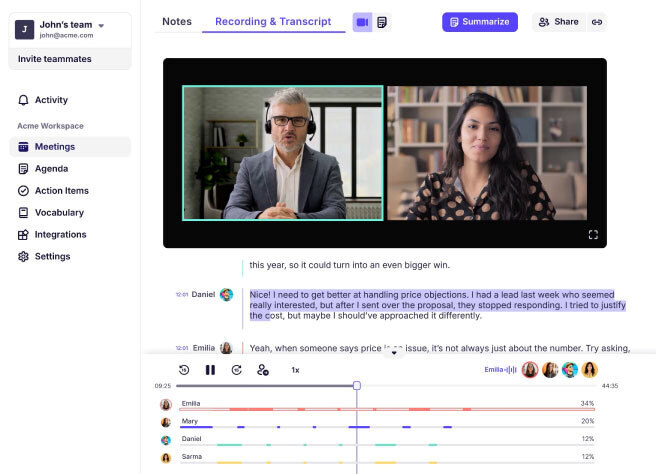
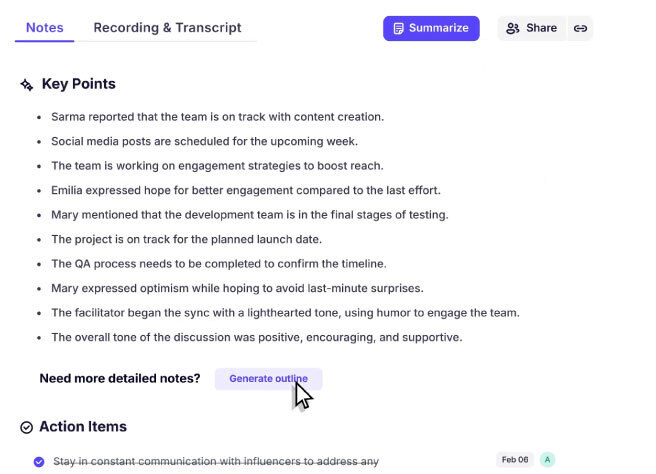
In practice you join a call as usual, Krisp filters the noise, and the notes, action items and recording land in your Krisp workspace afterwards, ready to push to Slack, Notion, HubSpot or Zapier.
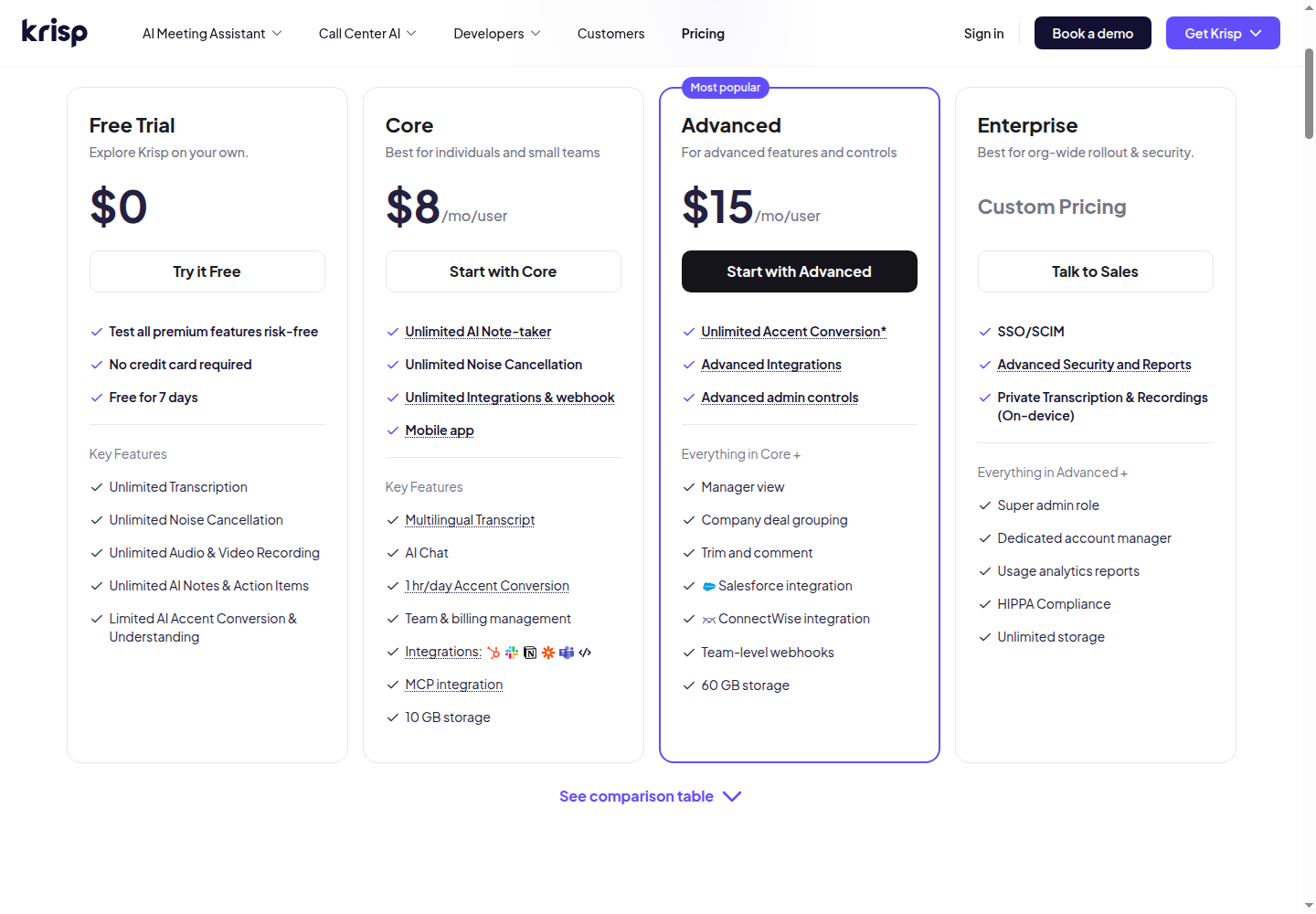
Krisp pricing starts at $8 per user a month on annual billing for Core, or $16 billed monthly, and annual billing saves 50%. There is a 7-day free trial with no credit card, but no free plan after it. Prices checked 8 Nov 2026 on krisp.ai, in US dollars.
| Plan | Price per user | Key limits and what it adds |
|---|---|---|
| Free Trial | $0 for 7 days, no card | Unlimited transcription, noise cancellation, recording and AI notes; limited accent conversion |
| Core | $8 a month billed annually, or $16 billed monthly | Bot-free note taker, mobile app, multilingual transcripts, AI Chat, 1 hour a day of accent conversion, HubSpot, Slack, Notion and Zapier, MCP, 10 GB storage |
| Advanced | $15 a month billed annually, or $30 billed monthly | 4 hours a day speaker-side accent conversion, unlimited listener side, Salesforce and ConnectWise, admin controls, manager view, 60 GB storage |
| Enterprise | Custom quote | SSO and SCIM, SOC 2 report access, BAA for 100+ seats, data center choice, on-device transcription, unlimited storage |
Every teammate in a Krisp team counts as a paid seat. Subscriptions renew automatically, and if you cancel you keep the plan until the end of the paid cycle. Volume discounts start above 50 members, and Call Center AI is priced separately, from $15 per agent a month billed annually.
A five-person team on Core pays $40 a month on annual billing ($480 a year), or $80 a month on monthly billing. Moving the same five people to Advanced costs $75 a month billed annually, which mainly buys Salesforce, admin controls and more accent conversion time. Transcription and noise cancellation are unlimited on every paid plan, so the seat count is the only real variable.
Public ratings for Krisp are mostly positive, with the mobile app as the weak spot. These are the figures on the review pages as of November 2026:
Krisp's own site claims a 4.7 rating on G2. The low value-for-money score on Capterra fits the loss of a free tier.
Krisp runs as a desktop app for Windows and Mac, a Chrome extension for Google Meet, and mobile apps for iPhone and Android. It works with any conferencing app because it acts as a virtual microphone and speaker.
Krisp ships monthly releases, and the recent ones focus on navigation and audio settings. The Meeting Assistant 3.18.3 release (16 Oct 2026) made it easier to organize meetings and keep audio settings on track. Version 3.17.4 (28 Sep 2026) added call duration tracking, timelier notes notifications and in-app accent conversion options.
On the contact center side, Krisp added Fraud Detection in beta (12 Oct 2026) and a Conference mode for voice translation in beta (26 Oct 2026). Meeting AI now has only a 7-day trial, so anyone who remembers a free plan should expect to pay.
The main drawback is cost for light users: there is no free plan, and a single user pays $96 a year on Core. Other limits are worth knowing before you buy:
The best Krisp alternatives depend on whether you care more about notes or about clean audio. These tools do the same meeting-notes job:
None of these four filters background noise, so I would only switch if noise is not a problem on your calls.
Krisp is a strong pick for anyone whose calls suffer from background noise and who also wants bot-free notes, since one subscription covers both. At $8 per user a month on annual billing it is fairly priced for teams, but light users and anyone after a free noise filter should look elsewhere.
No. Krisp offers a 7-day free trial with no credit card, then paid plans start at $8 per user a month billed annually (Core) or $16 billed monthly. Noise cancellation is included in every paid plan rather than sold on its own.
Core costs $8 per user a month billed annually or $16 monthly, Advanced costs $15 annually or $30 monthly, and Enterprise is quoted. Prices checked 8 Nov 2026.
Krisp says it holds SOC 2 Type II, GDPR and HIPAA compliance, encrypts data with AES-256 at rest and TLS 1.3 in transit, and never uses meeting data to train its AI models. Enterprise customers can get the SOC 2 report and a BAA for 100 or more seats.
Yes. Krisp works at the audio level as a virtual microphone and speaker, so it works with Zoom, Google Meet, Microsoft Teams, Slack Huddles and other conferencing apps. A Chrome extension also captures Google Meet calls.
Krisp is worth it if background noise is a regular problem on your calls and you also want bot-free notes and transcripts, since one plan covers both. If you only need meeting notes in a quiet room, a dedicated note taker may be better value.
Krisp transcribes English on the device and 15 more languages on its servers, including Spanish, French, German, Italian, Dutch, Polish, Portuguese, Hindi, Danish, Swedish, Norwegian, Czech, Ukrainian, Russian and Korean.
We may earn a commission when you buy through links on SaaSPic. It never changes our verdicts or the price you pay. Affiliate disclosure
Add this badge to your website so your visitors can read this independent review in one click.
 7.9/10
AI meeting assistant that records, transcribes and summarizes calls on Zoom, Meet and Teams, with search and CRM sync.
 7.2/10
AI meeting notetaker and transcription tool with 58 languages, bilingual transcription, AI summaries and a bot-free recorder.
 7.9/10
AI meeting notes app that records online and in-person meetings, writes notes and action items, and pushes them to your other tools.
 7.8/10
AI notepad that transcribes meetings from your device audio, with no bot joining the call, and turns your notes into summaries.
| Tool | Score | From | Free plan | Best for |
|---|---|---|---|---|
| Krisp | 7.6/10 | $8/mo | Yes | Remote and sales teams on noisy calls who want bot-free notes |
| Fireflies.ai | 7.9/10 | $10/mo | Yes | Sales and recruiting teams capturing every call |
| Notta | 7.2/10 | $97.99/yr | Yes | Multilingual teams transcribing meetings |
| Circleback | 7.9/10 | $18/mo | Yes | Sales and customer teams whose meetings feed a CRM |
| Granola | 7.8/10 | $14/mo | Yes | Founders, sales and product people in back-to-back meetings |
 8.4/10
Scheduling software that lets people book time with you through a link, with team routing, reminders, payments and AI meeting recaps.
 8.3/10
Web booking page and scheduler that syncs your calendars and lets clients book and pay for sessions, packages and subscriptions.
 8.1/10
Keyboard launcher for Mac and Windows with clipboard history, snippets, window management, thousands of extensions and built-in AI.