 6.4/10
Employee monitoring and time tracking with screenshots, app and website usage, attendance and live view on one cheap plan.

Time tracker and timesheet app for teams, with a free plan and per-seat paid tiers for invoicing, approvals and scheduling.
We may earn a commission when you buy through our links. How this works
Clockify is strong value for service businesses that bill hours: the free plan is usable and Standard covers invoicing, approvals and time off cheaply. Skip it if you need project management in the same tool or want a refundable subscription.
Best for: Small teams and agencies that bill tracked hours
8.1/10 Strong choice. The overall score is our judgment against the questions we ask of every tool, not an average. How we score
| Question | Score | Why |
|---|---|---|
| Does the jobWhat it actually does for the task it is sold for, and where it falls short. | 8.4 | Clockify covers timer, timesheet, kiosk, approvals, time off, invoicing, scheduling and activity monitoring across its published plans. |
| Ease of useSetup needed and how quickly you get something useful done. | 8.2 | Software Advice users rate ease of use 4.77 out of 5 across 9,276 reviews (Nov 2026). |
| Pricing and limitsWhat you pay at a realistic size, including caps, add-ons and deal limits. | 8.5 | The free plan includes unlimited tracking and paid seats start at $3.99 a month billed annually, though every invited user needs a seat and there are no refunds. |
| Reliability and supportUpdate pace, known problems and how support responds. | 7.6 | Clockify offers support on every plan and a monthly changelog, but the Android app sits at 3.9 stars on Google Play. |
| Fit against alternativesHow it compares with the alternatives for the people it is aimed at. | 7.9 | Against Toggl Track, Harvest and Hubstaff it is cheaper per seat, but it does not replace a project management tool. |
Clockify is a time tracker and timesheet app for teams that need to log work hours across projects, bill clients and run payroll from the same data. It suits freelancers, agencies, consultants and small businesses that want a generous free plan, and it is less suited to teams that need deep project management in the same tool.
Clockify is a web, desktop and mobile time tracking app from CAKE.com Inc., which also makes Pumble and Plaky. The vendor says it is used by more than 7 million people, and CAKE.com's own timeline says Clockify launched in 2017 as its first product.
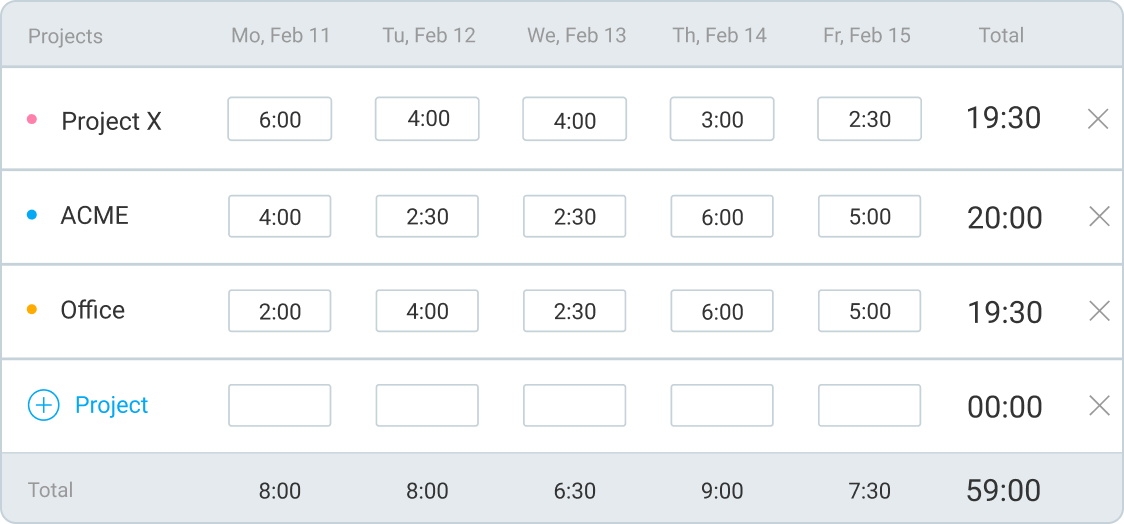
Each person tracks time against a project, task or client with a timer or a weekly timesheet, and those work hours flow into detailed reports, invoices, payroll figures and budgets. Paid plans add management features on top, and Pro adds activity monitoring.
Clockify fits teams that bill by the hour or need clean timesheets, such as agencies, lawyers, accountants, developers and construction crews (the vendor publishes pages for each of these). The free plan also makes it an easy pick for a solo freelancer who only needs a timer and reports.
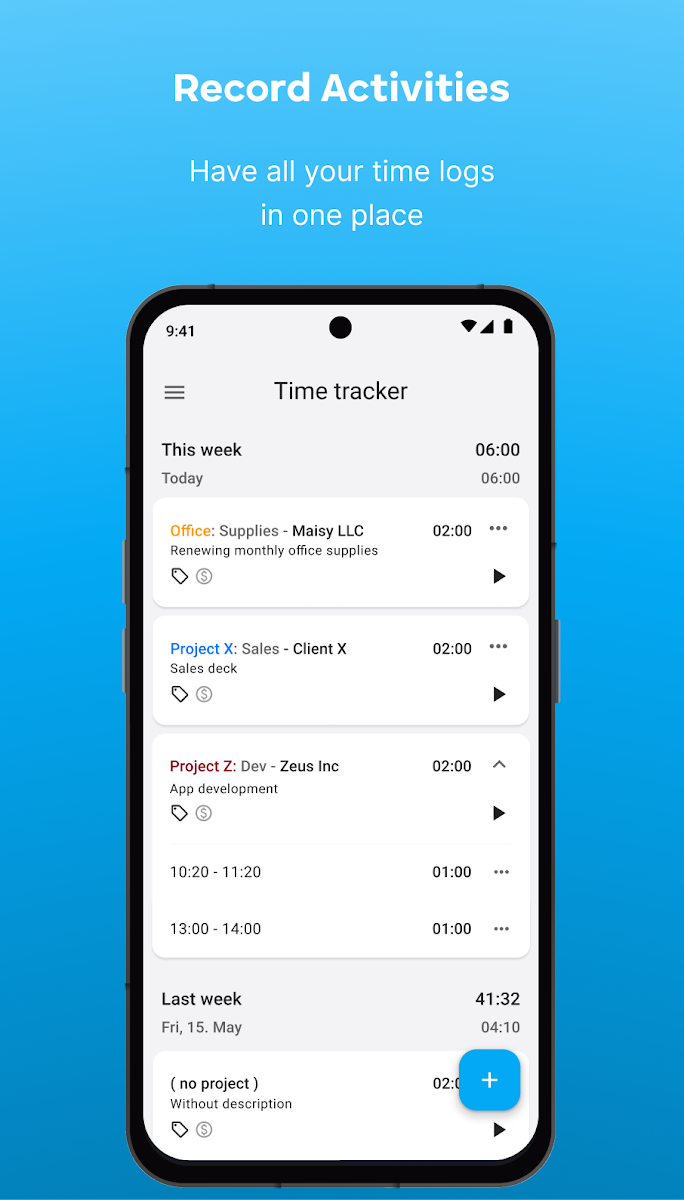
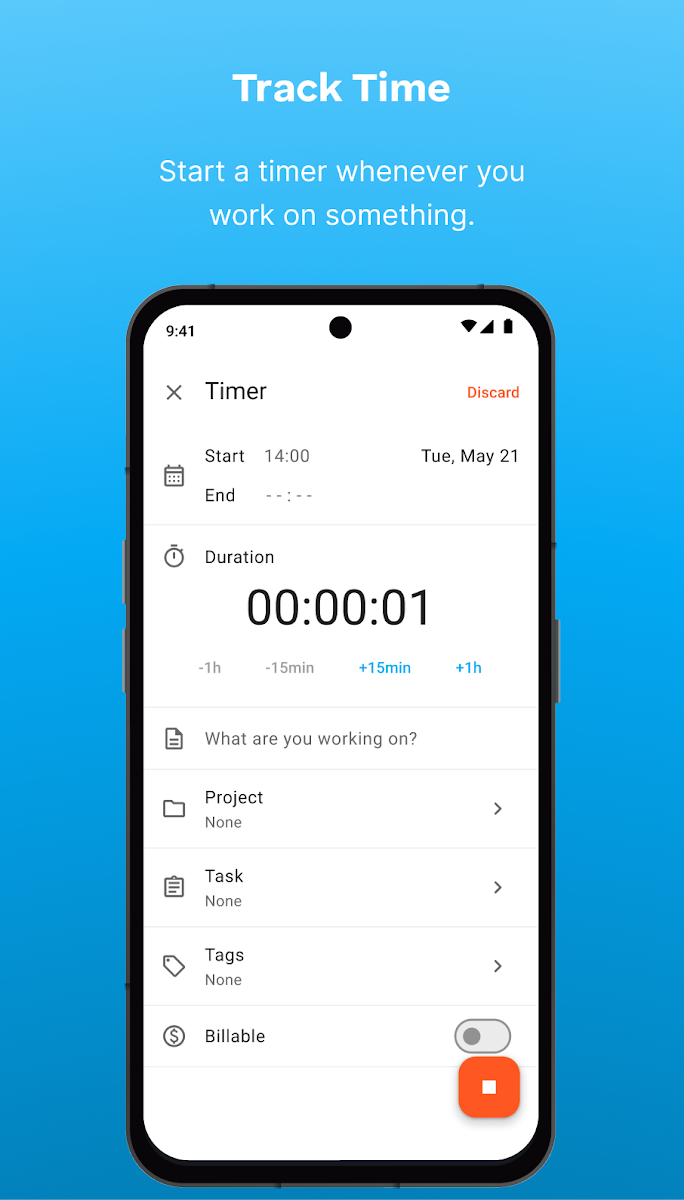
Clockify works around time entries. A typical day starts with the timer: you type what you are working on, pick a project, task and tags, mark it billable, and press start. If you forget, you add the entry manually in the weekly timesheet or the calendar view, and the auto tracker records which apps and websites you used so you can turn them into time entries later.
The Pro plan is where Clockify becomes a project cost tool. It adds scheduling, forecasting, project budgets and estimates, labor cost and profit, expense tracking and GPS location tracking.
The apps cover the web, Windows, macOS and Linux desktop, iPhone, iPad and Android, plus browser extensions for Chrome, Firefox and Edge. The Mac, Windows and Chrome apps have an offline mode, so you can keep tracking without a connection.
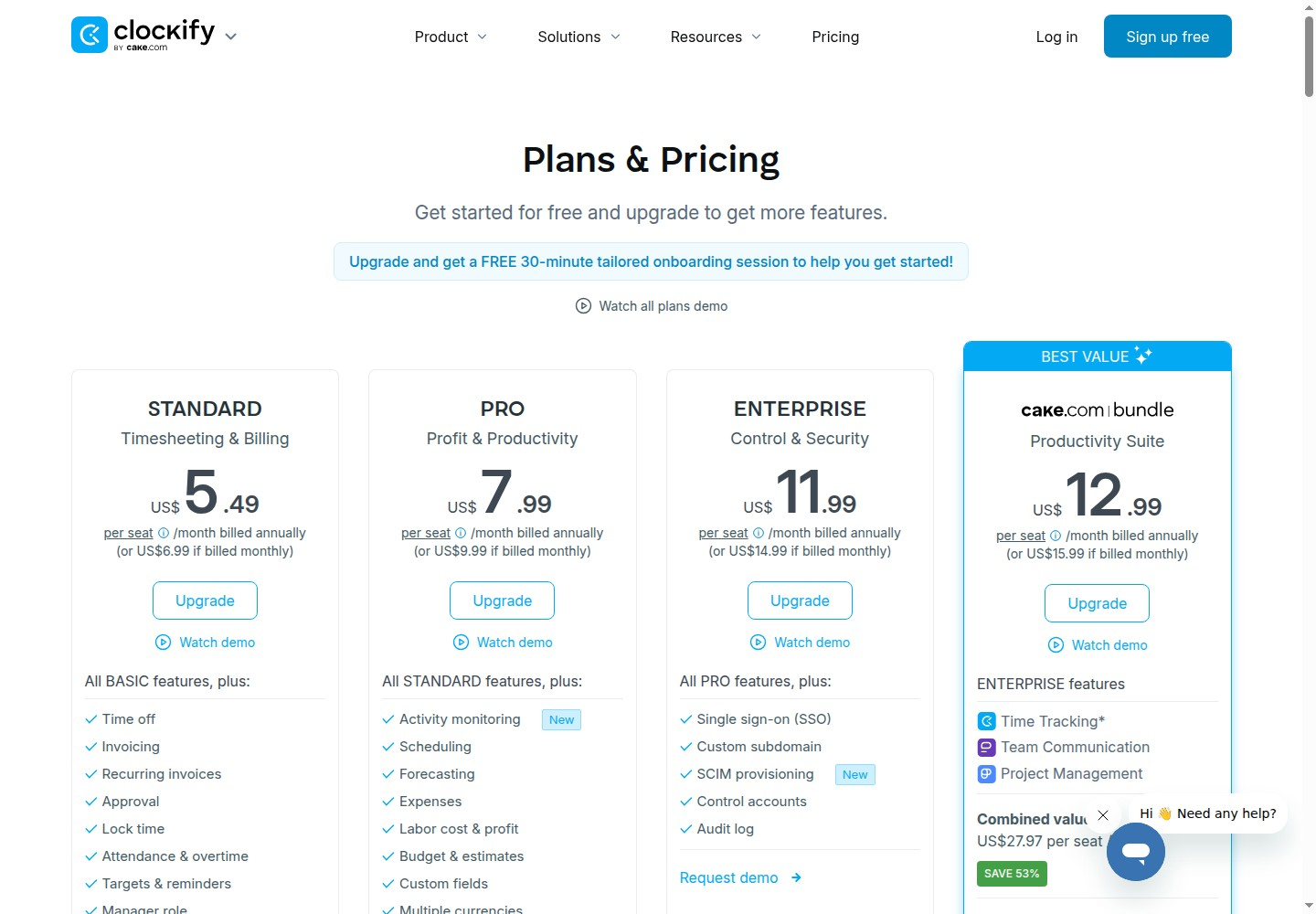
Clockify has a free plan and five paid tiers priced per seat, where every active or invited user takes a seat, including the owner and admins. Annual billing saves 20%. Prices checked 7 Nov 2026 on clockify.me, in US dollars, before tax.
| Plan | Price per seat (billed annually) | Price per seat (billed monthly) | What it adds |
|---|---|---|---|
| Free | $0 | $0 | Unlimited tracking, timer, timesheet, auto tracker, calendar, apps, Pomodoro, reports; invite up to 4 people |
| Basic | $3.99 a month | $4.99 a month | Kiosk, billable rates, add time for others, bulk edit, required fields, time audit, import time and users |
| Standard | $5.49 a month | $6.99 a month | Time off, invoicing, recurring invoices, timesheet approval, lock time, attendance and overtime, QuickBooks |
| Pro | $7.99 a month | $9.99 a month | Activity monitoring, scheduling, forecasting, expenses, labor cost and profit, budgets, GPS tracking, data region |
| Enterprise | $11.99 a month | $14.99 a month | SSO, custom subdomain, SCIM provisioning, control accounts, audit log |
| CAKE.com Bundle | $12.99 a month | $15.99 a month | Enterprise versions of Clockify, Pumble and Plaky together (no Clockify data regions) |
Kiosk-only staff can be added as limited users, who can only clock in through the kiosk, for $0.79 to $2.39 per limited seat a month on annual billing, depending on the plan. There is a 7-day free trial of Pro features with no credit card. Clockify says it does not give refunds, except for charges caused by a system error, so its own advice is to use the trial before paying. Cancelling drops you back to the free plan at the end of the term, and the vendor says no data is lost.
A 10-person agency that needs invoicing and timesheet approval would land on Standard, which works out at $54.90 a month on annual billing ($658.80 a year) or $69.90 a month billed monthly. The same team on Pro, for scheduling, expenses and budgets, pays $79.90 a month annually. Remember the owner and any admins count as seats too.
Clockify rates well on the larger review sites. It holds 4.8 out of 5 from 9,276 reviews on Software Advice (Nov 2026), with sub-scores of 4.77 for ease of use and 4.69 for value for money. The Android app is lower, at 3.9 stars from about 3,040 Google Play reviews (Nov 2026).
Play Store feedback includes requests for feature parity across apps. One highly voted review asked for the Pomodoro timer on Android and Windows; Clockify replied that it was on the macOS app, with Windows to follow.
Clockify connects with more than 100 tools, by its own count. Support is offered on every plan, including free, according to the pricing FAQ. Listed integrations include QuickBooks, Xero, Jira, Asana, Trello, Todoist, ClickUp, monday.com, GitHub, GitLab, Azure DevOps, Google Calendar, Outlook, Zendesk, HubSpot, Salesforce, Notion and Zapier.
Clockify's changelog is updated monthly. September 2026 brought the activity monitoring launch; October 2026 added aggregate time zones, per-plan API rate limits and a refreshed workspace settings screen; November 2026 added per-seat pricing for paid add-ons and dashboard filtering and PDF export.
The main drawbacks are how quickly features move up the paid tiers and the no-refund policy. A growing team can outgrow the cheap plans fast.
These alternatives do the same job of tracking hours for billing, payroll or attendance.
Clockify is one of the best value time trackers for small teams: the free plan is genuinely usable, and Standard at $5.49 a seat covers invoicing, approvals and time off for less than most rivals charge for timers alone. I would pick it for any service business that bills hours. I would skip it if you need real project management in the same tool, or if you are not comfortable with a no-refund subscription.
Yes. The free plan includes unlimited time tracking, the timer, timesheet, auto tracker, calendar, reports and all apps, and Clockify's pricing FAQ says you can invite up to 4 people. Paid plans start at $3.99 per seat a month on annual billing.
Clockify is used to track work hours against projects, tasks and clients, then turn those hours into timesheets, reports, invoices and payroll figures. Paid plans add approvals, time off, scheduling, expenses and activity monitoring.
Prices checked 7 Nov 2026 are $3.99 (Basic), $5.49 (Standard), $7.99 (Pro) and $11.99 (Enterprise) per seat a month on annual billing, or $4.99, $6.99, $9.99 and $14.99 billed monthly. Every active or invited user needs a seat.
No. Clockify says it does not offer refunds except for charges caused by a system error, and recommends using the 7-day free Pro trial before paying. Cancelling moves you back to the free plan without losing data.
Clockify gives more on its free plan and cheaper paid seats, with invoicing, time off and scheduling built in. Toggl Track is often preferred for its timer and reports, but its free plan is limited to a small team, so Clockify usually wins on cost for larger teams.
Yes. Clockify lists an offline mode for its Mac, Windows and Chrome apps, so you can keep tracking time without a connection, and its October 2026 changelog also mentions offline mode on the Linux app.
We may earn a commission when you buy through links on SaaSPic. It never changes our verdicts or the price you pay. Affiliate disclosure
Add this badge to your website so your visitors can read this independent review in one click.
 6.4/10
Employee monitoring and time tracking with screenshots, app and website usage, attendance and live view on one cheap plan.
 7.6/10
Employee monitoring and workforce analytics that tracks time, attendance, app and AI tool use from a desktop agent.
| Tool | Score | From | Free plan | Best for |
|---|---|---|---|---|
| Clockify | 8.1/10 | $3.99/mo | Yes | Small teams and agencies that bill tracked hours |
| Mera Work | 6.4/10 | $3/mo | No | Budget-minded teams that want full monitoring on one cheap plan |
| Insightful | 7.6/10 | $8/mo | No | Remote, contact center and BPO teams that need accurate hours |
 8.4/10
Scheduling software that lets people book time with you through a link, with team routing, reminders, payments and AI meeting recaps.
 8.3/10
Web booking page and scheduler that syncs your calendars and lets clients book and pay for sessions, packages and subscriptions.
 8.1/10
Keyboard launcher for Mac and Windows with clipboard history, snippets, window management, thousands of extensions and built-in AI.