 8.1/10
Time tracker and timesheet app for teams, with a free plan and per-seat paid tiers for invoicing, approvals and scheduling.


Employee monitoring and workforce analytics that tracks time, attendance, app and AI tool use from a desktop agent.
We may earn a commission when you buy through our links. How this works
Insightful is a well-reviewed monitoring and workforce analytics tool with fair Analytics pricing and strong security credentials, best for remote, contact center and BPO teams. Skip it if a simple timer would do or monitoring would damage trust.
Best for: Remote, contact center and BPO teams that need accurate hours
7.6/10 Good, with trade-offs. The overall score is our judgment against the questions we ask of every tool, not an average. How we score
| Question | Score | Why |
|---|---|---|
| Does the jobWhat it actually does for the task it is sold for, and where it falls short. | 8.0 | Insightful covers attendance, activity, app and AI tool use, projects, capacity reports and process intelligence across its plans. |
| Ease of useSetup needed and how quickly you get something useful done. | 7.6 | The vendor says data appears within 15 minutes of installing the agent, and G2 reviewers rate it 4.6 from 499 reviews. |
| Pricing and limitsWhat you pay at a realistic size, including caps, add-ons and deal limits. | 7.6 | Analytics is $8 per seat a month billed annually with free manager accounts, but screen recording and SSO cost extra and Insights needs 50 seats. |
| Reliability and supportUpdate pace, known problems and how support responds. | 7.6 | Trustpilot shows 4.1 from 68 reviews with replies to every negative review, and the help center publishes a monthly change log. |
| Fit against alternativesHow it compares with the alternatives for the people it is aimed at. | 7.2 | Against Hubstaff, Time Doctor and ActivTrak it is strong on analytics and security, but it is desktop only and heavier than a simple time tracker like Clockify. |
Insightful is employee monitoring and workforce analytics software that records how staff spend work time across apps, websites and AI tools, then turns it into attendance, productivity and capacity reports. It suits remote, hybrid and back-office teams such as BPOs, support centers and agencies; skip it if your team objects to activity tracking or you only need a simple timer.
Insightful, formerly called Workpuls, is a work intelligence platform from Insightful.io, Inc. that installs a desktop app on each employee's computer and reports where the working day goes. The company says it has built workforce analytics software since 2016, has its headquarters in New York City and runs operations from Belgrade, Serbia.
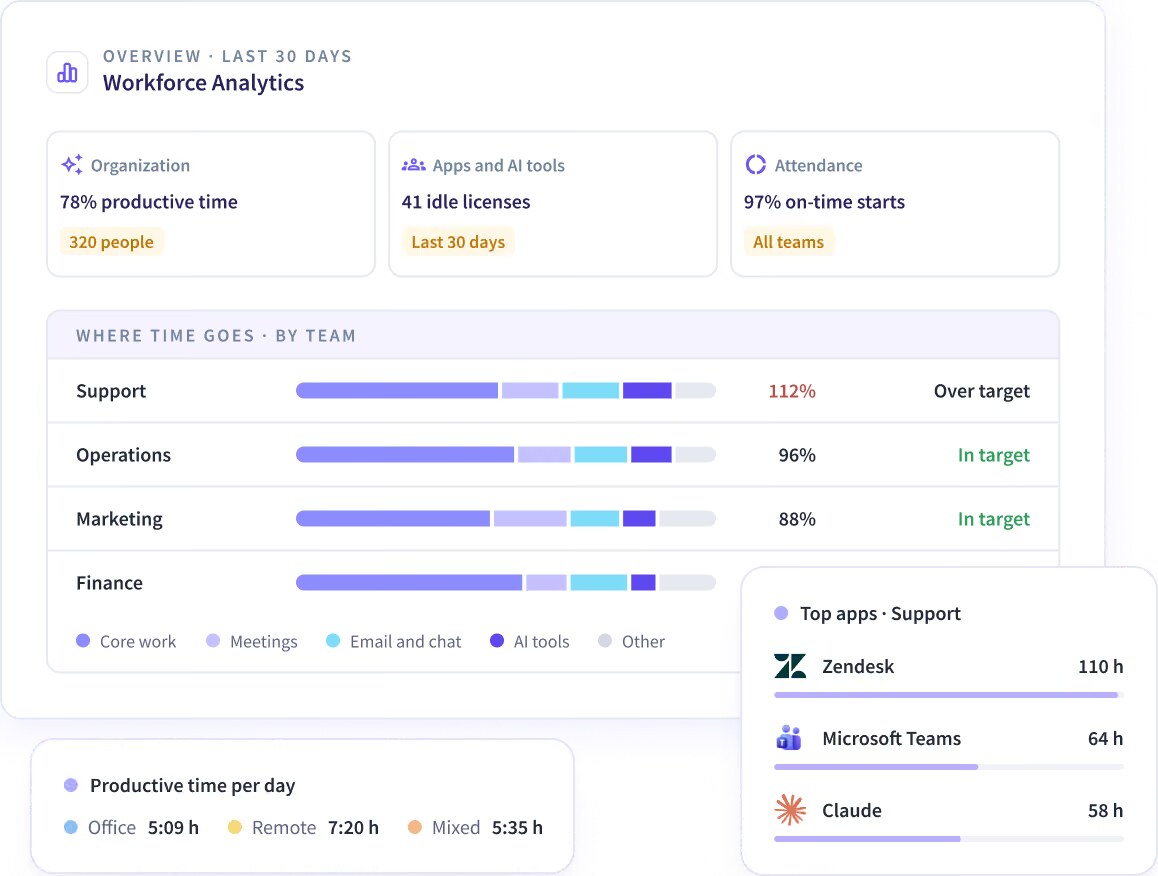
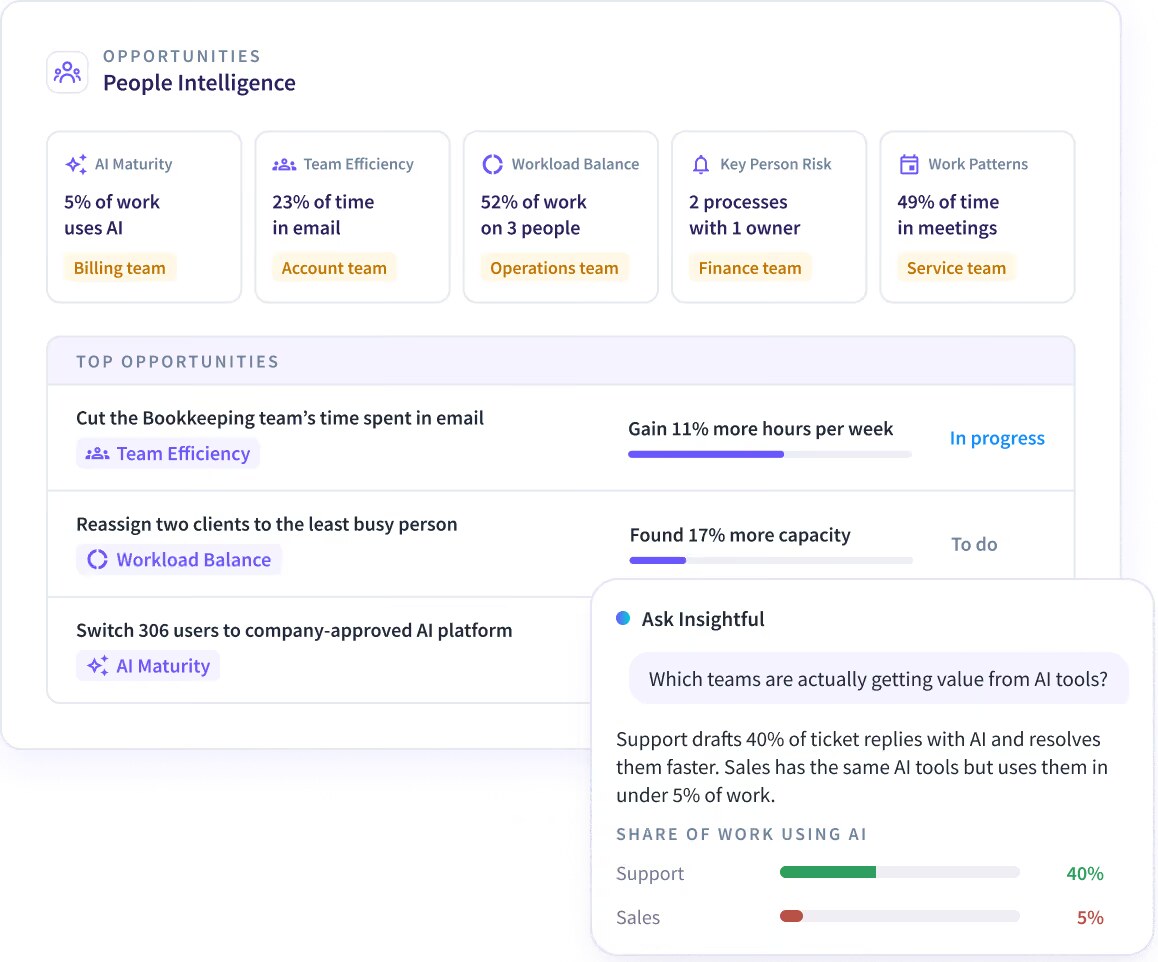
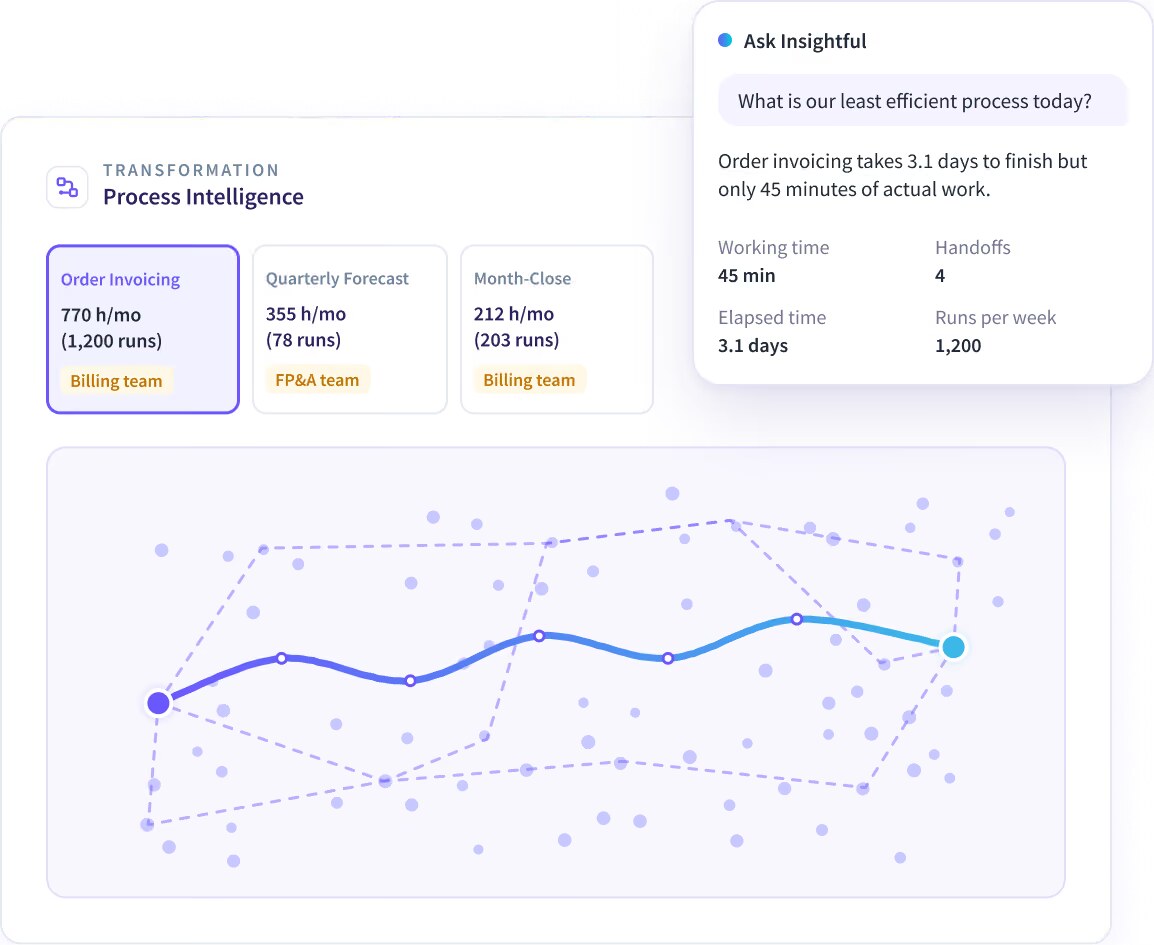
The vendor says more than 200,000 users at over 5,800 organizations in 50+ countries use it. It now sells three layers: Workforce Analytics (time, attendance and activity), People Intelligence (how teams work and where to improve) and Process Intelligence (which processes to improve or automate).
Insightful is for managers who need accurate hours and utilization without manual timesheets, especially across remote or outsourced teams. Its own pages target operations, IT, HR and information security teams, and industries such as BPO, call centers, healthcare, financial services and IT outsourcing.
Insightful works in four steps: install the desktop app, let it record activity, review the reports, then act on what they show. The vendor says you can see your team's data within 15 minutes of installing the app on Windows or macOS.
The vendor stresses that Insightful does not capture messages or documents, and that screen recording is an opt-in add-on.
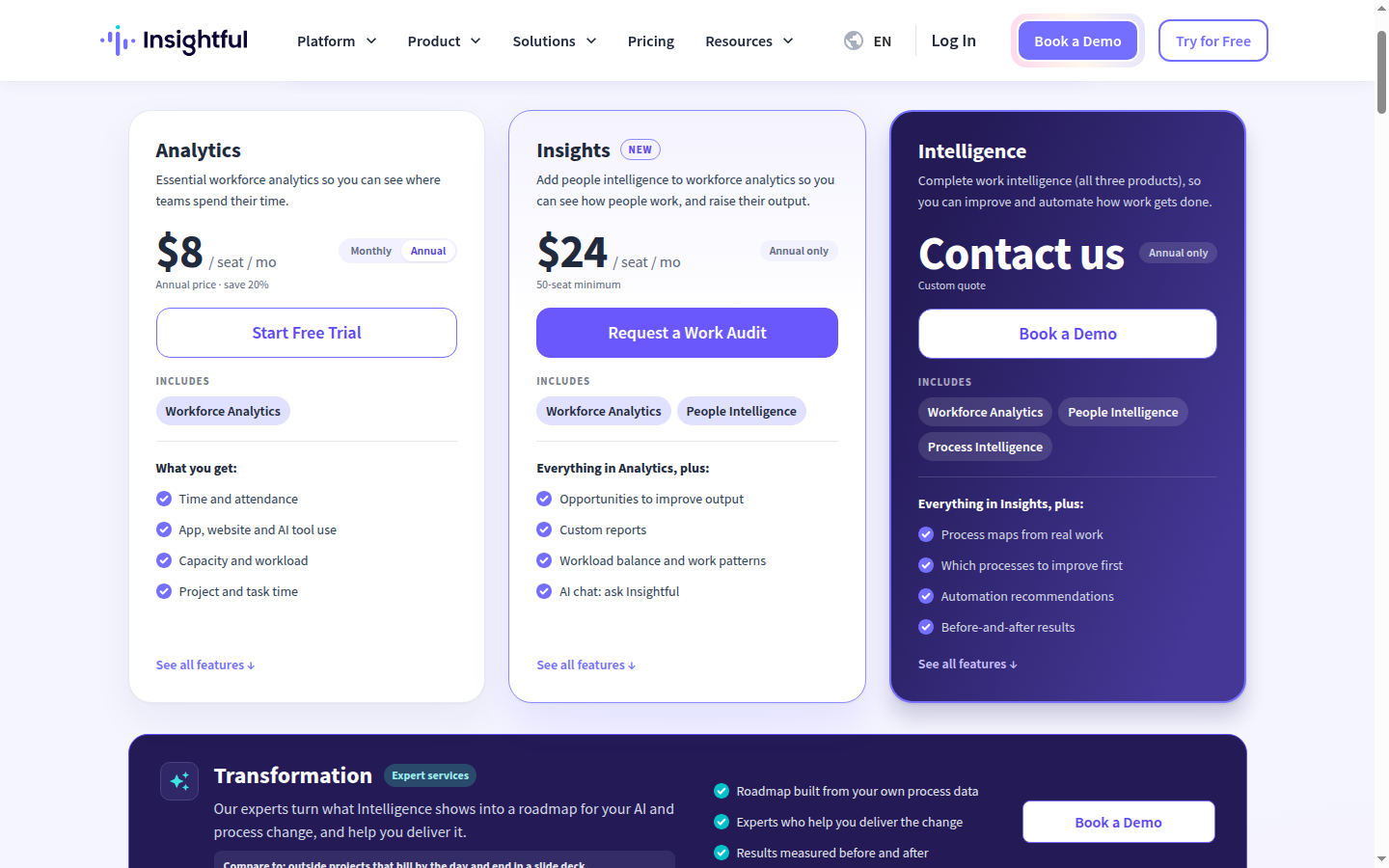
Insightful is priced per monitored seat in USD, with a self-serve Analytics plan and two annual-only plans above it. Prices checked 8 Nov 2026 on the Insightful pricing page.
| Plan | Price | Billing and minimum | What it includes |
|---|---|---|---|
| Analytics | $8 per seat a month billed annually, or $10 a month billed monthly | No minimum; free trial with no credit card | Workforce Analytics: time and attendance, app, website and AI tool use, capacity and workload, project and task time |
| Insights | $24 per seat a month | Annual only, 50-seat minimum; starts with a Work Audit | Analytics plus People Intelligence: improvement opportunities, custom reports, workload balance, work patterns, Ask Insightful |
| Intelligence | Custom quote | Annual only | Insights plus Process Intelligence: process maps, which processes to improve first, automation recommendations |
Every plan includes SOC 2 Type II coverage, unlimited admin and manager accounts, and the MCP server. Paid add-ons work on any plan: Workspace Security with SSO and audit logs ($4 per seat a month), more frequent screenshots ($3), on-demand screenshots ($4), screen recording ($4) and data warehouse exports to BigQuery or Snowflake ($0.50).
A seat is each employee whose work is recorded, however many computers they use; admins and managers who are not tracked are free. Monthly Analytics drops to $8 after six months, new seats are prorated to the end of your cycle, and US sales tax is added at checkout. Insightful does not publish a refund policy on its pricing page.
A 20-person team on Analytics with annual billing pays $160 a month, or $1,920 a year. Adding screen recording for everyone takes that to $240 a month. Insights is a bigger step: the 50-seat minimum means at least $1,200 a month, billed yearly.
Insightful is well rated by managers on review sites. On G2 it scores 4.6 out of 5 from 499 reviews (Nov 2026), with 77% five-star ratings. On Trustpilot it scores 4.1 out of 5 from 68 reviews (Nov 2026), 13 of them in the last 12 months, and the company has replied to every negative review.
Recent Trustpilot reviews praise named account managers, while one complaint describes new users being created automatically through Active Directory, with no notification and no refund for the extra seats. The vendor's own pricing page also cites a 4.7 rating and "best value" badges from G2 and Gartner.
Insightful runs as a web dashboard plus a desktop agent. These are the facts it publishes:
Insightful has moved from a monitoring tool to a three-product work intelligence suite this year, with new Analytics, Insights and Intelligence plans. In July 2026 it launched Workflow Optimization, its process intelligence module, in beta, along with a more resilient macOS agent and redesigned settings.
The November 2026 change log (5 November) lets managers view Activities for everyone in their org group and adds project and task columns to activity logs. The same summer update added the AI Adoption Report, Location Insights and Workload Distribution to the Analytics plan.
Insightful's main drawbacks are the privacy trade-off that comes with any monitoring tool and the steep jump between plans.
The main Insightful alternatives are other monitoring and time tracking tools, and Insightful publishes its own comparisons with ActivTrak, Hubstaff, Teramind and Time Doctor.
Insightful is a strong, well-reviewed choice for companies that genuinely need visibility into remote work, with fair Analytics pricing and solid security credentials. I would pick it for a contact center, BPO or agency that bills hours. Skip it if a simple timer would do, or if monitoring would cost you more in trust than it saves in time.
Insightful's desktop app records clock-in times, active and idle time, apps, websites and AI tools used, time in online meetings and project time, with optional screenshots. The vendor says it does not capture messages or documents, and screen recording is an opt-in add-on.
Prices checked 8 Nov 2026: Analytics is $8 per seat a month billed annually or $10 monthly, Insights is $24 per seat a month billed annually with a 50-seat minimum, and Intelligence is a custom quote.
Yes. Insightful, formerly Workpuls, is run by Insightful.io, Inc. with headquarters in New York and has been building workforce analytics software since 2016. It is rated 4.6 from 499 G2 reviews and 4.1 from 68 Trustpilot reviews.
Yes. The Analytics plan has a free trial with no credit card required. Insights and Intelligence start with a Work Audit of one department instead.
Yes. Insightful includes a Personal Employee Dashboard so staff can see their own productivity data, and admins can set privacy options such as screenshot blurring by team.
Yes. Insightful was previously called Workpuls, and its G2 seller profile still reads Insightful (formerly Workpuls). The product, now sold as Insightful work intelligence, adds People Intelligence and Process Intelligence on top of the original monitoring and time tracking.
We may earn a commission when you buy through links on SaaSPic. It never changes our verdicts or the price you pay. Affiliate disclosure
Add this badge to your website so your visitors can read this independent review in one click.
 8.1/10
Time tracker and timesheet app for teams, with a free plan and per-seat paid tiers for invoicing, approvals and scheduling.
 8.4/10
Scheduling software that lets people book time with you through a link, with team routing, reminders, payments and AI meeting recaps.
 8.3/10
Web booking page and scheduler that syncs your calendars and lets clients book and pay for sessions, packages and subscriptions.
 8.1/10
Keyboard launcher for Mac and Windows with clipboard history, snippets, window management, thousands of extensions and built-in AI.