 7.2/10
Mind mapping and visual planning software from Corel for Windows, Mac, web and Microsoft Teams, with Gantt and Kanban views.


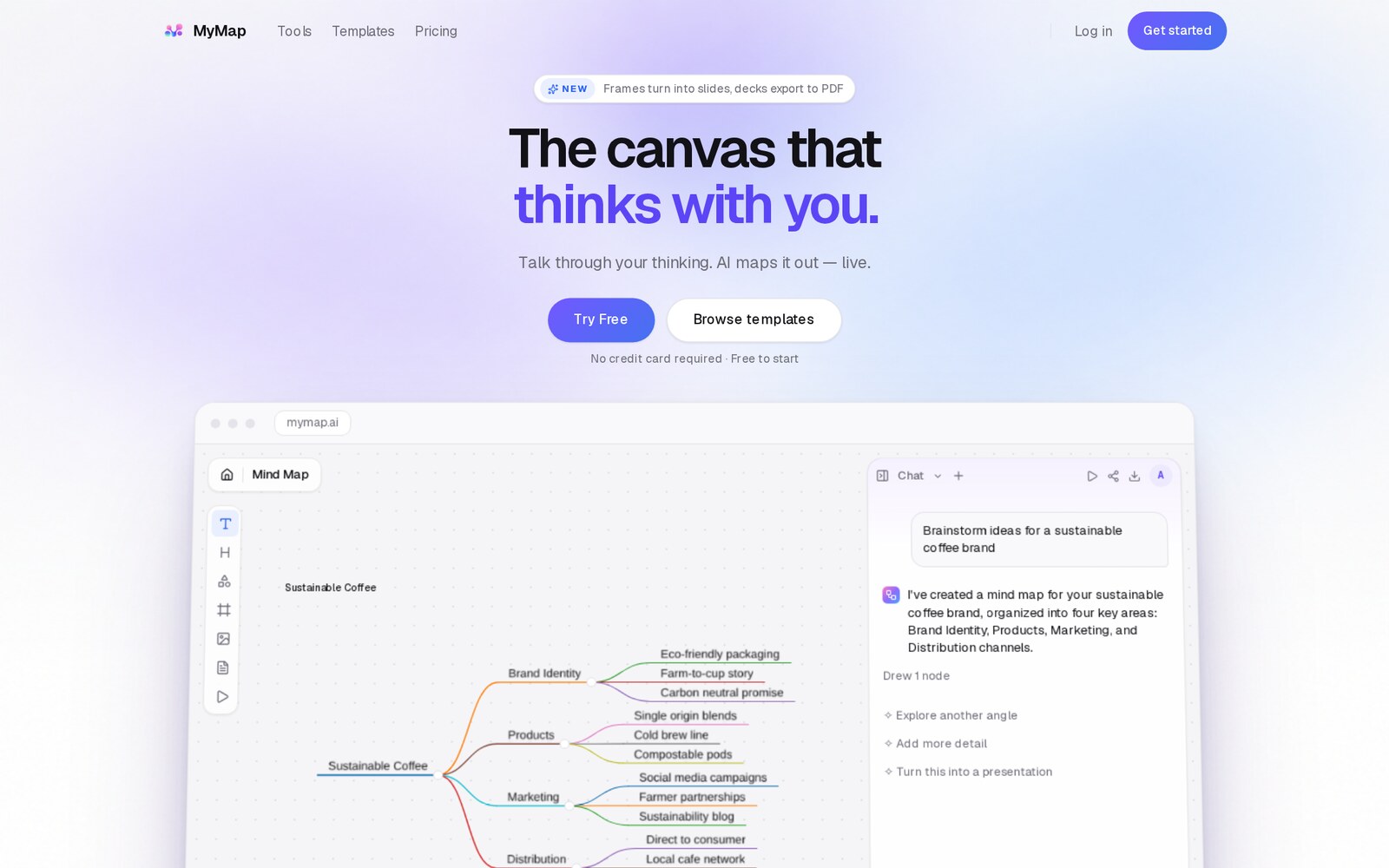
AI canvas that turns chat, notes, PDFs or videos into editable mind maps, flowcharts, diagrams and slides.
We may earn a commission when you buy through our links. How this works
MyMap AI suits consultants, students, educators and compliance teams who need clear diagrams quickly from notes or documents. Start on the free plan, skip the $1 trial unless you are happy to pay $144 for a year, and look at Miro if you need live team collaboration.
Best for: Consultants and students turning notes into diagrams
6.6/10 Good, with trade-offs. The overall score is our judgment against the questions we ask of every tool, not an average. How we score
| Question | Score | Why |
|---|---|---|
| Does the jobWhat it actually does for the task it is sold for, and where it falls short. | 7.5 | Picks the right diagram type from a sentence, supports many formats from SWOT to genograms, and turns frames into slides, but it is not a drawing tool. |
| Ease of useSetup needed and how quickly you get something useful done. | 7.0 | You start from a chat prompt, notes, PDFs or a YouTube link, and edit individual nodes by describing the change. |
| Pricing and limitsWhat you pay at a realistic size, including caps, add-ons and deal limits. | 5.5 | Pro is annual only at $144, the free plan allows 3 maps with watermarked PNG export, and free credits are described inconsistently. |
| Reliability and supportUpdate pace, known problems and how support responds. | 4.0 | Trustpilot is dominated by one-star reviews, with several users unable to cancel the $1 trial and some unable to find a way to contact support. |
| Fit against alternativesHow it compares with the alternatives for the people it is aimed at. | 6.0 | Quick for solo diagramming from documents; Miro is better for teams working together live. |
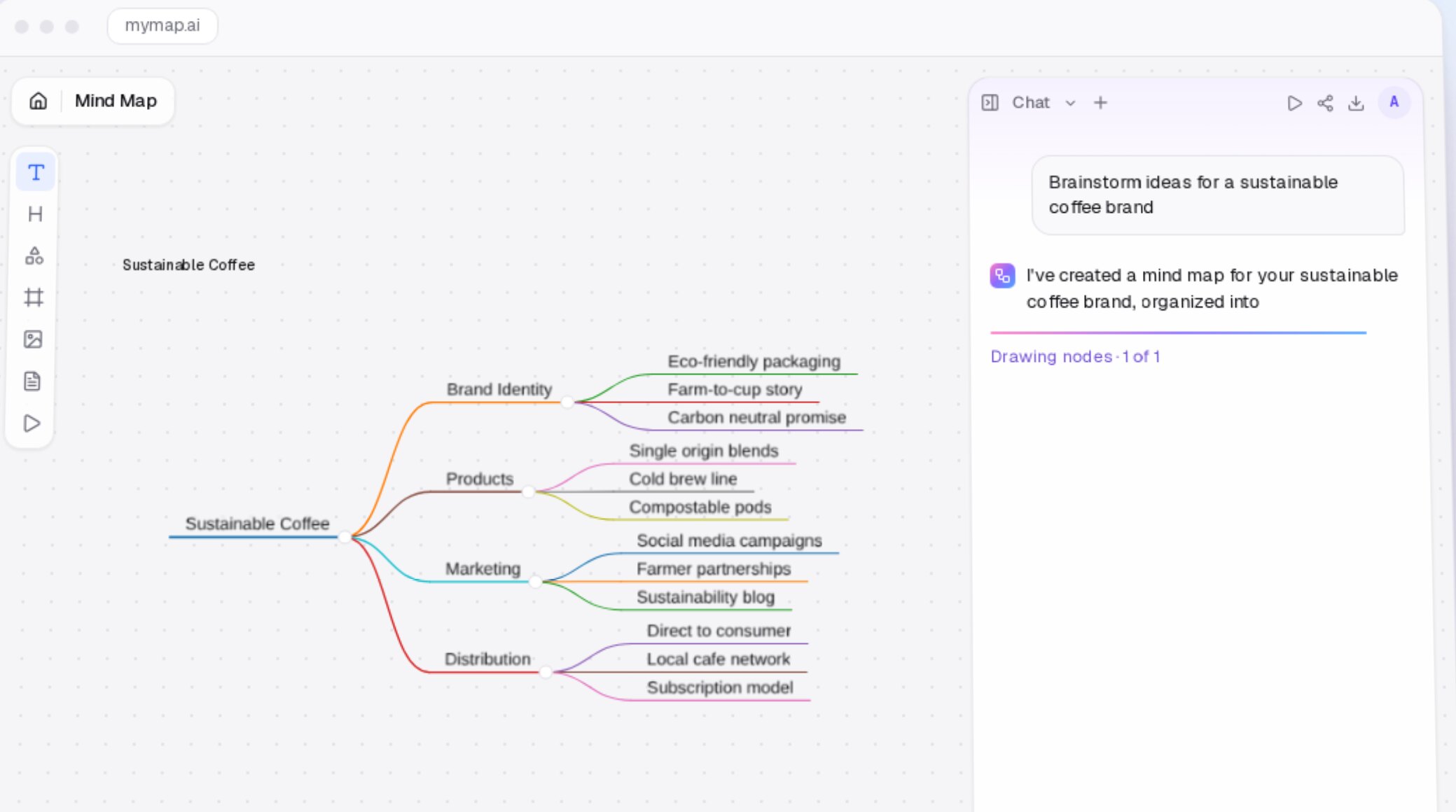
MyMap AI is an AI-powered visual canvas that turns a sentence, pasted notes, a PDF, a Word document or a YouTube link into mind maps, flowcharts and other diagrams, which you then edit by chatting. It suits consultants, compliance teams, students, educators and therapists who need a clear diagram fast, but its trial billing needs care.
MyMap is for people with a map to hand in: a process for a client, an audit tree for a certifier, a lecture summary or a family genogram. Its own pitch names process consultants, quality and compliance teams, students and educators, and family therapists.
Skip the paid plan if you are not ready to pay $144 for a year, because the $1 trial converts to annual billing. If your team needs a shared whiteboard for live workshops, a collaborative tool such as Miro is the better fit.
MyMap's key features are automatic diagram choice, chat-based editing and slides built from the board. You describe the job in plain language, MyMap AI builds the structure, then keeps every node editable, so the visual stays a working document rather than a picture.
You do not pick a diagram type first. A strategy question becomes a SWOT, a "why did this happen" becomes a fishbone, a brainstorm becomes an AI mind map, and a process with a decision becomes a flowchart. MyMap AI supports org charts, swimlanes, timelines, kanban boards, concept maps, genograms, ERD, BPMN, UML, Sankey diagrams, empathy maps and business model canvases.
To refine a diagram, you chat with AI: select a node and say what should change, and the assistant rewrites that node and leaves the rest alone. You choose the AI model for each message: economic models such as DeepSeek V4 Flash and Gemini 3.7 Flash on every plan, and premium models such as GPT-5.6 Terra, Claude Opus 5 and Claude Sonnet 5.5 on Pro and Max.
Frame any part of the board and it becomes a slide you can present in the browser, or export the deck to PDF with one page per frame. The homepage lists PNG, SVG, PDF, Markdown and share link exports, for the whole map or a selection. Source files can be PDFs, Word documents, images or a YouTube video link on every plan, which suits a workflow that starts from lecture notes or an interview transcript.
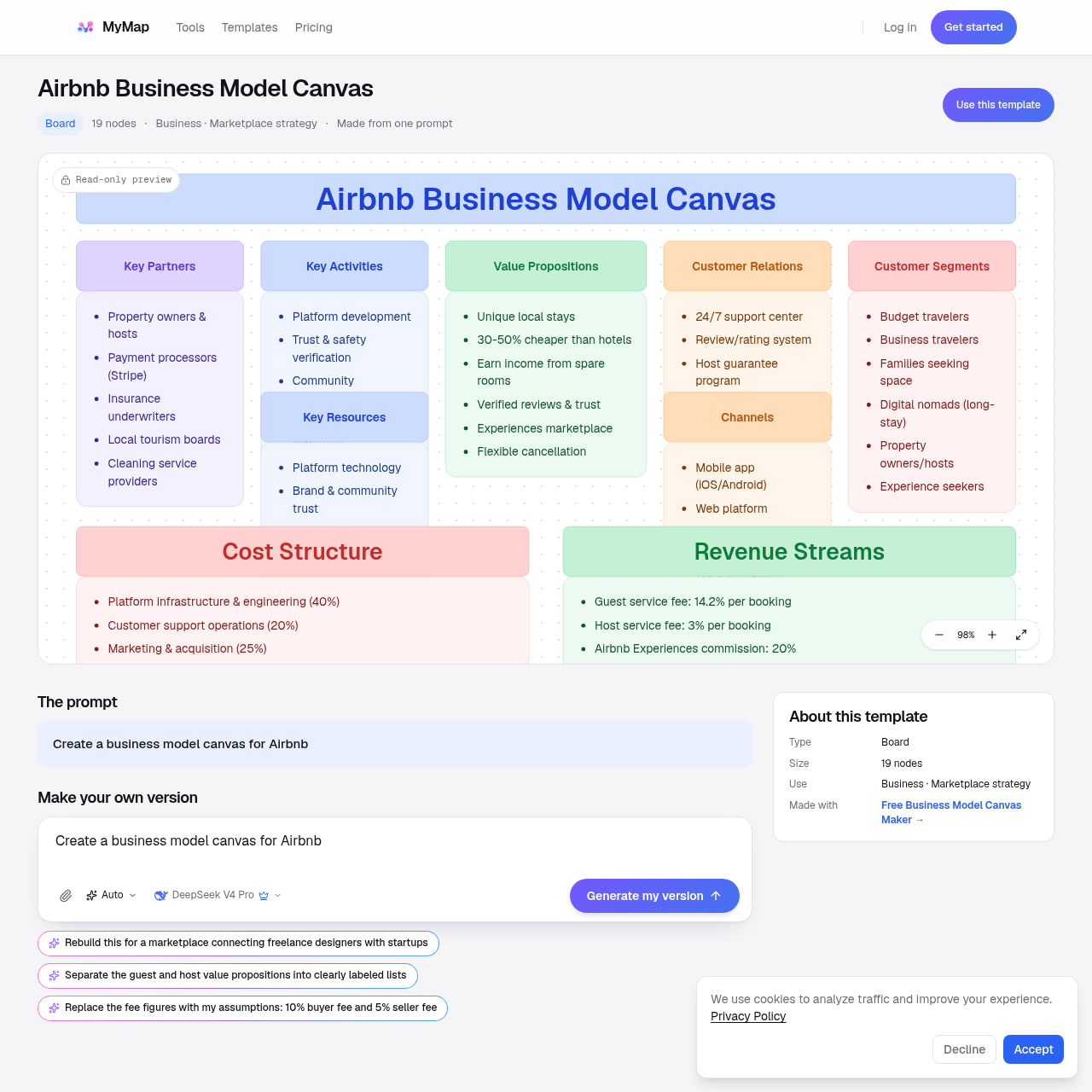
The template gallery holds 586 templates, each made from one prompt, from A3 problem-solving reports to AWS architecture diagrams. Each one shows its prompt and can be rebuilt for your own idea, which is a quick way to see how MyMap AI uses a prompt before you use MyMap AI on real work.
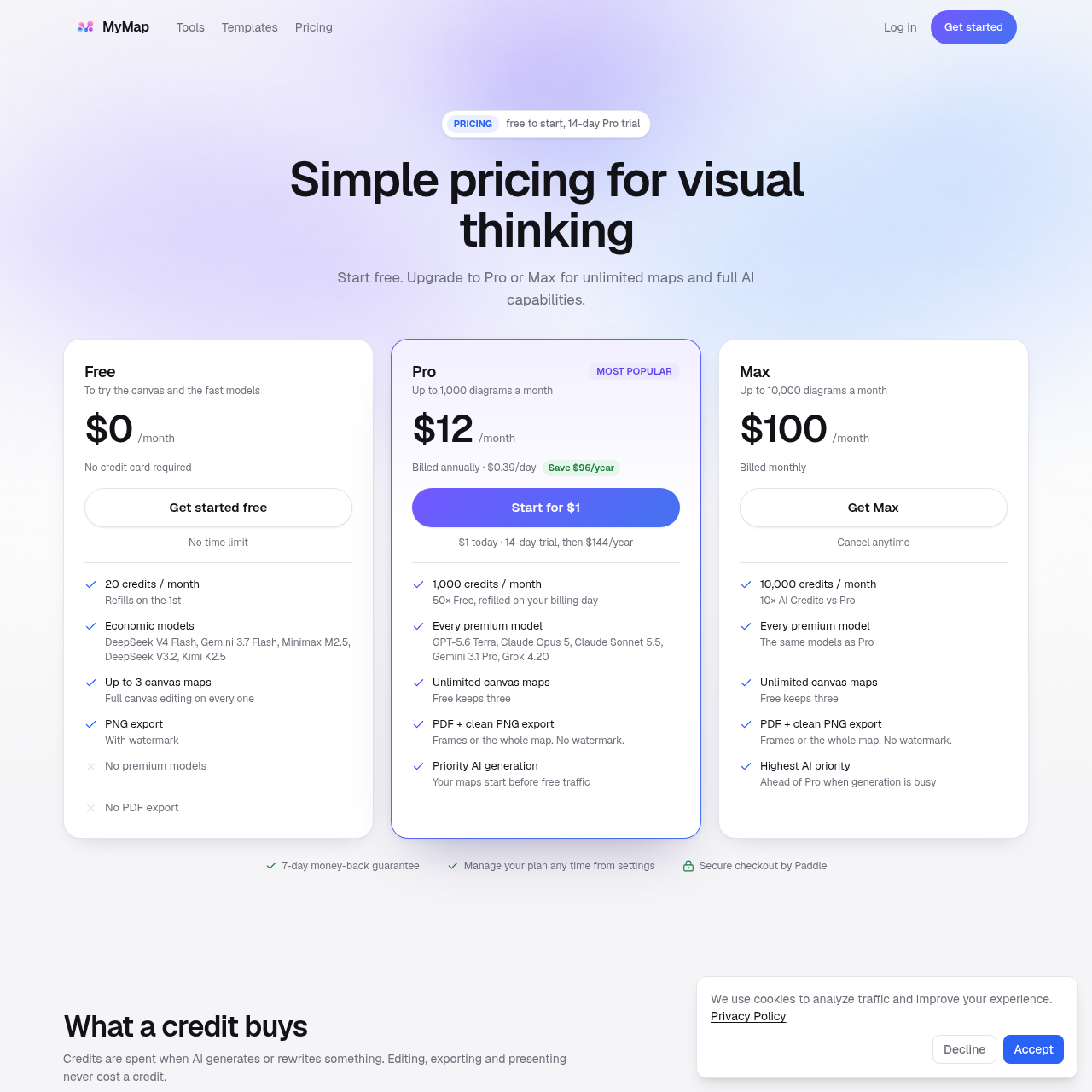
MyMap AI pricing has a free plan, Pro at $12 a month billed yearly, and Max at $100 a month billed monthly. Paid checkout runs through Paddle, with a 7-day money-back guarantee listed on the pricing page.
Prices checked 9 Nov 2026.
| Plan | Price | AI credits | What it includes |
|---|---|---|---|
| Free | $0, no card needed | 20 credits a month, refilled on the 1st | Economic models, up to 3 canvas maps, PNG export with watermark, no PDF export |
| Pro | $12 a month billed yearly ($144 a year); $1 for a 14-day trial, then $144 | 1,000 credits a month | Every premium model, unlimited maps, PDF and clean PNG export, priority generation |
| Max | $100 a month billed monthly | 10,000 credits a month | Same models as Pro, unlimited maps, clean exports, highest AI priority |
Credits are spent only when the AI generates or rewrites something; editing, exporting and AI presentation mode are free. Unused credits do not roll over. The homepage still describes Free as 5 credits a month, so expect the pricing page's 20 credits to be the current figure.
A prompt on a fast model starts at one credit, and premium models use a few, depending on the prompt and the canvas context. So Free's 20 AI credits per month cover up to about 20 fast-model generations, enough to try it, while Pro's 1,000 credits cover the vendor's "up to 1,000 diagrams a month" on fast models and fewer on premium ones.
The Pro trial costs $1 for 14 days and then charges $144 for the year unless you cancel from Settings first. The terms say subscriptions auto-renew and that refunds follow Paddle's policy. After a paid period ends, your maps stay saved and the three newest stay editable.
MyMap's public rating is poor. It holds a 1.9 TrustScore from 12 reviews on Trustpilot (Nov 2026), and the reviews are almost all 1-star.
The complaints repeat: trials that were hard to cancel, a full annual charge soon after signing up, refund requests that went unanswered, and no obvious support contact. The most recent, from Jan 2026, also reports the canvas rendering becoming jumbled after zooming, no undo button, and no way to delete the account. These are a small sample, but they line up with the annual-only trial.
MyMap is a web app at mymap.ai. The terms describe it as an AI-powered platform for visual maps, mind maps and diagrams on an interactive canvas, with AI chat, shared maps and presentation mode.
MyMap's latest headline feature is slides: frames now turn into slides and decks export to PDF, flagged as new on the homepage. The model list has moved to newer models, with Claude Sonnet 5.5, GPT-5.6 Terra and Gemini 3.1 Pro on paid plans.
The free allowance on the pricing page is now 20 credits a month. MyMap does not publish a dated changelog, so check the pricing page for the current limits.
The biggest drawback is billing: Pro is annual only, and the $1 trial turns into a $144 charge on day 14. The second is trust, given the Trustpilot record on cancellations and refunds.
The free plan is narrow, with three maps and watermarked PNGs. There is no live multi-user editing named on the site, so it is a tool for one person to build a diagram rather than a team whiteboard.
The closest MyMap AI alternatives are AI-assisted diagram and mind map tools. In any comparison, the main difference is how much collaboration and billing flexibility you get, and whether the interface is built for one person or a team.
MyMap AI does the diagram job well on paper: it picks the right structure from a sentence, edits by chat, and turns boards into slides. The annual-only Pro trial and a 1.9 Trustpilot rating keep my score at 6.6. Use the free plan first, and set a reminder before day 14 if you start the $1 trial.
Yes. The free plan includes 20 AI credits a month, up to three editable maps and the economic AI models, with PNG export that carries a watermark. No credit card is needed.
Pro costs $12 a month billed yearly, which is $144 a year, and Max costs $100 a month billed monthly. Pro starts with a 14-day trial that costs $1.
For mind maps from a prompt or a document, MyMap AI, Xmind and Whimsical all generate maps with AI. MyMap stands out for picking the diagram type itself and editing nodes by chat; Xmind suits classic mind mapping, and Whimsical suits teams that want monthly billing.
ChatGPT replies mainly in text, so you usually need another tool to draw the map. MyMap AI creates the mind map or flowchart directly on a canvas and lets you choose models such as GPT-5.6 Terra or Claude Sonnet 5.5 on paid plans.
The pricing page lists a 7-day money-back guarantee, and checkout and refunds run through Paddle under its policy. Trustpilot reviewers report trouble getting refunds, so cancel before the 14-day trial ends if you are unsure.
No. Unused credits do not roll over. Free refills on the 1st of each month, and Pro and Max refill on the day you subscribed. Editing, exporting and presenting never use credits.
We may earn a commission when you buy through links on SaaSPic. It never changes our verdicts or the price you pay. Affiliate disclosure
Add this badge to your website so your visitors can read this independent review in one click.
 7.2/10
Mind mapping and visual planning software from Corel for Windows, Mac, web and Microsoft Teams, with Gantt and Kanban views.
 8.4/10
Scheduling software that lets people book time with you through a link, with team routing, reminders, payments and AI meeting recaps.
 8.3/10
Web booking page and scheduler that syncs your calendars and lets clients book and pay for sessions, packages and subscriptions.
 8.1/10
Keyboard launcher for Mac and Windows with clipboard history, snippets, window management, thousands of extensions and built-in AI.