 8.1/10
Keyboard launcher for Mac and Windows with clipboard history, snippets, window management, thousands of extensions and built-in AI.


Text expander that turns short abbreviations into shared snippets on Mac, Windows, Chrome, iPhone, iPad and Android.
We may earn a commission when you buy through our links. How this works
TextExpander suits support, sales, recruiting and healthcare teams that want one shared snippet library on every device, from $5 per user a month billed annually. Solo users with a few phrases should try its free plan or a free tool such as Espanso first.
Best for: Support, sales and clinical teams sharing standard replies
7.6/10 Good, with trade-offs. The overall score is our judgment against the questions we ask of every tool, not an average. How we score
| Question | Score | Why |
|---|---|---|
| Does the jobWhat it actually does for the task it is sold for, and where it falls short. | 8.3 | It expands Snippets in any app on six platforms with fill-ins, date math, conditional sections and script Snippets. |
| Ease of useSetup needed and how quickly you get something useful done. | 7.8 | The workflow is create, customize, expand and share, and it holds 9.5 out of 10 on TrustRadius, though one reviewer finds team editing tricky. |
| Pricing and limitsWhat you pay at a realistic size, including caps, add-ons and deal limits. | 6.8 | Pro is $5 per user a month billed annually, but Free allows only 5 active Snippets and Pro stops at 5 users. |
| Reliability and supportUpdate pace, known problems and how support responds. | 7.6 | SOC 2, SOC 3 and HIPAA compliance, a public status page and priority email support on paid plans, with ongoing releases in Nov 2026. |
| Fit against alternativesHow it compares with the alternatives for the people it is aimed at. | 7.4 | Stronger for shared team libraries than Espanso or aText, though free and Mac-only options suit solo users better. |
TextExpander is a text expander that turns a short abbreviation into a full email, reply, note or template in any app on Mac, Windows, Chrome, iPhone, iPad and Android. It is a strong pick for support, sales, recruiting and healthcare teams that want one shared library, with a free plan limited to 5 active Snippets and paid plans from $5 per user a month billed annually ($6 month to month).
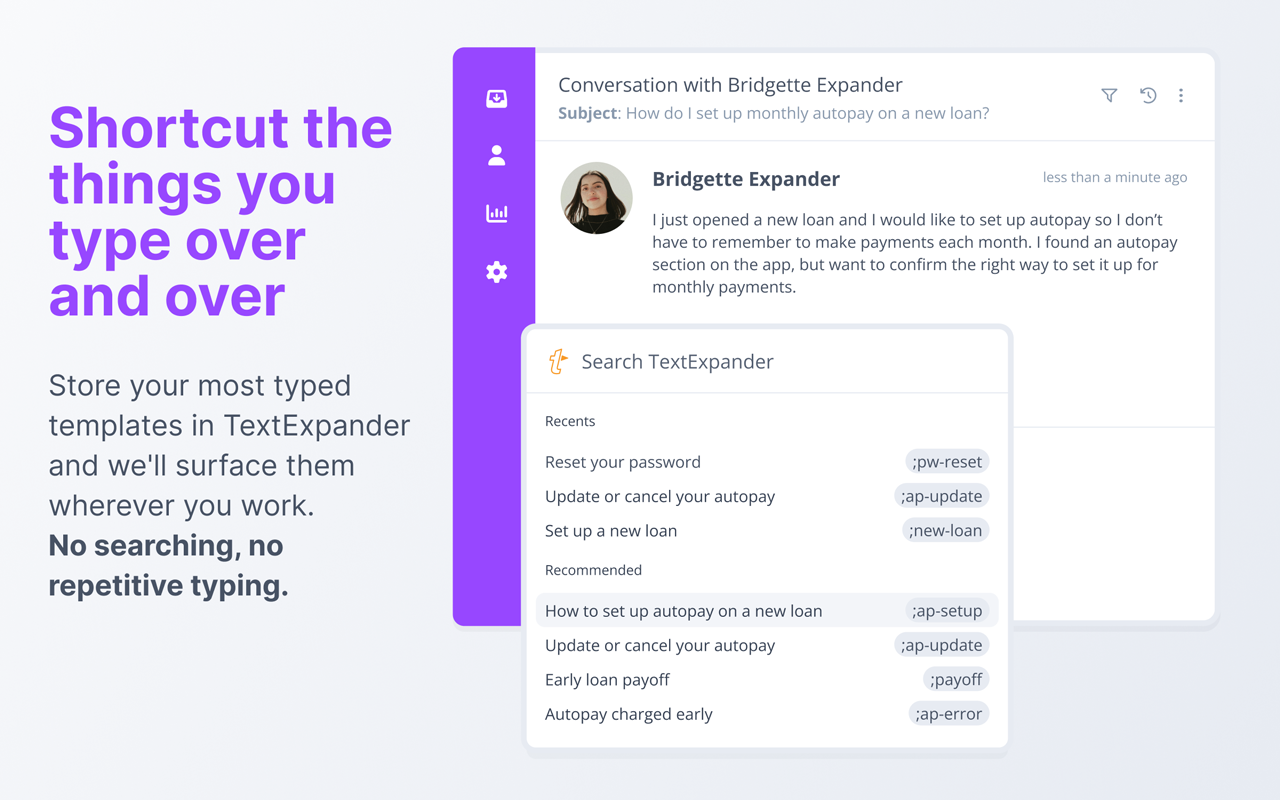
TextExpander stores the text you type most often and inserts it when you type a shortcut, for example ;addr for your mailing address. It began in 2005 as Textpander, which Smile bought from its developer Peter Maurer, and it is now published by TextExpander, Inc.
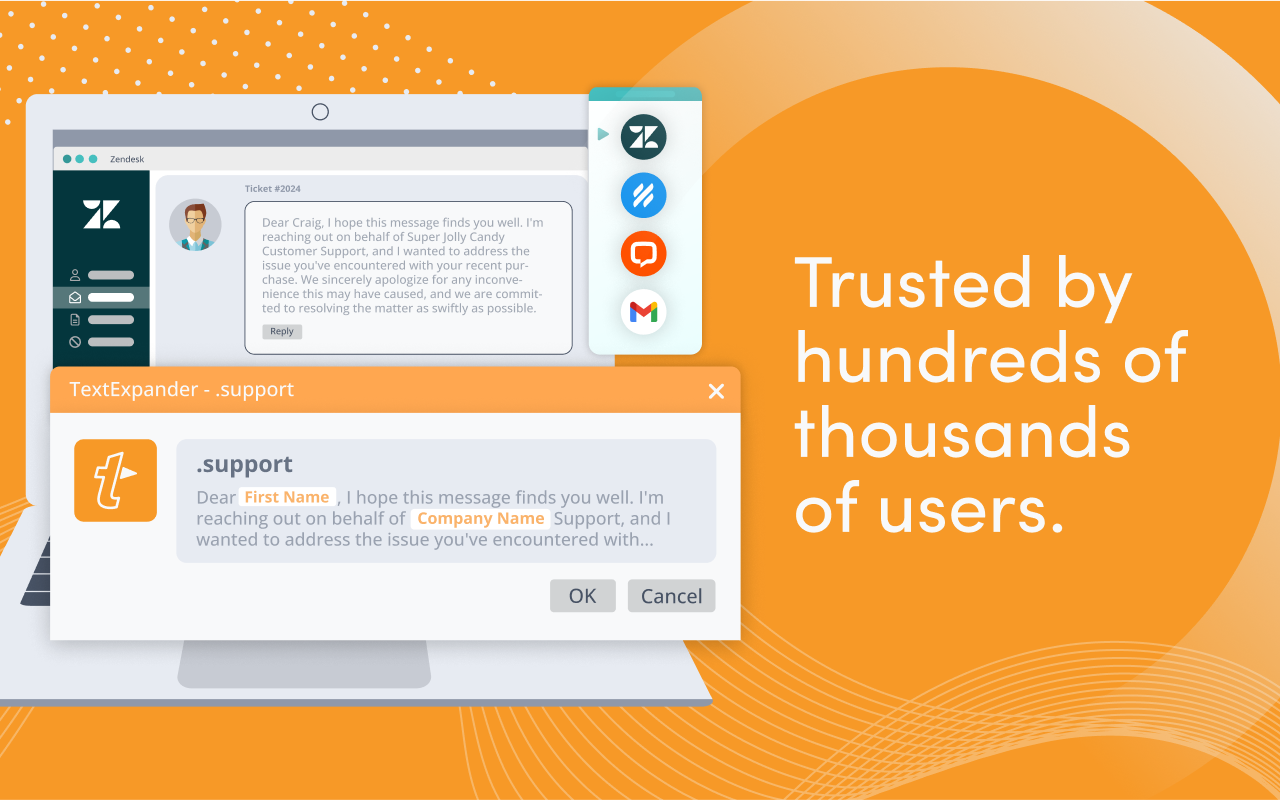
The vendor pitches the service at teams that answer the same questions every day, and its own solution pages cover customer support, healthcare, recruiting and operations. Shared standard responses pay off most for customer service agents, recruiters and sales staff.
Skip it if you are an individual with a handful of phrases and no need for cloud sync or sharing. The free plan is tight, and free tools such as Espanso or the snippets built into Raycast cover simple personal use.
The TextExpander workflow has four steps. You save a Snippet, customize it with fill-ins, expand it by typing its abbreviation in any app, and share it so the whole team sends the same wording instead of copy and paste from old messages.
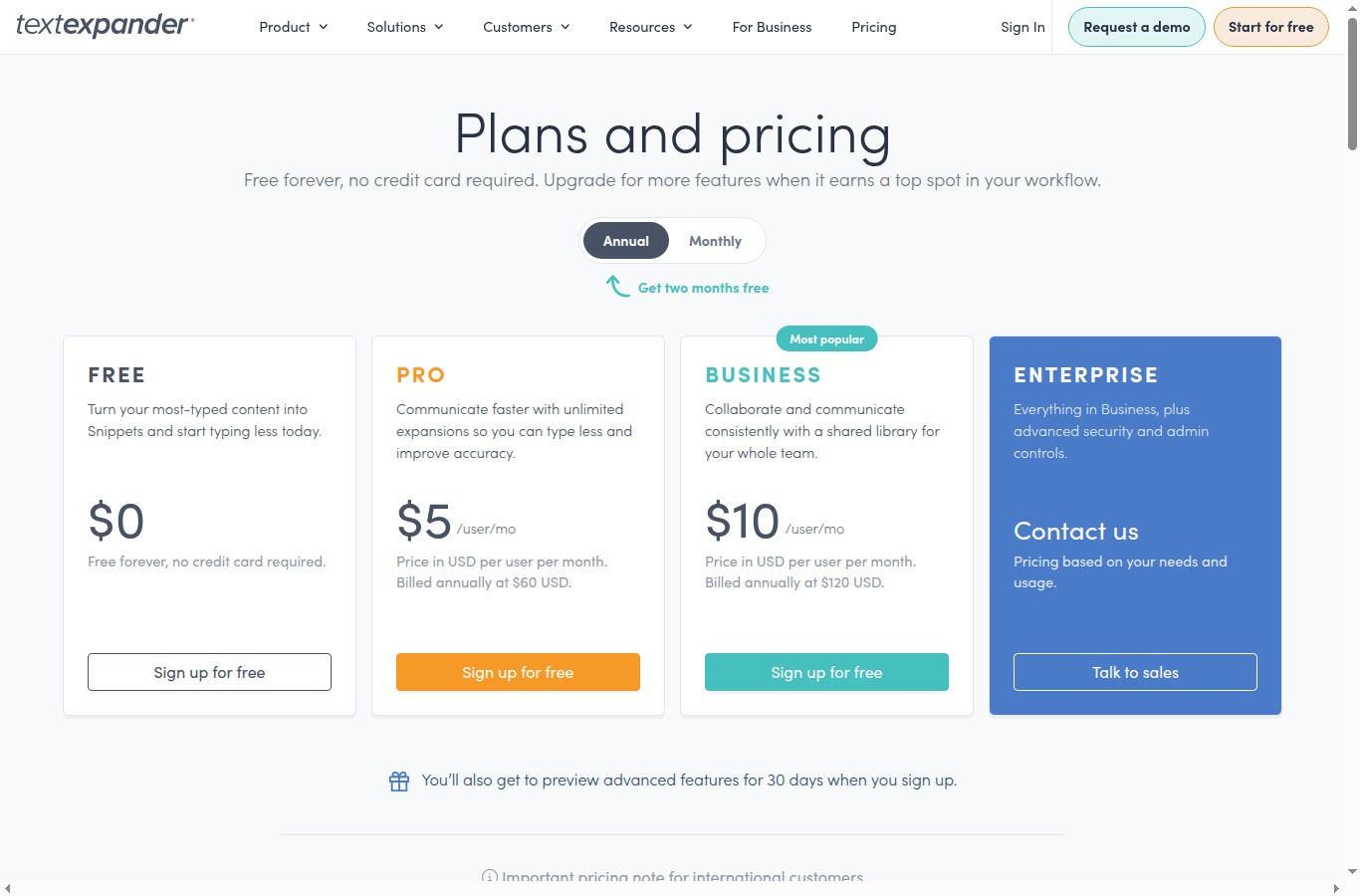
TextExpander has a free plan and three paid tiers, with every price per seat in USD, excluding tax. Prices checked 24 Nov 2026.
| Plan | Price per seat (USD) | What it includes |
|---|---|---|
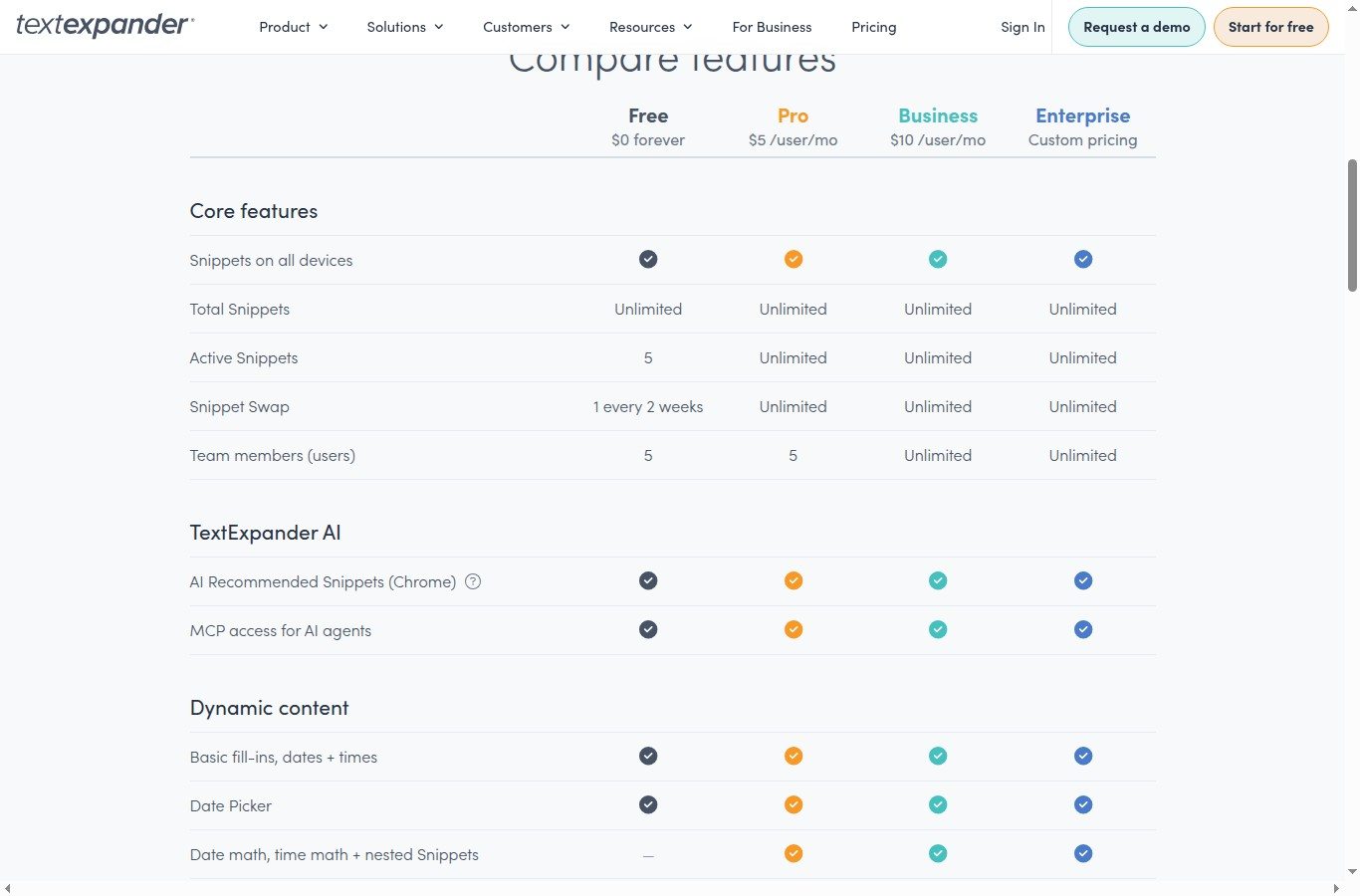
| Free | $0, free forever, no card | Unlimited stored Snippets but only 5 active, 1 swap every 2 weeks, up to 5 team members and 3 teams, basic fields, every device |
| Pro | $5 a month billed annually ($60 a year), or $6 a month billed monthly | Unlimited active Snippets, up to 5 people, unlimited teams, date math, conditional sections, JavaScript, 24 hours of activity history, priority email support |
| Business | $10 a month billed annually ($120 a year), or $12 a month billed monthly | Unlimited people, Snippet Requests, guest sharing, Google SSO, 7 days of activity history, onboarding help for eligible customers |
| Enterprise | Quote only | SSO with all providers and SCIM, granular sharing controls, custom reporting, annual invoiced billing, custom MSA and security review |
Every new account gets a 30-day preview of paid features. When it ends, the account moves to Free automatically, keeps everything and leaves 5 entries active. You can upgrade, downgrade or cancel the subscription from account settings, and annual plans run to the end of the paid term. Buyers outside the US may see VAT or GST added at checkout.
A five-person support team on Pro pays $300 a year billed annually, or $360 a year paying monthly. Pro stops at 5 people, so a sixth person moves the whole team to Business, where 12 people cost $1,440 a year billed annually or $1,728 a year paying monthly.
Ratings are high for the desktop and Chrome versions and weaker for the new iPhone app. On 24 Nov 2026 TextExpander held 9.5 out of 10 from 11 reviews and ratings on TrustRadius, and 4.6 from 126 ratings on the Chrome Web Store, where the extension lists 100,000 users.
A TrustRadius reviewer on the sales team likes dropping in the right links and consistent wording, but would like the interface to look more modern and finds team editing a bit tricky. The iPhone app had 3.3 from 11 ratings on the US App Store, where one reviewer says it interferes with dictation.
TextExpander runs on macOS 12 or later, Windows 10 or later, Chrome 109 or later, iPhone, iPad and Android, and one account syncs your library across all of them on every plan, including Free. The vendor says expansion still works when you are offline.
The biggest recent change is a redesigned desktop app. Releases 8.5 and 8.6 for Mac and PC bring a new layout, a labeled editor toolbar, full dark mode and nested lists, and the software now updates its interface in the background (IT teams can turn that off). Release 8.6 started a phased rollout on 12 Nov 2026 and reached 100% with the 18 Nov 2026 update.
On the AI side, recommendations are live in the Chrome extension, the MCP server is listed on every plan but is still in early access, and AI creation is in early access too. New iPhone, iPad and Android apps are also out.
The main cons are the small free plan and the 5-person cap on Pro.
The closest options are other text expanders, and the right one depends on your system and how much sharing you need.
TextExpander is one of the most complete text expanders for teams, with apps for every major desktop and phone, form fields, shared libraries and SOC 2 and HIPAA paperwork, from $5 per seat a month billed annually. We would pick it for a support, sales or clinical team that needs everyone sending the same wording. An individual with a few phrases should start with its free plan or a free tool, because 5 active entries run out quickly.
Yes, there is a free plan with no credit card. It stores unlimited Snippets but only 5 can be active at once, with one swap every two weeks, and new accounts get a 30-day preview of paid features first.
Pro is $5 per user a month billed annually ($60 a year) or $6 monthly, and Business is $10 per user a month billed annually ($120 a year) or $12 monthly. Enterprise is quote only. Prices are in USD and exclude tax.
Espanso is a free, open source text expander for Linux, macOS and Windows. Mac users who already run Raycast can also use its built-in snippets, which auto-expand by keyword.
It is used to insert text you type often, such as email replies, support answers, signatures, links and clinical notes, by typing a short abbreviation. Teams use shared Snippet libraries to keep wording consistent.
Yes. The iPhone and iPad app adds its own keyboard with swipe typing, and the Android app works with your existing keyboard. Both are included on every plan, including Free, and sync with Mac, Windows and Chrome.
Yes, the vendor says TextExpander complies with the HIPAA Security, Privacy and Breach Notification rules and offers a BAA to customers who need one. It also holds SOC 2 and SOC 3 certification.
We may earn a commission when you buy through links on SaaSPic. It never changes our verdicts or the price you pay. Affiliate disclosure
Add this badge to your website so your visitors can read this independent review in one click.
 8.1/10
Keyboard launcher for Mac and Windows with clipboard history, snippets, window management, thousands of extensions and built-in AI.
 8.4/10
Scheduling software that lets people book time with you through a link, with team routing, reminders, payments and AI meeting recaps.
 8.3/10
Web booking page and scheduler that syncs your calendars and lets clients book and pay for sessions, packages and subscriptions.
 8.1/10
Time tracker and timesheet app for teams, with a free plan and per-seat paid tiers for invoicing, approvals and scheduling.