 6.4/10
German maker of one-click Windows utilities such as PC Fresh, WashAndGo, SSD Fresh and AntiRansomware.


Windows defragmentation and drive optimization suite for HDD, SSD and NVMe, with automatic, boot-time and health tools.
We may earn a commission when you buy through our links. How this works
A thorough Windows drive optimizer with automatic and boot-time optimization, drive health and cleanup tools for a one-time price. Pick it for hard drives or servers, and skip it on SSD-only PCs where Windows' free optimizer is enough.
Best for: Windows users and admins optimizing hard drives and servers
7.0/10 Good, with trade-offs. The overall score is our judgment against the questions we ask of every tool, not an average. How we score
| Question | Score | Why |
|---|---|---|
| Does the jobWhat it actually does for the task it is sold for, and where it falls short. | 7.8 | Covers HDD defragmentation, SSD and NVMe optimization, boot-time and background optimization, drive health and cleanup tools, per O&O's product page and blog. |
| Ease of useSetup needed and how quickly you get something useful done. | 7.2 | Version 32 adds a guided interface with recommendations and automatic optimization, though a Trustpilot reviewer found the older method names confusing. |
| Pricing and limitsWhat you pay at a realistic size, including caps, add-ons and deal limits. | 7.0 | A one-time $29.95 for one PC with a 30-day trial, but major upgrades cost extra and there is no home multi-PC pack listed. |
| Reliability and supportUpdate pace, known problems and how support responds. | 5.6 | Free support lasts 30 days, Software Advice rates support 3.0 from one review, and Trustpilot reviewers call support defensive. |
| Fit against alternativesHow it compares with the alternatives for the people it is aimed at. | 6.6 | More complete than Windows Defragment and Optimize Drives and Auslogics Disk Defrag, but the free Windows tool covers basic SSD maintenance. |
O&O Defrag is a paid defragmentation and drive optimization program from O&O Software that keeps hard disks, SSDs and NVMe storage organized, mostly automatically in the background. It suits Windows 10 and 11 users, small offices and IT admins who want more control than the built-in optimizer, with a 30-day free trial.
O&O Defrag is a defragmentation tool and PC optimization suite made by O&O Software GmbH, a Berlin software company whose copyright line runs from 1997. The current version, O&O Defrag 32, launched on 16 Sep 2026 with a redesigned interface, a benchmark tool and boot-time optimization.
It comes in a Professional Edition for individual PCs and a Server Edition for servers and company workstations. O&O also sells other Windows utilities, such as the O&O PowerPack bundle, but Defrag is its long-running flagship.
O&O Defrag fits people who want their storage optimized automatically and in more depth than the operating system does by default.
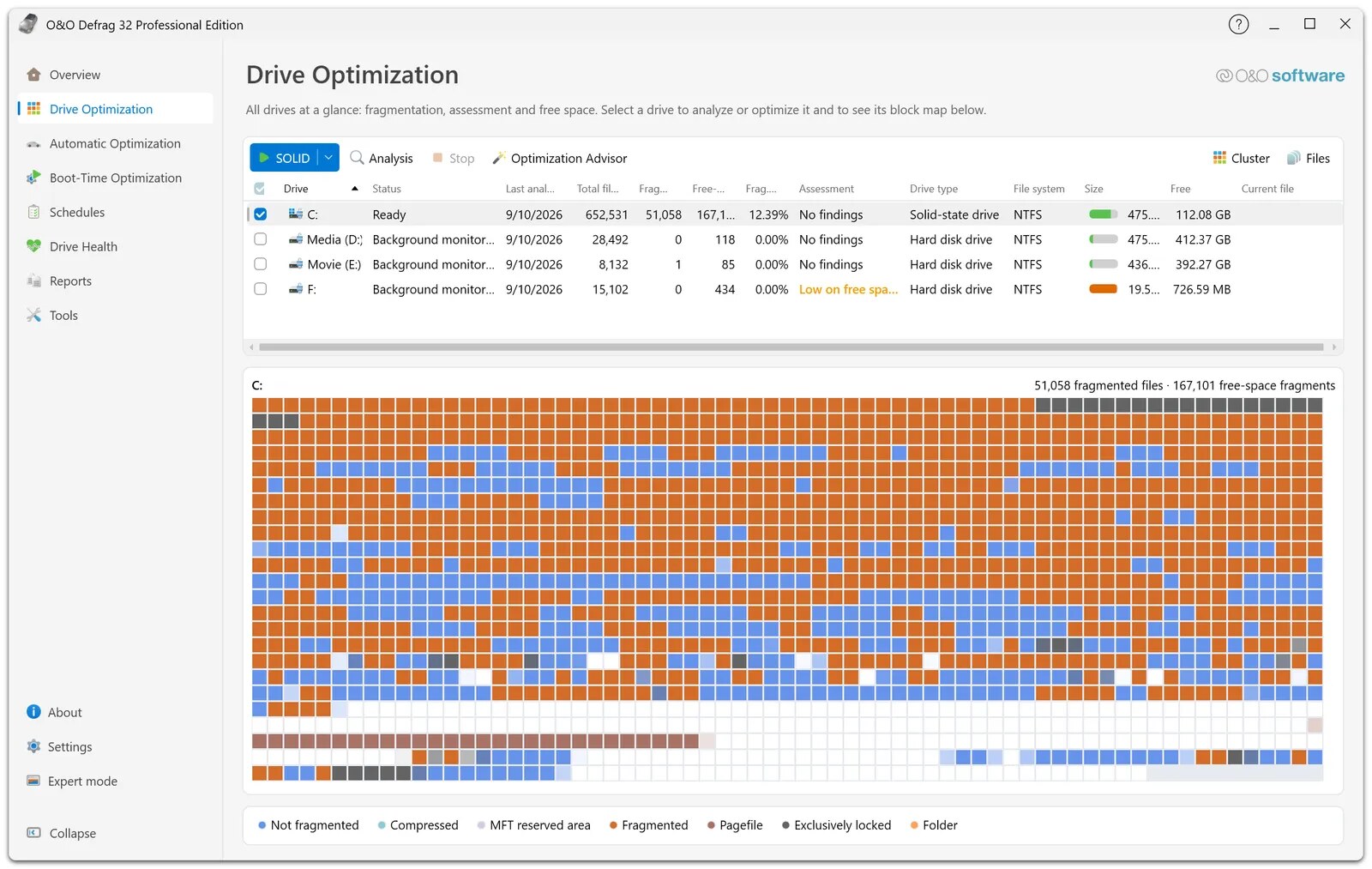
O&O Defrag analyzes each drive, detects the hardware type (HDD, SSD or NVMe), and applies a suitable method to reduce fragmentation and restore speed, either on demand or fully automatically in the background.
The software uses different methods depending on the drive type, and in the classic view you get extensive configuration options to pick them yourself.
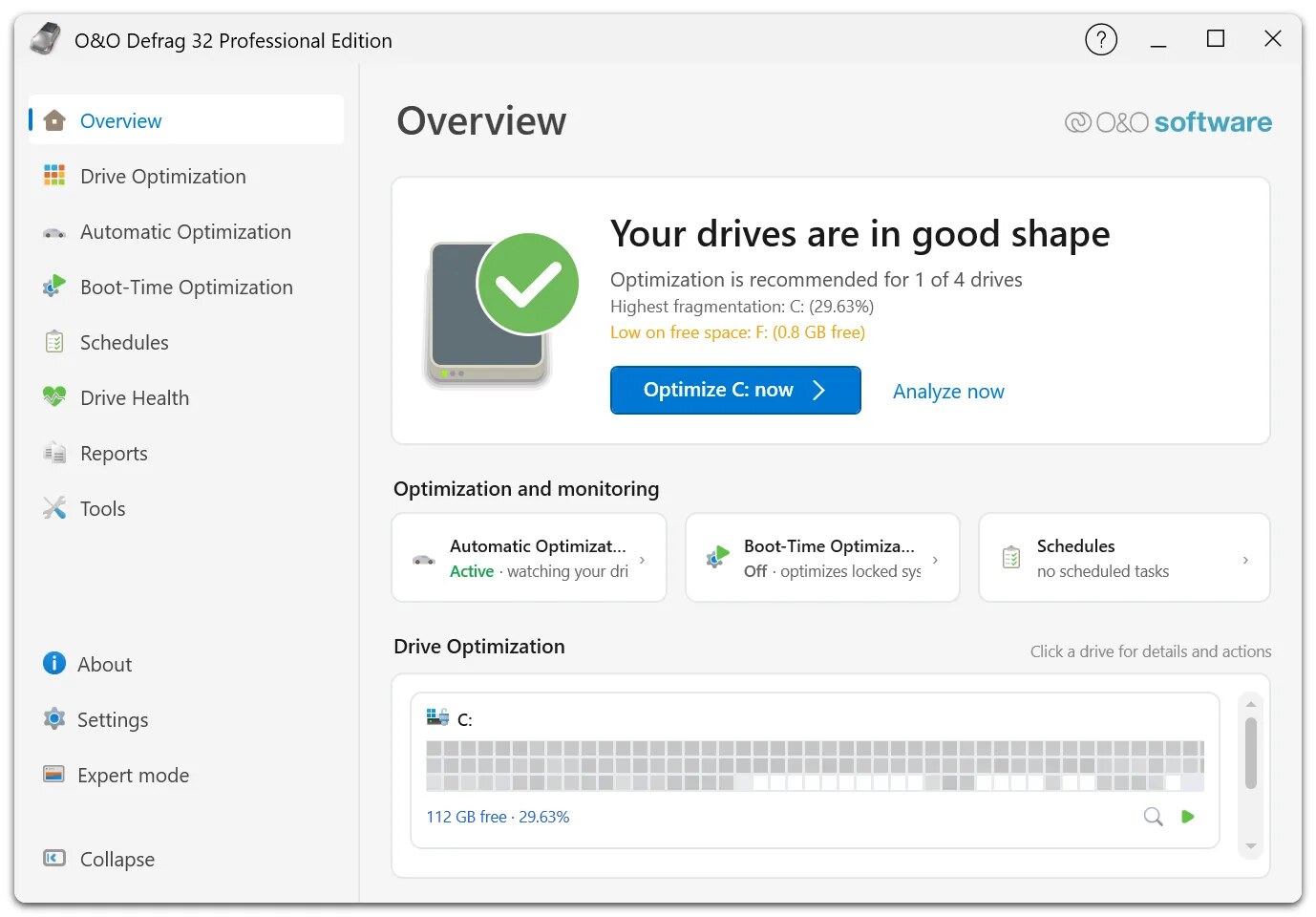
Automatic optimization runs in the background, and O&O ActivityMonitor reduces its activity when other applications need the PC's performance. You can also set schedules, analyze several volumes at once and read reports on what was done.
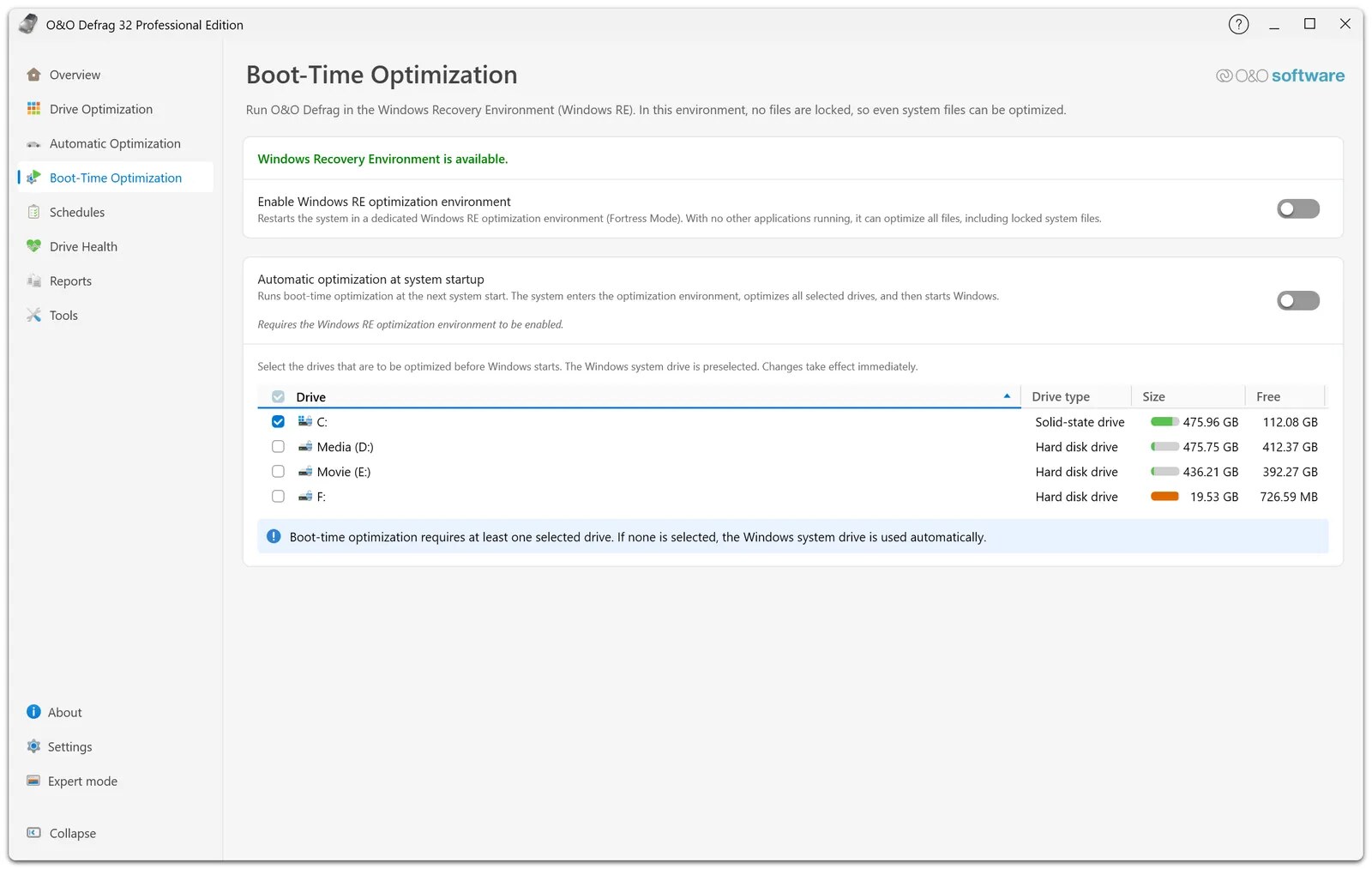
Boot-time optimization handles files that are locked during normal use, such as system files, by running in the Windows Recovery Environment before the system starts. For larger jobs, O&O IntensiveOptimize runs in a separate environment and also works on BitLocker-encrypted drives.
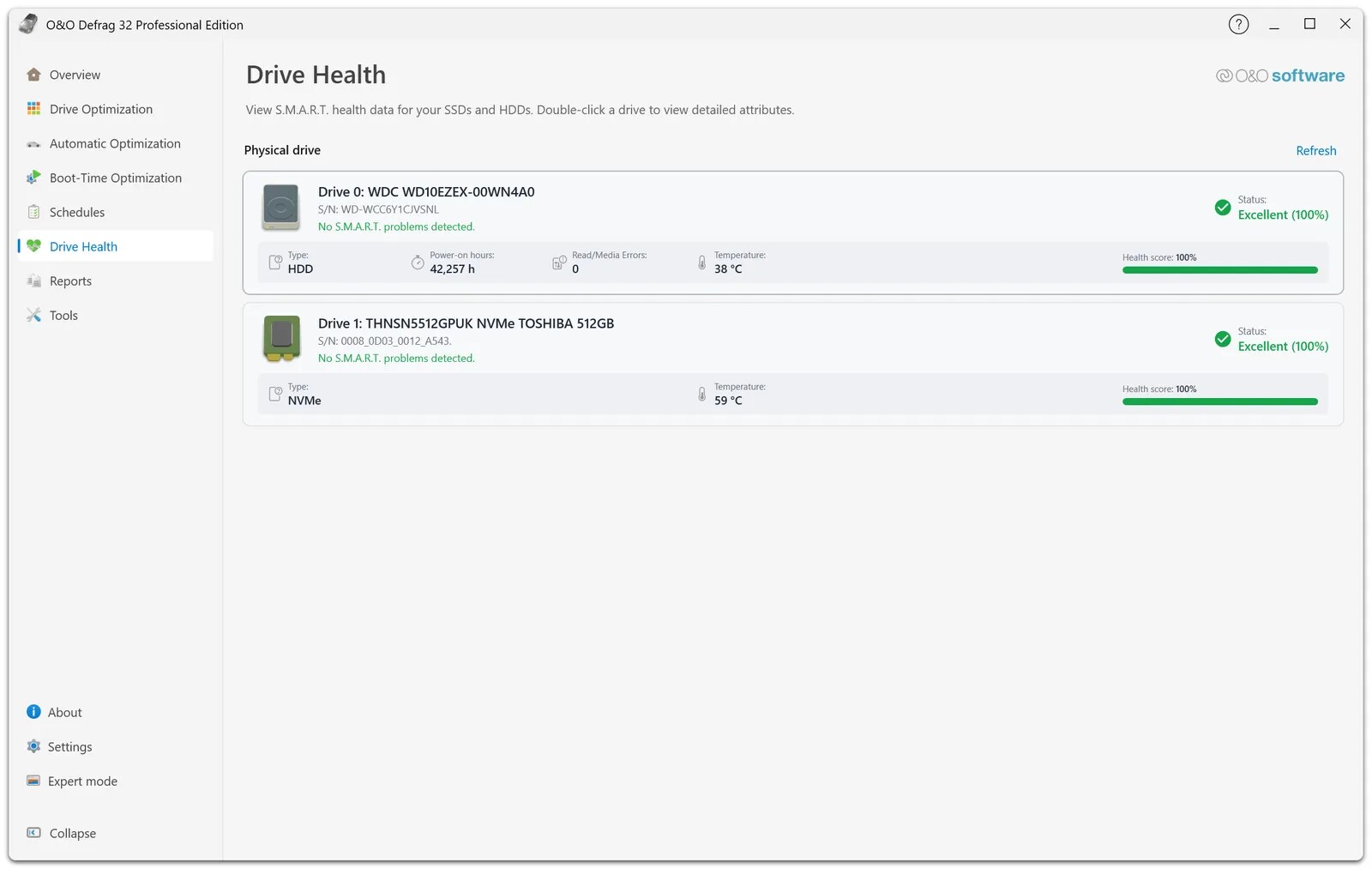
Version 32 has a new user interface with a guided tour, recommendations and an Overview screen, and an Expert Mode that switches back to the classic interface. The Drive Health page reads S.M.A.R.T. data and shows a health score, temperature and errors for each SSD, HDD and NVMe drive.
The program bundles several extra tools that go beyond defragmentation and help speed up start times.
O&O Defrag 32 Professional Edition costs $29.95 once for one PC (shown as €29.90 on the euro product page), with no subscription, a 30-day free trial and a 30-day money-back guarantee. The Server Edition starts from €299. Prices checked 12 Nov 2026.
| Edition | Price | What it includes |
|---|---|---|
| 30-day trial | Free | Full O&O Defrag 32 Professional Edition test on your current Windows system for 30 days |
| Professional Edition | $29.95 once (list $49.95), or €29.90 (list €49.90) | 1 PC, buy once and use always, Windows 10 and 11, free technical support for the first 30 days, prices include VAT |
| Server Edition | From €299 once | For Windows servers and company workstations, with advanced management and network features, Windows Server 2016 through the current release |
Licenses are tied to a version. Existing customers enter the serial number of an older O&O Defrag on the upgrade page to get a personal upgrade offer, and the FAQ says version 32 replaces earlier versions on the website.
A single Windows PC costs $29.95 once at the current price, and three home PCs come to about $90, since the product page lists only a one-PC license. Moving to the next major version later means paying for an upgrade.
Public review volume for O&O Defrag is small. On Software Advice it has a single review rated 5.0, scoring 4.0 for ease of use, 4.0 for value, 3.0 for customer support and 4.0 for functionality (Nov 2026).
On Trustpilot, reviews of O&O Software as a whole are mostly negative. A December 2021 reviewer who liked the defrag tool disliked that each license only covers one version and that the method names were confusing, and a July 2022 reviewer called the defragger too slow and support defensive. Other complaints there concern O&O's backup and erase tools rather than Defrag.
O&O Defrag is a desktop program for Windows only, available in English and German, and you install it from a 63 MB installer.
O&O Defrag 32, announced on the O&O blog on 16 Sep 2026, is the biggest update in years. It brought the redesigned interface with Expert Mode, O&O SpeedCheck, a new boot-time optimization page that runs in Windows RE, a S.M.A.R.T. health indicator, BitLocker support for boot-time and IntensiveOptimize jobs, and an improved O&O VisualDisk.
The main drawbacks are how much it adds on modern SSD-only PCs, defrag speed on badly fragmented drives, and how licenses and upgrades work.
The closest alternatives are the free built-in tool and other drive optimization utilities, and the choice depends on your drive type and budget.
O&O Defrag 32 is a thorough, well-equipped optimizer for modern Windows PCs, with automatic background optimization, boot-time defragmentation, drive health and useful cleanup tools for a one-time $29.95. I would pick it for PCs with hard drives or for admins who need the Server Edition's scheduling. On an SSD-only home PC, the free built-in optimizer covers the basics, so try the 30-day trial before buying.
No, but you can test O&O Defrag 32 Professional Edition free for 30 days. After that it costs $29.95 once for one PC (€29.90 on the euro page), with no subscription and a 30-day money-back guarantee.
O&O says yes. It detects SSD and NVMe drives and uses its SOLID/Quick and SOLID/Complete methods, designed to avoid unnecessary writes, plus TRIM, instead of classic hard drive defragmentation.
The Professional Edition is for individual workstations on Windows 10 and 11. The Server Edition, from €299, also runs on Windows Server 2016 through the current release and adds advanced management and operating options for companies.
It does more. O&O lists fully automatic background optimization, boot-time defragmentation of locked system files, several methods, SSD-specific processes and optimization with as little as 5% free space, while Windows offers weekly analyze and optimize.
Not major versions. You buy a license for the current version, and owners of older versions enter their serial number on the upgrade page to get a personal upgrade offer.
The Professional and Workstation Editions run on Windows 11 and Windows 10. The Server Edition runs on Windows 11, Windows 10 and Windows Server 2016, 2019, 2022 and the current Windows Server release, and O&O Defrag also supports ARM64 PCs.
We may earn a commission when you buy through links on SaaSPic. It never changes our verdicts or the price you pay. Affiliate disclosure
Add this badge to your website so your visitors can read this independent review in one click.
 6.4/10
German maker of one-click Windows utilities such as PC Fresh, WashAndGo, SSD Fresh and AntiRansomware.
 8.4/10
Scheduling software that lets people book time with you through a link, with team routing, reminders, payments and AI meeting recaps.
 8.3/10
Web booking page and scheduler that syncs your calendars and lets clients book and pay for sessions, packages and subscriptions.
 8.1/10
Time tracker and timesheet app for teams, with a free plan and per-seat paid tiers for invoicing, approvals and scheduling.