 8.3/10
AI voice platform for text to speech, voice cloning, dubbing, music and sound effects, plus voice agents and an API for developers.


Windows and Mac desktop AI voice studio for local text to speech, voice cloning, voice design and audiobooks, paid once.
We may earn a commission when you buy through our links. How this works
FusionVoice suits creators and small teams who make voiceovers every week on Windows or an Apple Silicon Mac and want to stop paying per character. Anyone who needs top cloud voice quality, browser access, team features or an API should choose ElevenLabs or Murf AI.
Best for: Creators making frequent voiceovers on a Windows PC or Apple Silicon Mac
6.8/10 Good, with trade-offs. The overall score is our judgment against the questions we ask of every tool, not an average. How we score
| Question | Score | Why |
|---|---|---|
| Does the jobWhat it actually does for the task it is sold for, and where it falls short. | 7.6 | Covers text to speech, voice cloning, voice design, multi-speaker Studio projects and audiobooks across seven engines, per the maker's site and screenshots. |
| Ease of useSetup needed and how quickly you get something useful done. | 6.8 | Quick TTS is a single screen of engine, voice and Generate, but larger engines are separate downloads and Qwen3-TTS needs an NVIDIA GPU on Windows. |
| Pricing and limitsWhat you pay at a realistic size, including caps, add-ons and deal limits. | 8.2 | $67 once (or $27 at the founder price) is about three months of ElevenLabs Creator at $22 a month, with no character limits locally. |
| Reliability and supportUpdate pace, known problems and how support responds. | 5.4 | A 30-day full refund and free v1.x updates lower the risk, but the product is at version 1.0 with no independent ratings. |
| Fit against alternativesHow it compares with the alternatives for the people it is aimed at. | 6.3 | ElevenLabs and Murf AI offer stronger cloud voices, browser access and APIs, so FusionVoice fits best for frequent local production. |
FusionVoice is a desktop AI voice studio for Windows and Mac that generates speech, clones voices and designs new ones on your own computer for a one-time price. It suits creators, course makers, podcasters and small marketing teams who make a lot of voiceover and are tired of per-character billing.
FusionVoice is a one-time-purchase text to speech app that runs locally, made by Dave Guindon, the developer behind the AppBreed software range. The pitch is simple: pay once, generate as much audio as you like on your own machine, and pay per use only when you pick a premium cloud engine.
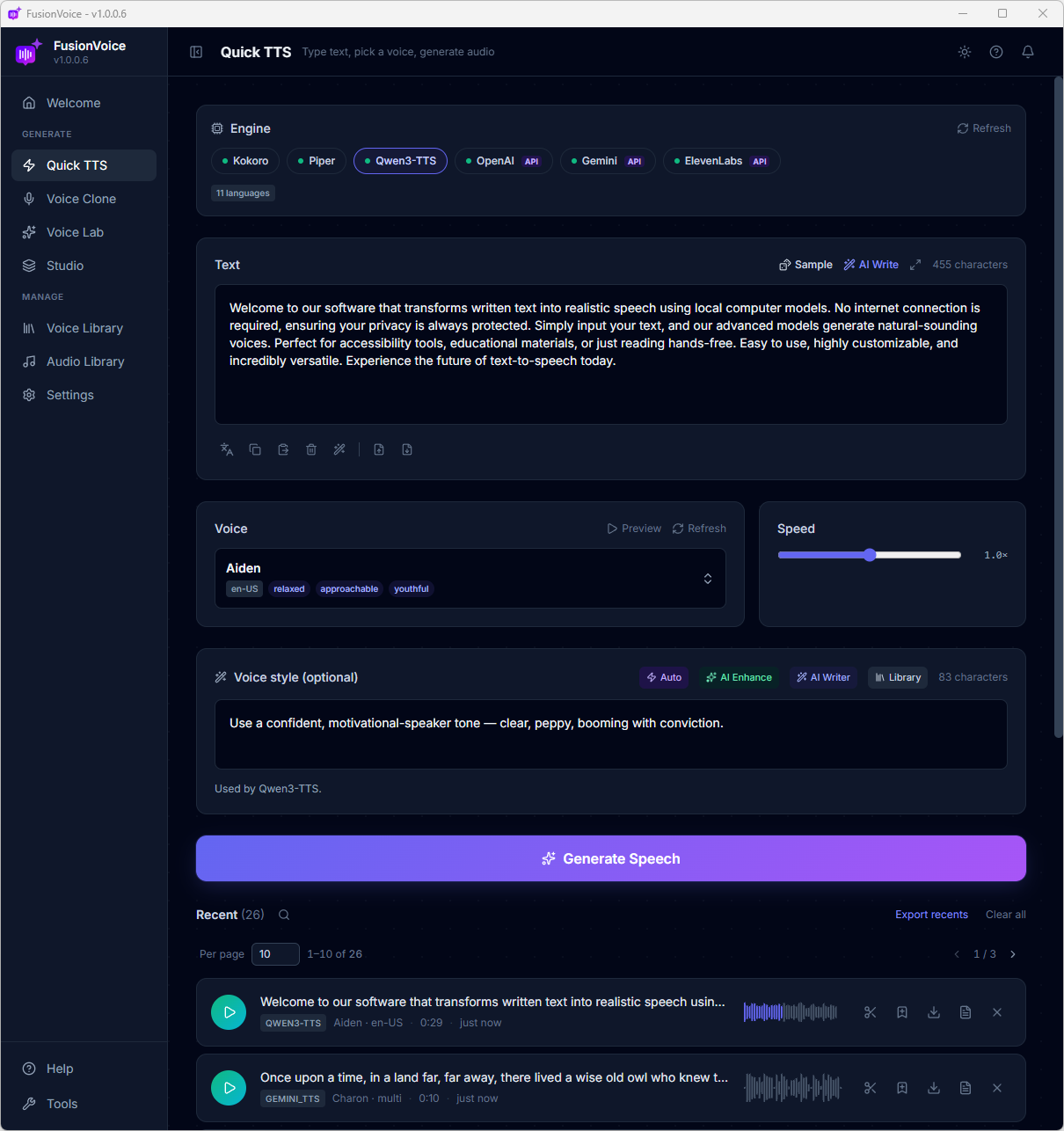
The app bundles seven voice engines. Four run locally for free (Kokoro, Piper, OmniVoice and Qwen3-TTS), and three are cloud engines on your own API key (OpenAI, Gemini and ElevenLabs).
FusionVoice fits people who make voiceovers often enough that a monthly subscription adds up: YouTube creators, course producers, indie audiobook makers and agencies. The license allows commercial use and up to 10 installs, so a small team can share one purchase.
Skip it if you are on Linux, an Intel Mac, an iPad or a Chromebook, because version 1 supports only Windows 10 and 11 and macOS 14 or later on Apple Silicon. Skip it too if you want a browser tool you can open anywhere, team collaboration in the cloud, or an API for developers.
The app is split into five tools, plus a Voice Library for every voice you clone or design and an Audio Library for every render, stored as plain files on your disk. A typical job runs from a script in Quick TTS or Studio, through a voice choice, to a rendered file you trim and save.
Quick TTS is the fast path: paste a script, pick an engine and a voice, and generate. The site lists 135 voices across six engines here, 54 of them on Kokoro. The same screen has speed control, background music, an AI Write button that drafts a script, local translation into 200+ languages, a trim tool, and voice style directions on engines that support them.
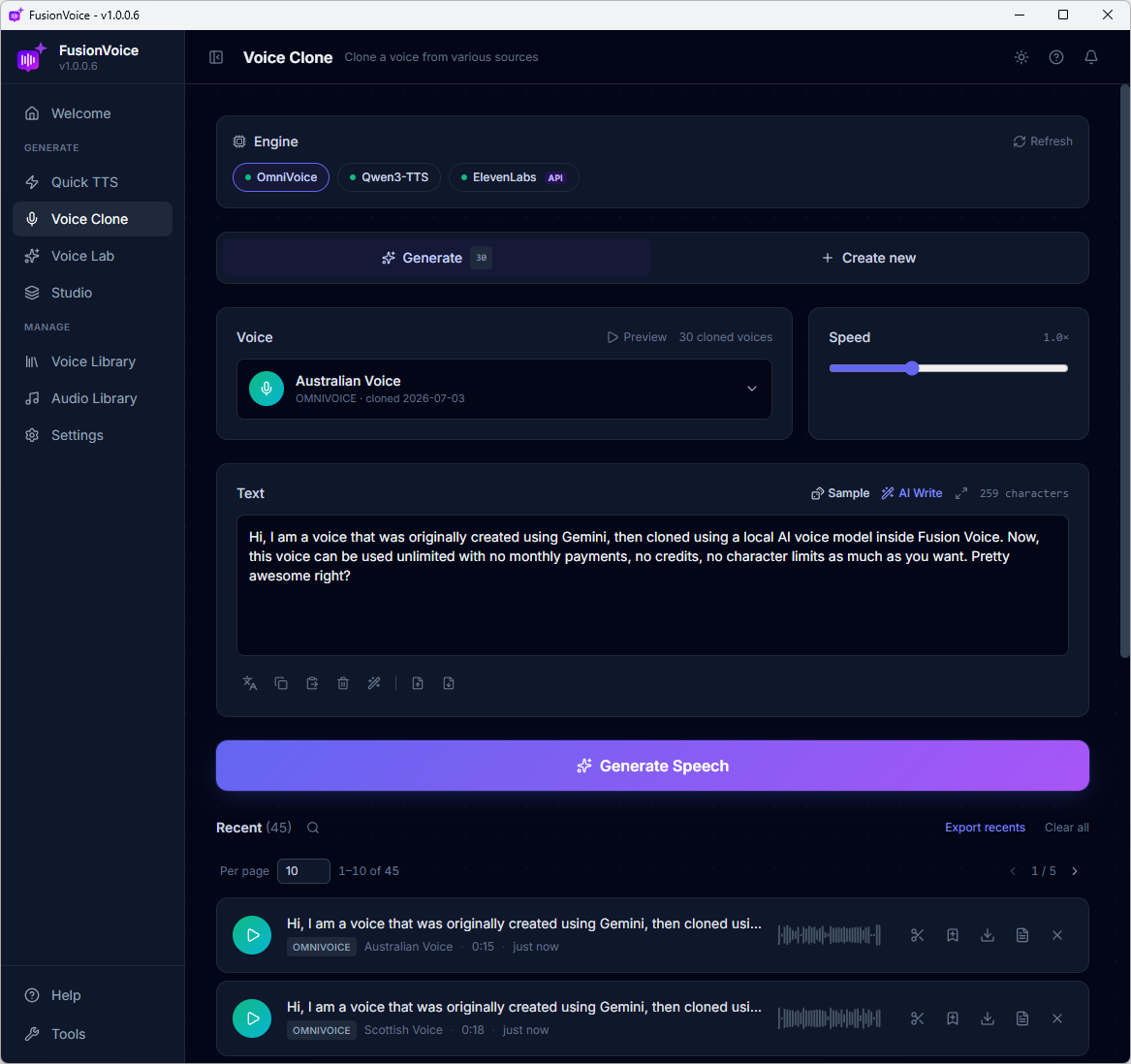
Voice Clone builds a reusable voice from a short sample, which the vendor puts at 3 to 10 seconds of audio. You can record your mic, import a WAV or MP3, pull audio from a YouTube, Vimeo or podcast link, or use a take from your Audio Library. Two clone engines run locally (OmniVoice and Qwen3-TTS) and keep the clone on your disk; ElevenLabs cloning is available with your own key. The FAQ says you must get consent before cloning anyone else's voice.
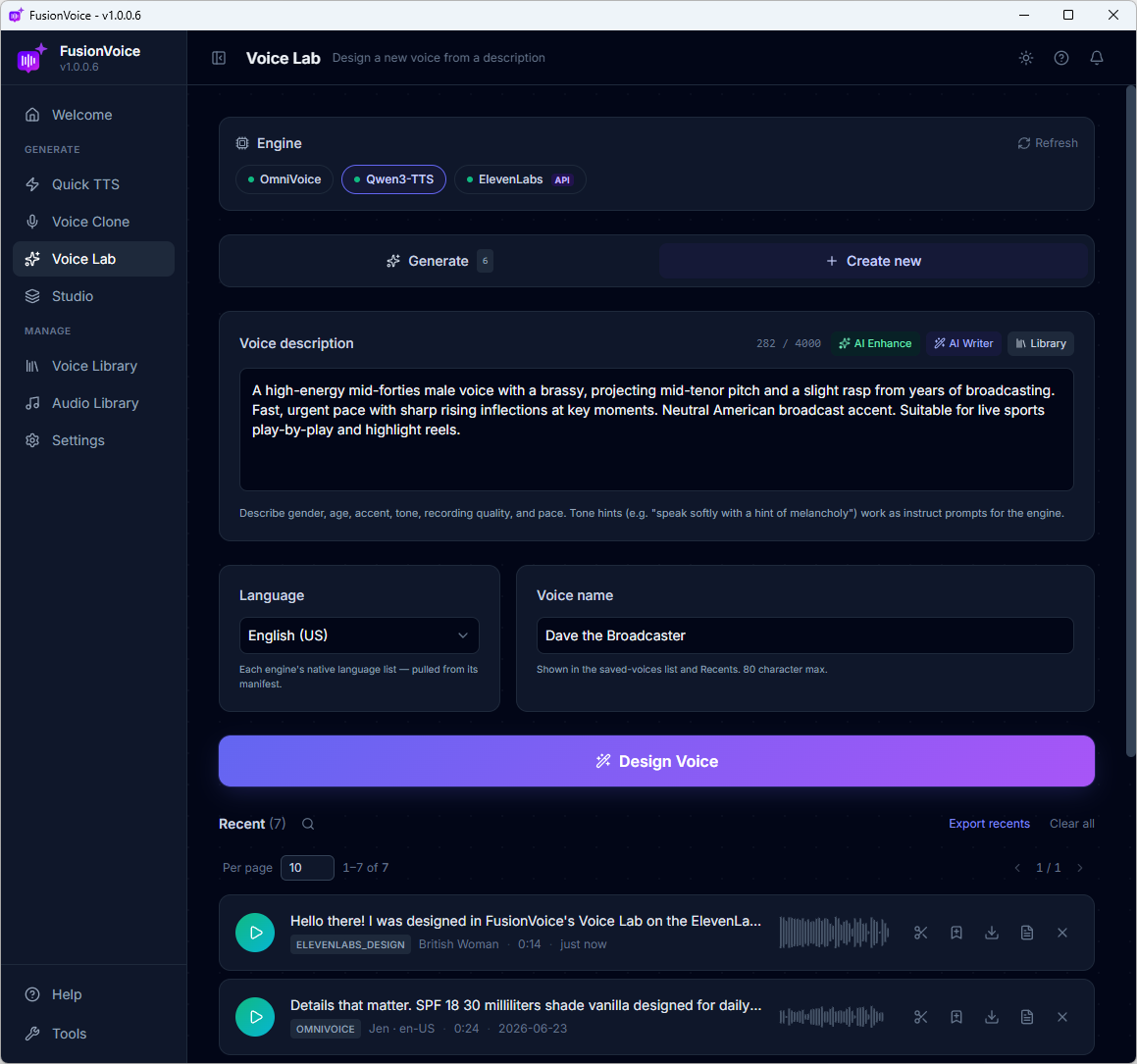
Voice Lab designs a new voice from a written description, with no reference audio. On Qwen3-TTS and ElevenLabs you can write up to 4,000 characters of direction; on OmniVoice you click together gender, age, pitch and one of ten accents. Analyze Audio listens to 30 seconds of a clip and writes a description you can use to design an original voice instead of cloning one.
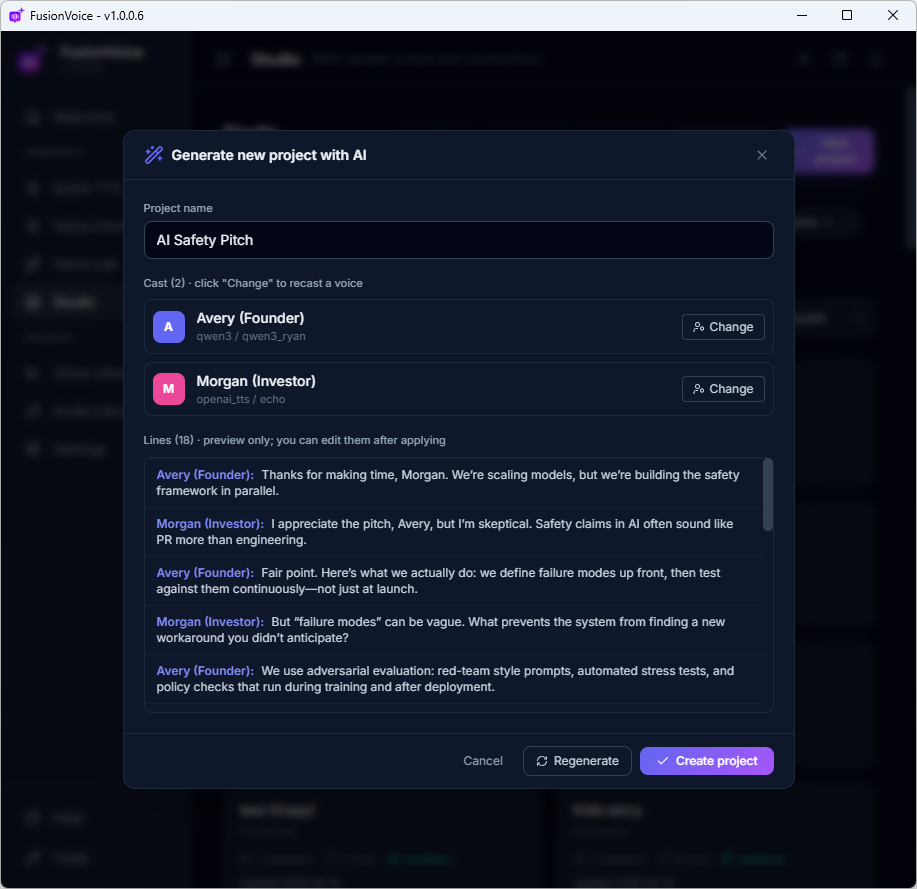
Studio is the multi-speaker tool for podcasts and dialogues. Describe a production, let the AI write and cast it, then edit lines, add music and sound effects, and render one finished file. The Audiobooks tool takes a book, detects the narrator and characters, casts voices and renders chapter by chapter.
FusionVoice is a one-time purchase in US dollars with no subscription and no per-character billing on the local engines. Prices checked 4 Nov 2026 on the maker's own site.
| Option | Price | What it includes | Terms |
|---|---|---|---|
| FusionVoice v1, regular price | $67 one-time | All five tools, four local engines, cloud engines on your own API key, commercial use, up to 10 installs | Free v1.x updates, 30-day money-back guarantee |
| FusionVoice v1, phase 1 founder price | $27 one-time with the launch discount applied at checkout | Same app and license as the regular price | The site says founder pricing lasts until version 1.1 is released |
| Cloud engines (optional) | Billed by OpenAI, Gemini or ElevenLabs at their own rates | Premium voices and ElevenLabs cloning through your own account | FusionVoice adds no markup |
There is no free trial. Instead there is a 30-day money-back guarantee: the FAQ says you email support within 30 days and get a full refund for any reason. Updates within version 1 are free, and the vendor says it typically ships 30 to 80 updates over one to two years per major version. A future version 2, if it ships, would be a separate purchase or paid upgrade.
A typical voiceover job on the local engines costs nothing beyond the purchase price, because the app has no credits or character limits for Kokoro, Piper, OmniVoice and Qwen3-TTS. A weekly YouTube voiceover, a 20-lesson course or a full audiobook all run on your own hardware.
For comparison, ElevenLabs lists its Creator plan at $22 a month with 121k credits and Professional Voice Cloning. A year of that is $264, so FusionVoice at $67 costs about three months of Creator, or about five weeks at the $27 founder price. Cloud engines still bill on your own key, so the saving holds only if the local voices suit your work.
There is no independent review profile with a rating to weigh yet, as the product is at version 1.0. The maker's page shows ten five-star quotes from named customers and beta testers, one calling it "the best desktop alternative to ElevenLabs" they have seen. Treat these as the vendor's selected testimonials; several come from long-time buyers of the developer's other apps.
These are the facts the maker publishes about the app and its requirements.
FusionVoice is a new launch. The site lists the current version as 1.0, its screenshots show build 1.0.0.6, and the launch is running a phase 1 founder price that the maker says ends when version 1.1 ships.
The biggest limit is platform support. Mac users need Apple Silicon and macOS 14, and there is no web or mobile version, so you cannot generate audio away from your own computer.
The free local engines carry the value claim, so expect a quality gap against premium cloud voices on some jobs. The maker itself pitches the cloud engines for "premium polish", and its FAQ says quality varies on low-resource languages.
Finally, it is a young product from a one-developer brand. There is no long update history or third-party rating yet, and version 2 would be a paid upgrade.
These tools do the same job of generating, cloning or designing AI voices, and each suits a different buyer.
FusionVoice packs a lot into a one-time price: local text to speech, voice cloning, voice design, multi-speaker Studio projects and audiobooks, with cloud engines as an optional extra on your own key. I would pick it if you make voiceovers every week on a Windows PC or an Apple Silicon Mac and want to stop paying per character. If you need the very best voices, browser access, team features or an API, ElevenLabs or Murf AI is the safer choice.
Yes. FusionVoice is a one-time payment of $67, with a phase 1 founder price of $27 that the maker says lasts until version 1.1. There is no subscription and no per-character billing on the local engines.
Yes, the four local engines (Kokoro, Piper, OmniVoice and Qwen3-TTS) run on your computer and work offline. The OpenAI, Gemini and ElevenLabs engines need an internet connection and your own API key.
Yes. Voice Clone builds a reusable voice from a short sample recorded on your mic, imported as WAV or MP3, or pulled from a link. Local clones stay on your disk, and you need consent to clone anyone else's voice.
No. Instead there is a 30-day money-back guarantee, and the FAQ says you get a full refund for any reason if you email support within 30 days.
No. Version 1 supports Windows 10 and 11 and macOS 14 or later on Apple Silicon only. Linux, iPad, Android and Chromebook are not supported.
We may earn a commission when you buy through links on SaaSPic. It never changes our verdicts or the price you pay. Affiliate disclosure
Add this badge to your website so your visitors can read this independent review in one click.
 8.3/10
AI voice platform for text to speech, voice cloning, dubbing, music and sound effects, plus voice agents and an API for developers.
 7.4/10
AI voice platform with a voiceover studio, AI dubbing and a fast text to speech API, with 200+ voices across 35+ languages.
 6.1/10
AI text-to-speech with 800+ voices and emotional styles, bundled with an AI content writer, sold for a one-time price.
 6.9/10
AI voice generator with text to speech, voice cloning, talking photo avatars, video translation and transcription.
| Tool | Score | From | Free plan | Best for |
|---|---|---|---|---|
| FusionVoice | 6.8/10 | $27 one-off | No | Creators making frequent voiceovers on a Windows PC or Apple Silicon Mac |
| ElevenLabs | 8.3/10 | $6/mo | Yes | Creators and product teams producing AI voiceovers and dubbing at volume |
| Murf AI | 7.4/10 | $19/mo | Yes | Training, slide and explainer voiceovers |
| HumanTalk | 6.1/10 | $49 one-off | No | Budget creators who want voiceovers without a monthly fee |
| DupDub | 6.9/10 | $15/mo | Yes | Creators who want voiceovers and talking avatars in one tool |
 8.4/10
Voice AI platform with Sonic text to speech, Ink speech to text and Managed Agents for phone voice agents via API.
 8.3/10
AI video and image generator running Kling's own models, with keyframes, character references, native audio, motion control and an API.
 8.0/10
AI video platform for avatar presenter videos, voice cloning and lip-synced video translation in 175+ languages and dialects.