 7.2/10
AI meeting notetaker and transcription tool with 58 languages, bilingual transcription, AI summaries and a bot-free recorder.

Windows and Mac app that transcribes audio and video locally with Whisper, translates into 204 languages offline and runs AI prompts.
We may earn a commission when you buy through our links. How this works
Fusion Scribe suits creators, agencies and researchers who transcribe large volumes or private recordings and want to pay once instead of per minute. Teams that need meeting bots, shared cloud workspaces or a proven track record should pick a cloud transcription service.
Best for: Creators bulk transcribing without per-minute fees
6.8/10 Good, with trade-offs. The overall score is our judgment against the questions we ask of every tool, not an average. How we score
| Question | Score | Why |
|---|---|---|
| Does the jobWhat it actually does for the task it is sold for, and where it falls short. | 7.6 | Local Whisper transcription, offline NLLB translation into 204 languages, bulk downloads and AI prompts are all in one app, per the sales page. |
| Ease of useSetup needed and how quickly you get something useful done. | 7.0 | The vendor says it auto-detects hardware and language, and the screenshots show tabbed single and bulk workflows. |
| Pricing and limitsWhat you pay at a realistic size, including caps, add-ons and deal limits. | 8.0 | A $27 one-time launch price with no per-minute or per-word fees and a 30-day refund. |
| Reliability and supportUpdate pace, known problems and how support responds. | 5.4 | It is version 1.0 from a small developer with help desk support and no dated changelog or independent reviews. |
| Fit against alternativesHow it compares with the alternatives for the people it is aimed at. | 6.2 | It beats cloud tools such as Otter.ai on cost and privacy for bulk work but lacks their meeting bots and collaboration. |
Fusion Scribe is desktop software for Windows and Mac that transcribes audio and video locally with OpenAI's Whisper models, translates transcripts offline into 204 languages and runs AI prompts on the results. It is for creators, marketers, researchers and agencies who transcribe a lot and want a one-time price instead of per-minute fees.
Fusion Scribe is a one-time-purchase desktop app from AppBreed, the software brand of developer Dave Guindon, that combines a media downloader, a local transcription engine, an offline translator and an AI prompt tool. Because transcription and translation run on your own computer, there are no usage caps or file size limits, according to the vendor.
AppBreed is owned by Innantech Industries Incorporated of British Columbia, Canada, according to the AppBreed terms. The sales page lists the current version as 1.0. The developer says he built it for his own business after transcribing over 60 videos became too expensive.
Fusion Scribe suits YouTubers, podcasters, course creators and agencies who transcribe large batches of recordings or online videos, and anyone who cannot send sensitive audio to a cloud service. The commercial license also lets you sell transcription as a service.
Skip it if you want a meeting bot that joins Zoom or Teams calls, if you work on a Chromebook, iPad or phone, or if you need a cloud workspace where a team edits transcripts together. Medical teams looking for an AI scribe that writes into an EHR need a clinical product instead; Fusion Scribe is a general transcription tool.
The usual workflow is to load files or links, transcribe them singly or in bulk, then translate, edit, run AI prompts and export. These are the main parts, per the vendor's sales page:
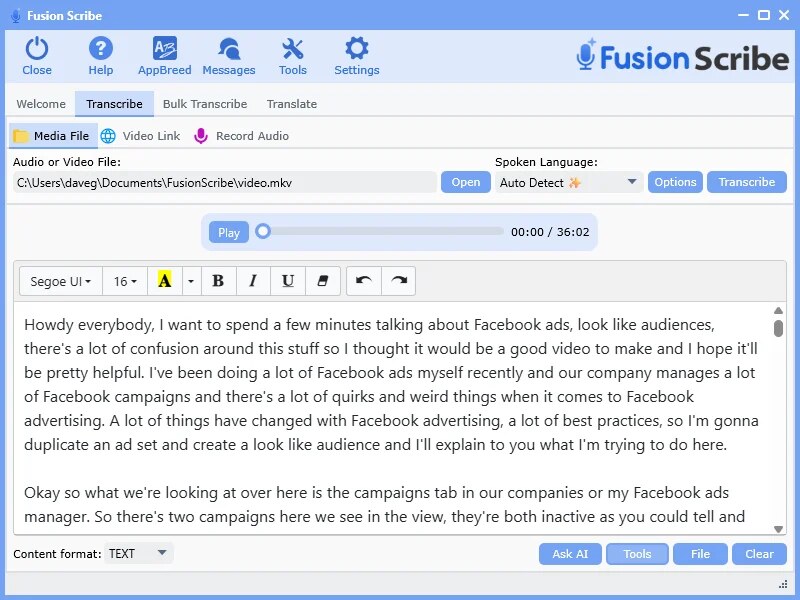
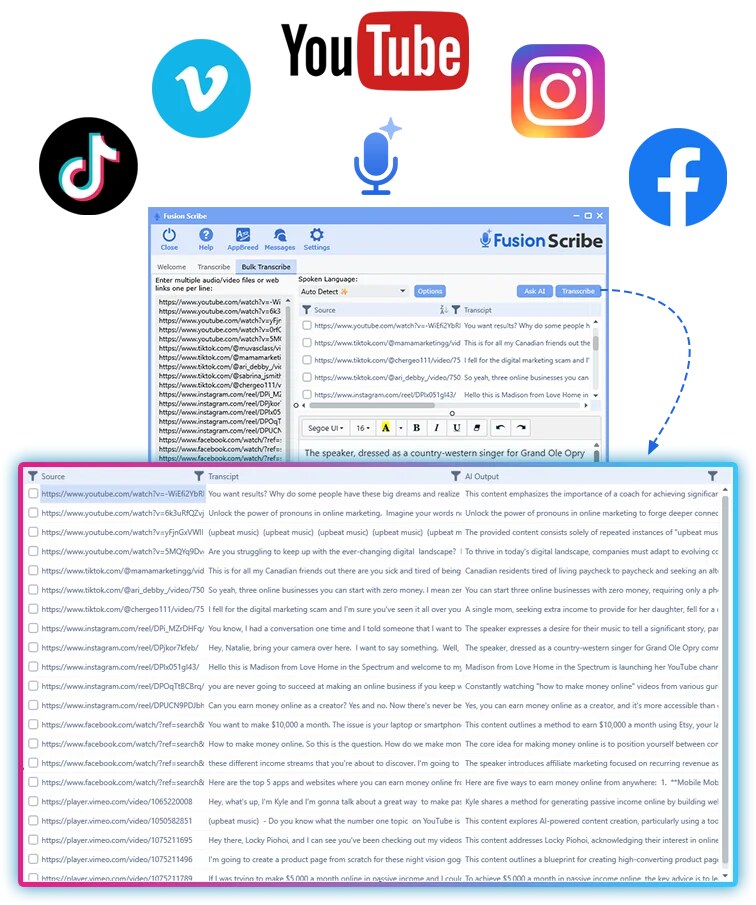
The Transcribe tab takes a media file, a video link or a live recording from your microphone. You choose a local Whisper model or an API, the spoken language can be detected automatically from more than 100, and an optional English translation is built in. Bulk Transcribe accepts an unlimited list of files or links, downloads and converts them, and saves the batch as a project you can reopen. A data grid shows every transcript, and double-clicking a row opens it in the editor with an audio player for checking.
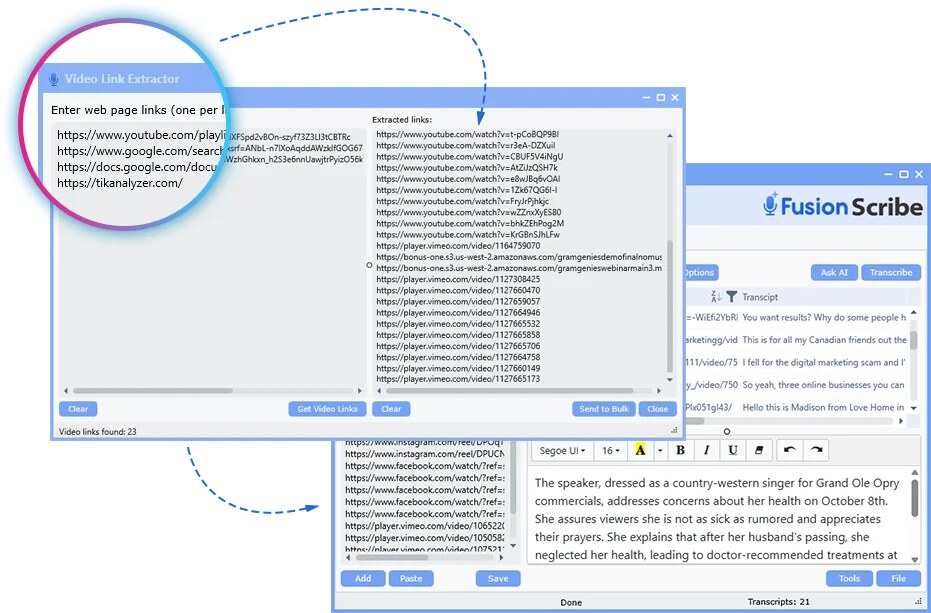
Fusion Scribe pulls video or audio from more than 1,800 websites, including playlists and channels, and can save the files to your computer. A Video Link Extractor scans pages such as YouTube playlists, Google search results or Google Docs and collects every YouTube, Vimeo or cloud-hosted video link into a list you can send to bulk transcription. It imports more than 26 audio and 31 video formats.
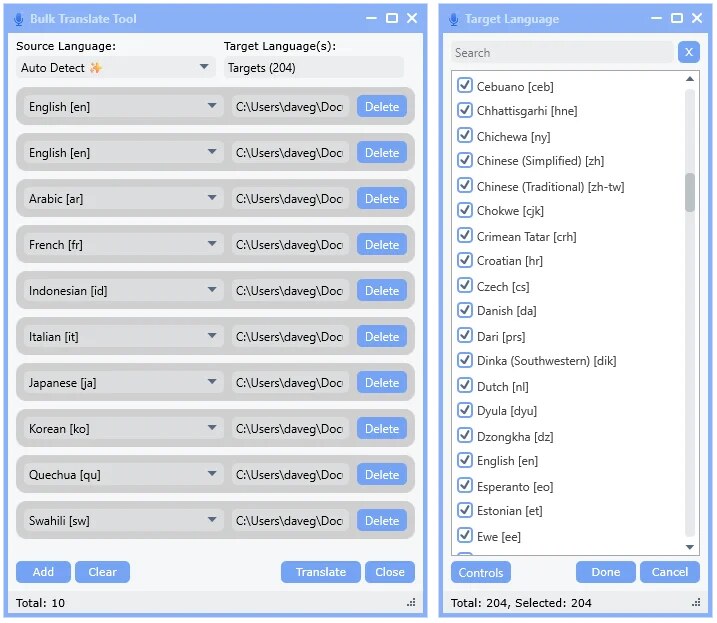
A built-in translator based on Meta's NLLB-200 model translates transcripts into 204 languages with no internet connection and no per-word fees. It auto-detects the source language, can translate into several languages at once with a separate file for each, keeps SRT and VTT timestamps intact, and has a bulk tool for whole libraries. It uses NVIDIA GPU acceleration when available.
Ask AI runs prompts on one transcript, on each row of a batch, or on all transcripts combined, for summaries, chapters with timestamps, show notes, quotes and social posts. More than 80 preloaded prompts in 10 categories are included, and you can save your own. The vendor says built-in free AI models need no API key or credits, and you can add keys for Gemini, OpenAI, Claude, Grok, Mistral, DeepSeek and Perplexity to unlock more than 25 further models.
Transcripts export as TXT, CSV, VTT, SRT or JSON. You can also import custom Whisper models and use quantized models tuned for speed, and there is an optional cloud API with 10 free hours a month.
Fusion Scribe is sold as a one-time purchase with no subscription during its launch period. Prices checked 4 Nov 2026 on fusionscribe.com:
| Plan | Price (USD) | Billing | What it includes |
|---|---|---|---|
| Fusion Scribe lifetime license (launch price) | $27, shown against a regular $67 | One-time payment | Windows and Mac app, unlimited local transcription and translation, AI tools, free updates for major version 1, 30-day money-back guarantee |
| Install allowance | Included | One-time payment | Normally 1 computer; during the promotion, an outsource license for up to 10 computers, plus a commercial license |
The vendor says the $27 founder price lasts until version 1.1 is released, and the FAQ warns that the product may move to monthly payments later. It states there are no upsells after purchase. Refunds are available within 30 days through the AppBreed support desk. Translation is included with no extra cost.
A podcaster with a 3-hour episode each week pays $27 once and then nothing per minute, because transcription and translation run locally. The real constraint is hardware: long files and big batches take longer on a computer without a capable GPU. Optional AI with your own API keys adds that provider's usage charges.
Fusion Scribe has no independent ratings on the major review platforms yet. The sales page carries many testimonials from named buyers, several of them long-time AppBreed customers, who praise the bulk transcription and the lack of usage limits; these are selected by the vendor. One reviewer says it let them cancel a Descript subscription.
These are the facts the vendor publishes:
The biggest recent addition is the offline translation engine, which the sales page labels as a new feature and the vendor's affiliate page says was just added. The Video Link Extractor and a refreshed single-file Transcribe screen also appear in images added to the site this year.
These are the points to weigh before buying:
These tools also turn audio and video into transcripts, with different trade-offs on cloud versus local processing:
Fusion Scribe packs a lot into a cheap one-time license: local Whisper transcription, bulk downloads, offline translation into 204 languages and AI prompts, with no per-minute fees. I would pick it if you transcribe large volumes or private recordings on a decent Windows or Mac machine. If you need meeting bots, team collaboration or a mature product with a track record, a cloud service is the safer choice.
The sales page shows a $27 one-time launch price against a regular $67, which the vendor says lasts until version 1.1. It includes free updates for version 1 and a 30-day money-back guarantee.
Yes. Transcription runs locally with Whisper models and translation runs locally with Meta's NLLB-200, so audio does not have to leave your computer. Downloading videos from websites needs an internet connection.
If you want unlimited transcription without per-minute fees, a local Whisper app such as Fusion Scribe fits. If you want meeting notes and team sharing in the cloud, Otter.ai or Notta fit better.
Yes. It runs on macOS 12 or later and on Windows 10 and 11. It does not run on Chromebooks, iPads or Android devices.
No. The vendor says built-in free AI models need no API key or credits. You can optionally add your own keys for Gemini, OpenAI, Claude, Grok, Mistral, DeepSeek or Perplexity.
We may earn a commission when you buy through links on SaaSPic. It never changes our verdicts or the price you pay. Affiliate disclosure
Add this badge to your website so your visitors can read this independent review in one click.
 7.2/10
AI meeting notetaker and transcription tool with 58 languages, bilingual transcription, AI summaries and a bot-free recorder.
 7.2/10
Transcription and conversation analysis for research, meetings and sales calls, with AI chat, a meeting assistant and an MCP server.
 7.9/10
AI meeting assistant that records, transcribes and summarizes calls on Zoom, Meet and Teams, with search and CRM sync.
| Tool | Score | From | Free plan | Best for |
|---|---|---|---|---|
| Fusion Scribe | 6.8/10 | $27 one-off | No | Creators bulk transcribing without per-minute fees |
| Notta | 7.2/10 | $97.99/yr | Yes | Multilingual teams transcribing meetings |
| Speak AI | 7.2/10 | $240/yr | Yes | Research and sales teams analyzing many recorded conversations |
| Fireflies.ai | 7.9/10 | $10/mo | Yes | Sales and recruiting teams capturing every call |
 8.4/10
Voice AI platform with Sonic text to speech, Ink speech to text and Managed Agents for phone voice agents via API.
 8.3/10
AI voice platform for text to speech, voice cloning, dubbing, music and sound effects, plus voice agents and an API for developers.
 8.3/10
AI video and image generator running Kling's own models, with keyframes, character references, native audio, motion control and an API.