 8.1/10
Keyboard launcher for Mac and Windows with clipboard history, snippets, window management, thousands of extensions and built-in AI.


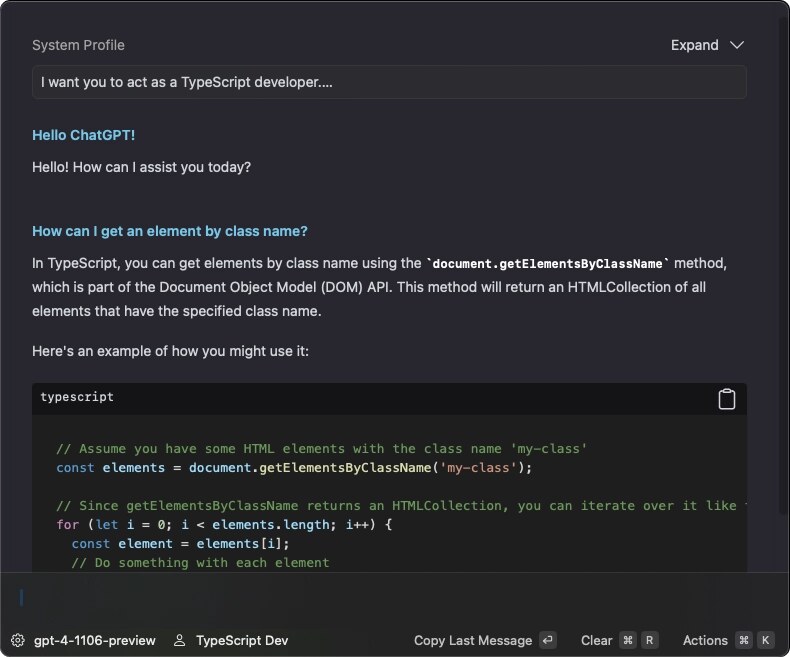
Native macOS ChatGPT launcher with a hotkey floating panel, prompt profiles and templates, using your own OpenAI API key.
We may earn a commission when you buy through our links. How this works
Beam suits Mac users who only need OpenAI models, like keyboard-driven tools and prefer paying per use over a monthly plan. Anyone who wants several AI providers, a public update history or Windows support should look at BoltAI, Raycast or the official ChatGPT app.
Best for: Mac users who want ChatGPT on a hotkey with their own API key
6.1/10 Good, with trade-offs. The overall score is our judgment against the questions we ask of every tool, not an average. How we score
| Question | Score | Why |
|---|---|---|
| Does the jobWhat it actually does for the task it is sold for, and where it falls short. | 6.8 | Covers a hotkey floating chat, chat with selected text, screenshots and PDFs, and reusable profiles, macros, templates and extensions, per its documentation. |
| Ease of useSetup needed and how quickly you get something useful done. | 7.2 | Every action has a keyboard shortcut and a Command K palette, but you must set up and fund an OpenAI API account first. |
| Pricing and limitsWhat you pay at a realistic size, including caps, add-ons and deal limits. | 7.0 | A free 30-day license or a permanent one from $10, plus pay-as-you-go API costs, against Raycast Pro from $8 a month. |
| Reliability and supportUpdate pace, known problems and how support responds. | 4.2 | Support is email and Discord, there is no public changelog, and refunds need a functional reason within 7 days. |
| Fit against alternativesHow it compares with the alternatives for the people it is aimed at. | 5.2 | BoltAI covers 300+ models from many providers and Raycast adds a full launcher, so Beam's OpenAI-only scope is narrow. |
Beam is a native macOS app that puts ChatGPT in a floating panel you open with a hotkey, using your own OpenAI API key instead of a ChatGPT subscription. It suits Mac users who want quick AI help inside whatever app they are working in, and who are happy to pay OpenAI per use.
Beam is a ChatGPT launcher for the Mac: a small SwiftUI app that connects straight to the OpenAI API with a key you add yourself. The idea is that you never switch windows to ask a question.
Because Beam talks to the API, you pay OpenAI pay-as-you-go for the tokens you use rather than a flat monthly fee. Beam itself is sold on a pay-what-you-want basis through its own Lemon Squeezy store. The FAQ confirms you do not need a ChatGPT Plus subscription, and that GPT-4 and the other available OpenAI models work with it.
Beam fits Mac users who write, code or research all day and want ChatGPT one keystroke away: developers asking quick code questions, writers rewording a paragraph, or anyone who translates and summarizes text often.
Skip it if you use Windows, an iPhone or an iPad, since Beam is a macOS app only. Skip it too if you want Claude, Gemini or local models in the same window, because the site describes Beam only as an OpenAI client. And if you already pay for a ChatGPT plan and want its own app features, OpenAI's desktop app is the more direct route.
The workflow is built around global hotkeys. You press a shortcut anywhere on your Mac, a floating chat panel appears over your current app, you ask your question, and with another keystroke you insert the answer back where your cursor was.
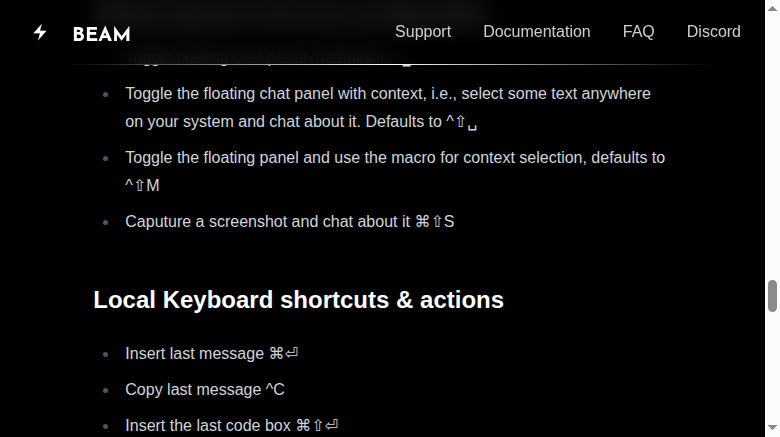
Control and Space toggles the floating chat panel. Control, Shift and Space opens it with context: select any text on your system first, and you chat about that selection. Command, Shift and S captures an area of your screen so you can ask about it. Command and Return inserts the last message into your app, and Command, Shift and Return inserts the last code block. All shortcuts are configurable.
Beam has four ways to reuse prompts, all documented on its site.
Beam can open a PDF (Command and O) and chat about it for summaries and answers, keeps a conversation history (Command and H), saves conversations, regenerates the last reply and switches models with Command and 1. A command palette on Command and K lists every action. There is also a "Floating ChatGPT+" option that opens the official ChatGPT app in a pop-up window over other apps.
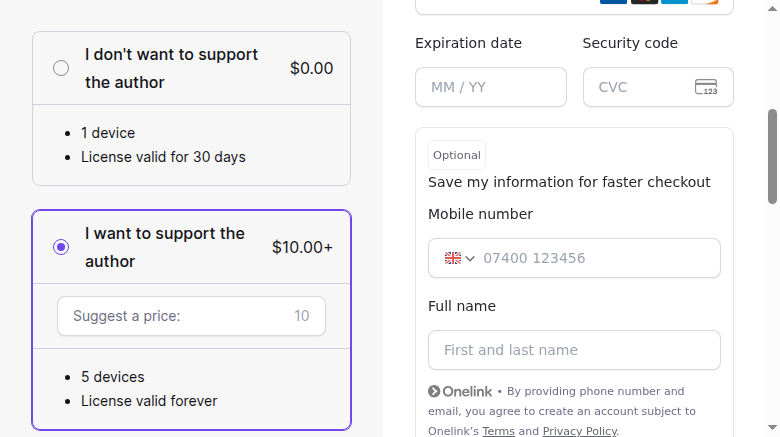
Beam is pay what you want, with a free license that runs for 30 days and a supporter license that never expires. Prices checked 4 Nov 2026 on Beam's own Lemon Squeezy checkout, in US dollars.
| Option | Price | What it includes | Terms |
|---|---|---|---|
| Free license ("I don't want to support the author") | Free | Full app on 1 device | License valid for 30 days |
| Supporter license ("I want to support the author") | $10 or more, you choose the price | Full app on 5 devices | License valid forever |
| OpenAI API usage | Billed by OpenAI per use | Whatever models your API key can access | Pay as you go on your OpenAI account |
The refund policy is narrow. The terms of service, dated 6 Jan 2024, offer a 7-day refund only for valid reasons that affect the usability and functionality of the app, and say that simply not liking it does not qualify, because the free option lets you evaluate it first. The homepage FAQ also describes this as a 7-day money-back guarantee.
For most people, Beam costs a one-off $10 plus a small OpenAI bill. A typical day of rewording emails, summarizing pages and asking code questions runs on your API key, so you pay only for the tokens those requests use, with no monthly floor.
That is the trade-off against a flat subscription. A ChatGPT plan or Raycast Pro (from $8 a month billed annually) charges the same whether you use it once or a hundred times a day. With Beam, heavy users of the most expensive models could end up paying more than a flat plan, while light users usually pay less. Profile settings for max tokens and history size help keep each request small.
Beam does not have a rating on the major review platforms to weigh. The homepage shows one five-star post from a user on X who says the profiles, templates and native UI are worth "the cost of a few coffees", and the vendor says Beam has more than 1,500 happy users. Treat both as the vendor's own figures.
These are the facts Beam publishes about the app.
Beam does not publish a changelog or release dates. The homepage says the app has had more than 20 updates since its first release, and the terms of service are dated 6 Jan 2024, so buyers have no public record of recent releases or which macOS versions are supported.
The main drawback is that Beam is locked to one provider. Newer Mac AI clients let you switch between OpenAI, Anthropic, Google and local models in the same window, while Beam's site only covers OpenAI.
The lack of a changelog is a real risk for an app that depends on OpenAI's API and on macOS updates. The free license also lasts only 30 days, so it is closer to a trial than a free plan, and the refund policy excludes "I did not like it" requests.
You also need to set up and fund an OpenAI API account, though the FAQ says no developer knowledge is needed.
These Mac apps do the same job of putting an AI chat a hotkey away.
Beam is a tidy, native way to reach ChatGPT from anywhere on a Mac, with useful prompt tools (profiles, macros, templates and extensions) and a price you set yourself. I would pick it if you only use OpenAI models, like keyboard-driven tools and want to pay per use rather than monthly. If you want several AI providers, a public update history or a broader launcher, BoltAI or Raycast is the better bet.
No. Beam connects to the OpenAI API with your own key, so you pay OpenAI pay-as-you-go for what you use instead of a ChatGPT subscription.
Beam is pay what you want. A free license covers 1 device for 30 days, and a supporter license from $10 covers 5 devices and never expires.
Yes. The FAQ says GPT-4 and all other available OpenAI models work with Beam, and you can switch models with a shortcut.
Beam says it runs locally, is sandboxed, and only uses your key to talk to OpenAI. Its privacy policy says it stores no data on its servers and has no access to your key or chats.
Beam offers a 7-day refund only for valid reasons that affect usability or functionality. Simply not liking the app does not qualify, because the free license lets you try it first.
We may earn a commission when you buy through links on SaaSPic. It never changes our verdicts or the price you pay. Affiliate disclosure
Add this badge to your website so your visitors can read this independent review in one click.
 8.1/10
Keyboard launcher for Mac and Windows with clipboard history, snippets, window management, thousands of extensions and built-in AI.
 6.8/10
Multi-model AI workspace with a Chrome extension and Mac app for writing, research, images, video, websites and browser games.
 7.0/10
All-in-one AI assistant with GPT, Claude and Gemini models in a browser sidebar, plus writing, PDF, translation, image and agent tools.
 6.8/10
Multi model AI assistant with a Chrome extension for summaries, writing and research, plus web and mobile apps.
| Tool | Score | From | Free plan | Best for |
|---|---|---|---|---|
| Beam | 6.1/10 | $10 one-off | Yes | Mac users who want ChatGPT on a hotkey with their own API key |
| Raycast | 8.1/10 | $10/mo | Yes | Keyboard-first Mac and Windows users |
| Clico | 6.8/10 | $19.90/mo | Yes | Students and knowledge workers who want a multi-model AI helper inside the browser |
| Monica | 7.0/10 | $99/yr | Yes | Individuals who want many AI models in one browser sidebar |
| Merlin AI | 6.8/10 | $19/mo | Yes | Students and knowledge workers who want many AI models in a browser extension |
 8.4/10
Scheduling software that lets people book time with you through a link, with team routing, reminders, payments and AI meeting recaps.
 8.3/10
Web booking page and scheduler that syncs your calendars and lets clients book and pay for sessions, packages and subscriptions.
 8.1/10
Time tracker and timesheet app for teams, with a free plan and per-seat paid tiers for invoicing, approvals and scheduling.