
DocGPT AI
Lifetime deal on DocGPT AI
$299
Price tracked from Oct 28, 2026
GPT for Sheets add-on that runs ChatGPT, Claude, Gemini and more in Google Sheets and Docs via formulas and an AI agent.
We may earn a commission when you buy through our links. How this works
A broad, low-cost AI add-on for bulk work in Google Sheets with strong Marketplace ratings. Pick Starter for simple writing without keys or Business for cheap enrichment, and skip it if you need Excel or dependable support.
Best for: Marketing, SEO and sales teams doing bulk AI work in Google Sheets
7.0/10 Good, with trade-offs. The overall score is our judgment against the questions we ask of every tool, not an average. How we score
| Question | Score | Why |
|---|---|---|
| Does the jobWhat it actually does for the task it is sold for, and where it falls short. | 7.8 | Covers AI formulas across many models, a chat agent, web scraping and lead enrichment in Sheets, plus Docs, Slides and Forms, per the vendor and Marketplace listing. |
| Ease of useSetup needed and how quickly you get something useful done. | 7.0 | Formulas work like normal Sheets functions, but higher plans need API keys and the setup guide spends a checklist on accounts not syncing. |
| Pricing and limitsWhat you pay at a realistic size, including caps, add-ons and deal limits. | 7.6 | Starter is $79 a year with no keys needed and Business is $199.99 a year for unlimited queries, though provider bills come on top. |
| Reliability and supportUpdate pace, known problems and how support responds. | 5.2 | Trustpilot reviewers report unanswered support and refund requests, and Trustpilot notes the company has not replied to negative reviews. |
| Fit against alternativesHow it compares with the alternatives for the people it is aimed at. | 7.0 | Broader functions than SheetAI and cheaper than Clay for enrichment, but Autosheet and Numerous.ai also cover Excel. |
DocGPT.ai makes GPT for Sheets, a Google Workspace add-on that runs ChatGPT, Claude, Gemini and other AI models inside Google Sheets, Docs, Slides and Forms through formulas and an AI chat agent. It suits marketers, SEO teams and sales teams who process lists in spreadsheets and want AI applied to thousands of rows at once.
DocGPT.ai is the developer behind GPT for Sheets, an AI assistant add-on for Google Workspace listed on the Google Workspace Marketplace as GPT for Sheets Docs Forms Slides. The listing shows more than 1 million installs and was last updated on 9 Nov 2026.
The add-on brings AI formulas such as =GPT(), =CLAUDE() and =GEMINI() into cells, plus an AI chat sidebar that reads your data and proposes edits. The same add-on also works in Google Docs, Slides and Forms. DocGPT.ai lists its contact address in Kyiv, Ukraine on its Trustpilot profile.
GPT for Sheets fits people who already keep their work in spreadsheets and want an AI tool that does bulk tasks in place.
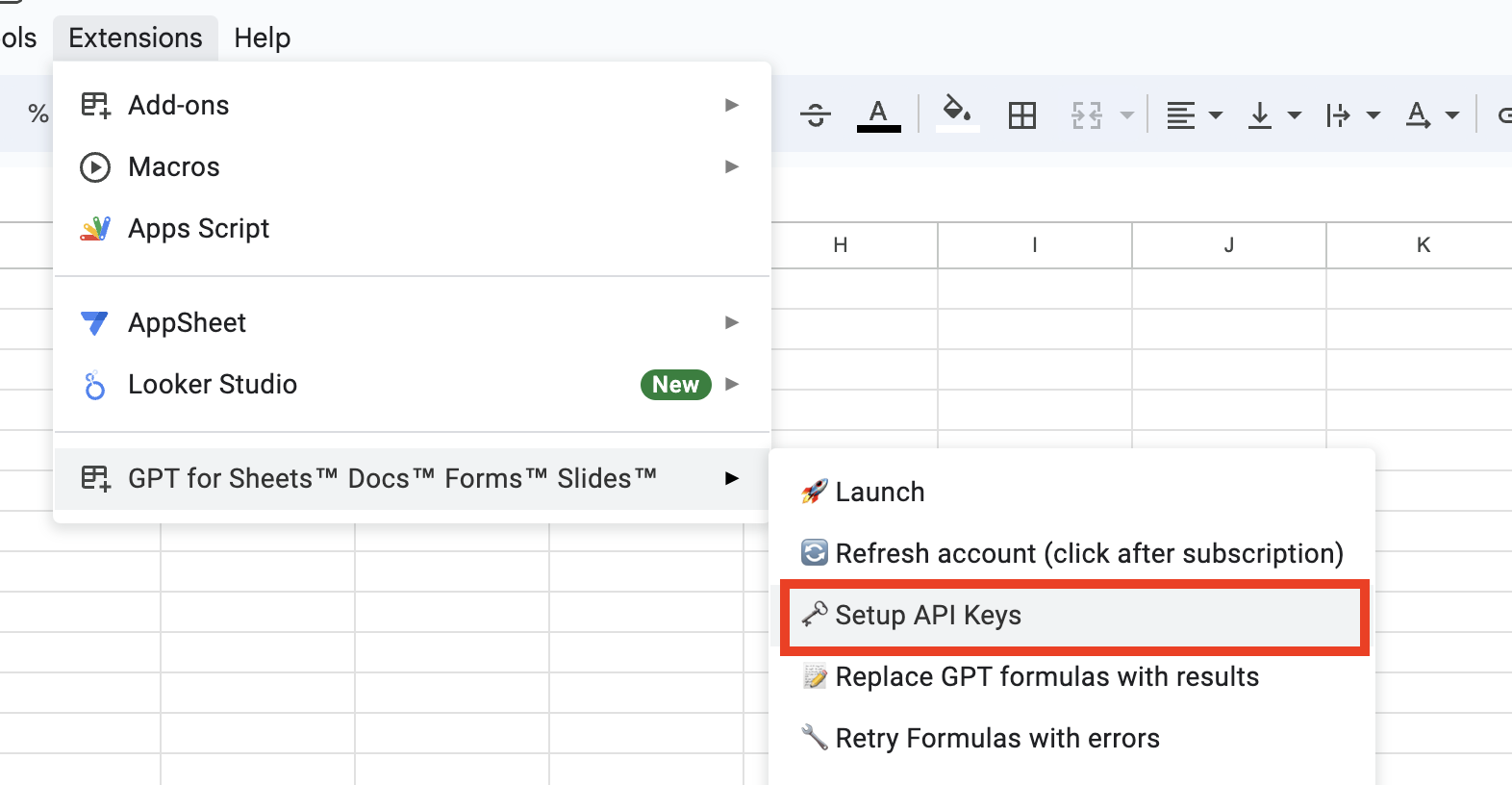
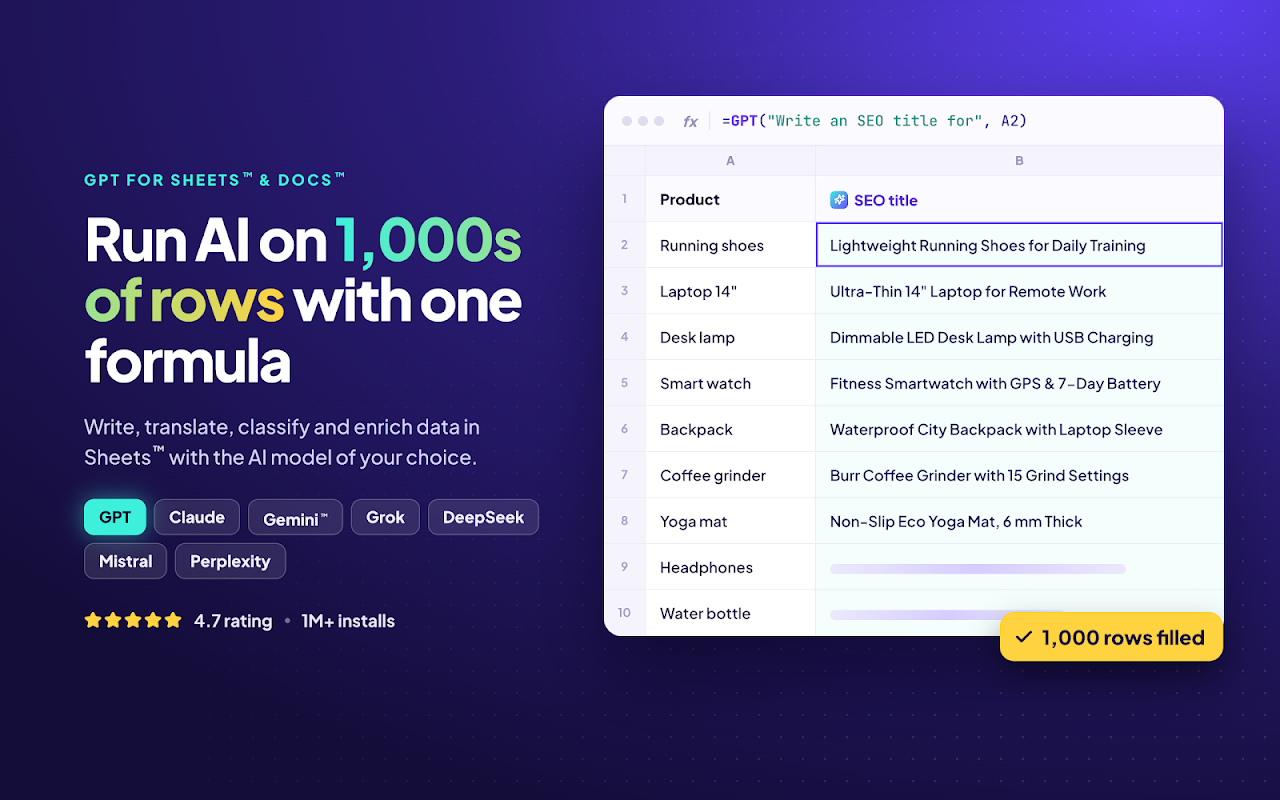
The workflow is to install the add-on, open a sheet, go to Extensions, then type a formula such as =GPT("Write a product title for", A2) and fill it down the column. The vendor says the add-on sends up to 400 prompts per minute, so thousands of rows are processed in one pass, and you can then replace the formulas with static results.
Each AI-powered formula can call a different model, so you can compare responses side by side and keep the best one. Typical uses are product descriptions, ad copy, SEO meta titles, translation of catalogs and sentiment tagging of customer feedback.
The AI chat sidebar answers questions about your data and makes edits on request, such as finding duplicate emails or sorting by date. It shows the planned changes first, applies them in one click and can undo them.
For research and enrichment, the add-on has SERP(), web scraping functions such as WEB_TITLE and WEB_HEADINGS, keyword research functions, Google Maps place data and YouTube search. Business plan integrations include Apollo, Hunter, Prospeo and LeadMagic for finding emails, MailChimp and EMAIL_SEND() for sending, and an API() function that calls any REST API from a cell. DocGPT.ai pitches this as a lightweight Clay alternative.
As a writing assistant in Google Docs, it can generate and rewrite a document, from full articles to product descriptions and summaries, in 14 tones and 35+ languages. In Slides it builds a presentation from a topic, and in Forms it generates quiz questions. Each AI response lands in your document or sheet, so you can edit it like any other text.
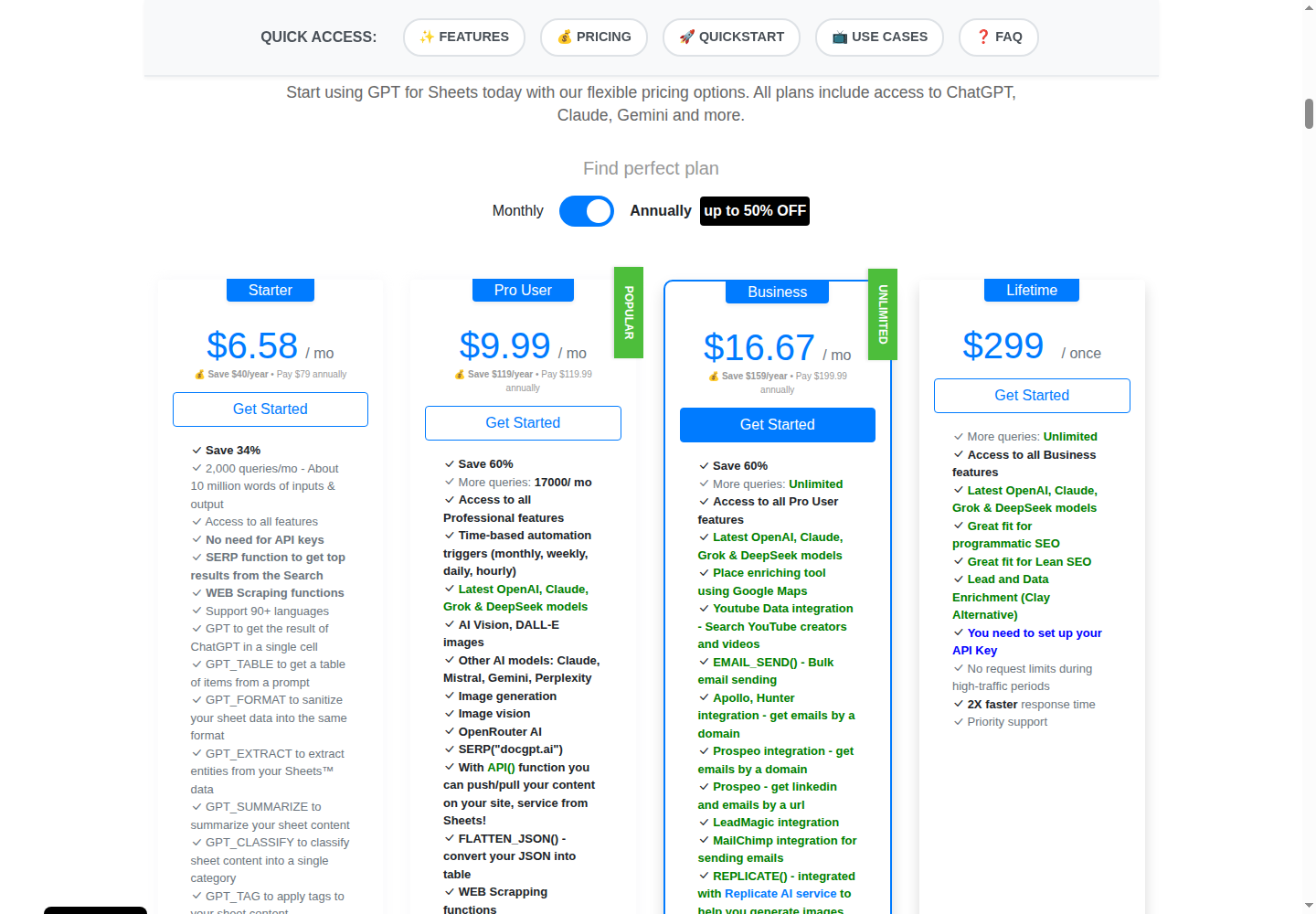
GPT for Sheets is free to install with trial credits and no card, and paid plans run from $9.99 a month, or $79 a year, up to a one-time lifetime plan. Prices are in USD, and the vendor offers a 30-day money-back guarantee. Prices checked 12 Nov 2026.
| Plan | Price (USD) | What it includes |
|---|---|---|
| Free trial | $0 | Free trial credits, no API key and no credit card needed |
| Starter | $9.99 a month, or $79 a year ($6.58 a month) | 2,000 queries a month on DocGPT.ai's own AI credits, SERP and web scraping, core GPT functions |
| Pro User | $19.99 a month, or $119.99 a year ($9.99 a month) | 15,000 queries a month on monthly billing or 17,000 on yearly, time-based automation, all models, vision and images, bring your own AI account |
| Business | $29.99 a month, or $199.99 a year ($16.67 a month) | Unlimited queries, lead enrichment integrations, bulk email, Maps and YouTube data, priority support, bring your own AI account |
| Lifetime | $299 once | Unlimited queries and all Business features for a one-time payment, bring your own AI account |
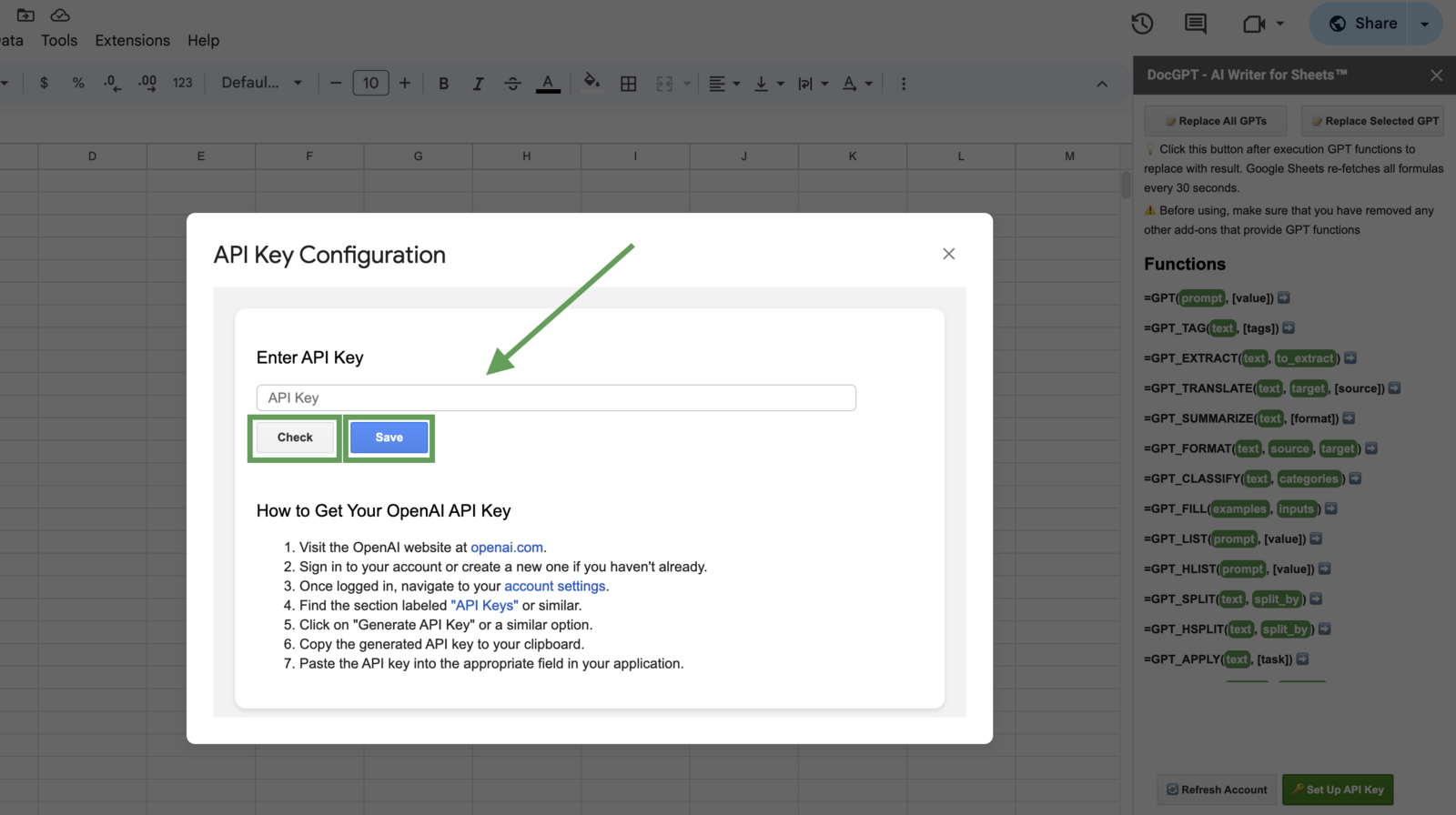
Only Starter runs on the vendor's own AI credits. On Pro, Business and Lifetime you connect your own OpenAI, Claude, Gemini or other API keys, so you also pay those providers per use. The vendor asks you to buy with the same email you use in Sheets, and payments go through Paddle.
Writing 1,500 product descriptions in a month fits within Starter's 2,000 queries at $9.99, with no other bills. A team enriching 20,000 leads a month would need Business at $29.99 a month, or $199.99 a year, plus whatever its own AI provider and enrichment API usage costs.
Users rate the add-on well on Google's marketplace, while a smaller set of Trustpilot ratings is more mixed. On the Google Workspace Marketplace it averages 4.7 stars from 1,380 reviews (Nov 2026).
Trustpilot's handful of ratings are mostly five stars and praise having AI inside Sheets and Gmail and frequent improvements. Two one-star reviews describe an API key that would not save and support requests, including a refund request, that went unanswered. Trustpilot also notes the company has not replied to negative reviews.
GPT for Sheets is a Workspace add-on, so it only runs inside Google's apps in the browser.
The latest dated change is the Google Workspace Marketplace listing update on 9 Nov 2026. The listing now titles the add-on GPT for Sheets Docs Forms Slides, AI Agent, and leads with the chat agent alongside the formulas.
The vendor's site currently positions the Business plan as a Clay alternative for lead enrichment, comparing its $29.99 a month to Clay's starting price of around $349 a month.
The main limits are the API key requirement, the add-on setup and support.
The closest alternatives are other AI add-ons that run models inside spreadsheets, and the comparison comes down to Excel support, premium plan pricing and whether you bring your own keys.
DocGPT.ai's GPT for Sheets packs a very wide set of AI formulas, models and enrichment tools into Google Sheets at low plan prices, and its 4.7 rating from 1,380 Marketplace reviews backs that up. I would pick Starter for simple bulk writing without API keys, and Business if you want a cheap Clay-style enrichment setup and are happy to manage your own provider accounts. Skip it if you need Excel or dependable support.
It is free to install and includes free trial credits with no credit card or API key needed. Paid plans start at $9.99 a month, or $79 a year, for Starter with 2,000 queries a month.
Not on Starter, which runs on DocGPT.ai's own credits. Pro User, Business and Lifetime need your own API keys from OpenAI, Anthropic, Google or other providers, set up from Extensions, GPT for Sheets, Setup API Keys.
Yes. Use =CLAUDE() and =GEMINI() in any cell next to =GPT() formulas, and other models through =PERPLEXITY(), =DEEPSEEK(), =MISTRAL(), =GROK() and =OPEN_ROUTER().
The vendor says no. Only the cells you run a formula or the AI chat on are sent to the model you chose, to process that request.
Yes. DocGPT.ai advertises a 30-day money-back guarantee on purchases, requested by contacting its support email.
The vendor says the add-on sends up to 400 prompts per minute, so a column with thousands of rows is filled in one pass. Starter is capped at 2,000 queries a month, Pro at 15,000 or 17,000, and Business is unlimited.
We may earn a commission when you buy through links on SaaSPic. It never changes our verdicts or the price you pay. Affiliate disclosure
Add this badge to your website so your visitors can read this independent review in one click.

 7.0/10
Google Sheets, Docs and Slides add-on that runs 100+ AI models on your own API key for bulk fills, formulas and writing.
 8.4/10
Scheduling software that lets people book time with you through a link, with team routing, reminders, payments and AI meeting recaps.
 8.3/10
Web booking page and scheduler that syncs your calendars and lets clients book and pay for sessions, packages and subscriptions.
 8.1/10
Time tracker and timesheet app for teams, with a free plan and per-seat paid tiers for invoicing, approvals and scheduling.